Select “rinsing cycle” from the display screen and
press the START button (see section 5.8).
After the completion of a successful rinsing cycle and automatic depressu-
rizing, a message appears on the screen informing the operator it is safe
to demount the protective beaker. Demount the protective beaker from the
machine and dispose of the rinsing water.
Cleaning cycle procedure 7.6
Accessoriesrequired:bluecleaninginsertwithbluesealingring,withoutpa-
cotizing blade!
The cleaning cycle is a part of the full cleaning
procedure for PACOJET 2, which consists of pre-
rinsing,cleaningandnal-rinsing.
The complete cleaning procedure can be programmed by selecting the option
“cleaning functions and machine settings” using the selector buttons adjacent
to the display screen. Then, on the following display screen, select “full clean-
ing procedure” (see section 5.8).
Procedure:
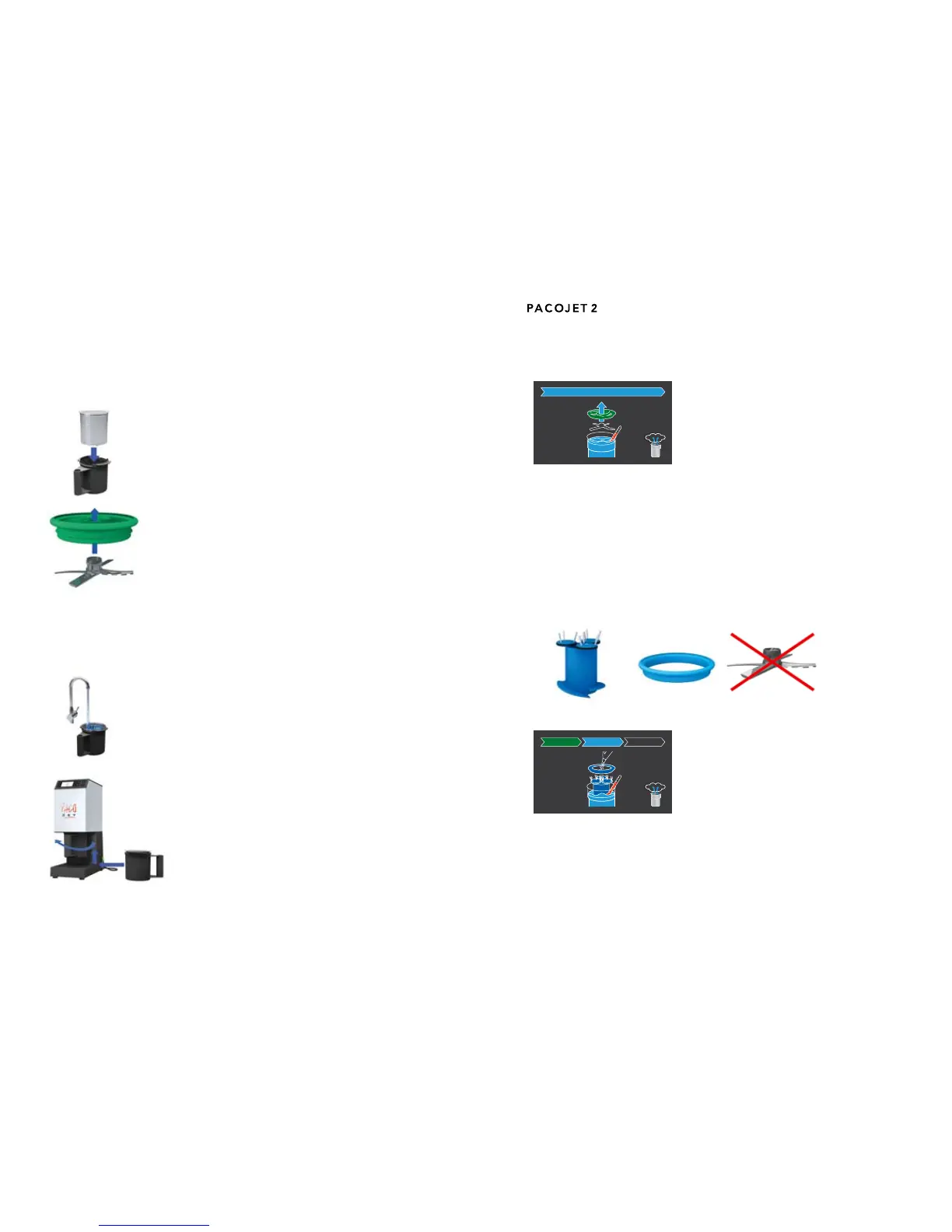
a) Insert an empty pacotizing beaker in the protec-
tive outer beaker.
b) Snap the pacotizing blade into the green rinsing
insert.
Afxtherinsinginserttogetherwiththepacotizingbladetothemachineshaft.
(This procedure is identical to afxing the spray guard with the pacotizing
blade to the machine shaft).
c) Fill the pacotizing beaker with hot water to about
2 cm from the beaker brim.
d) Insert the pacotizing beaker into the protective
outer beaker and mount in place, securing by
rotating in a clockwise direction.


 To Next Page