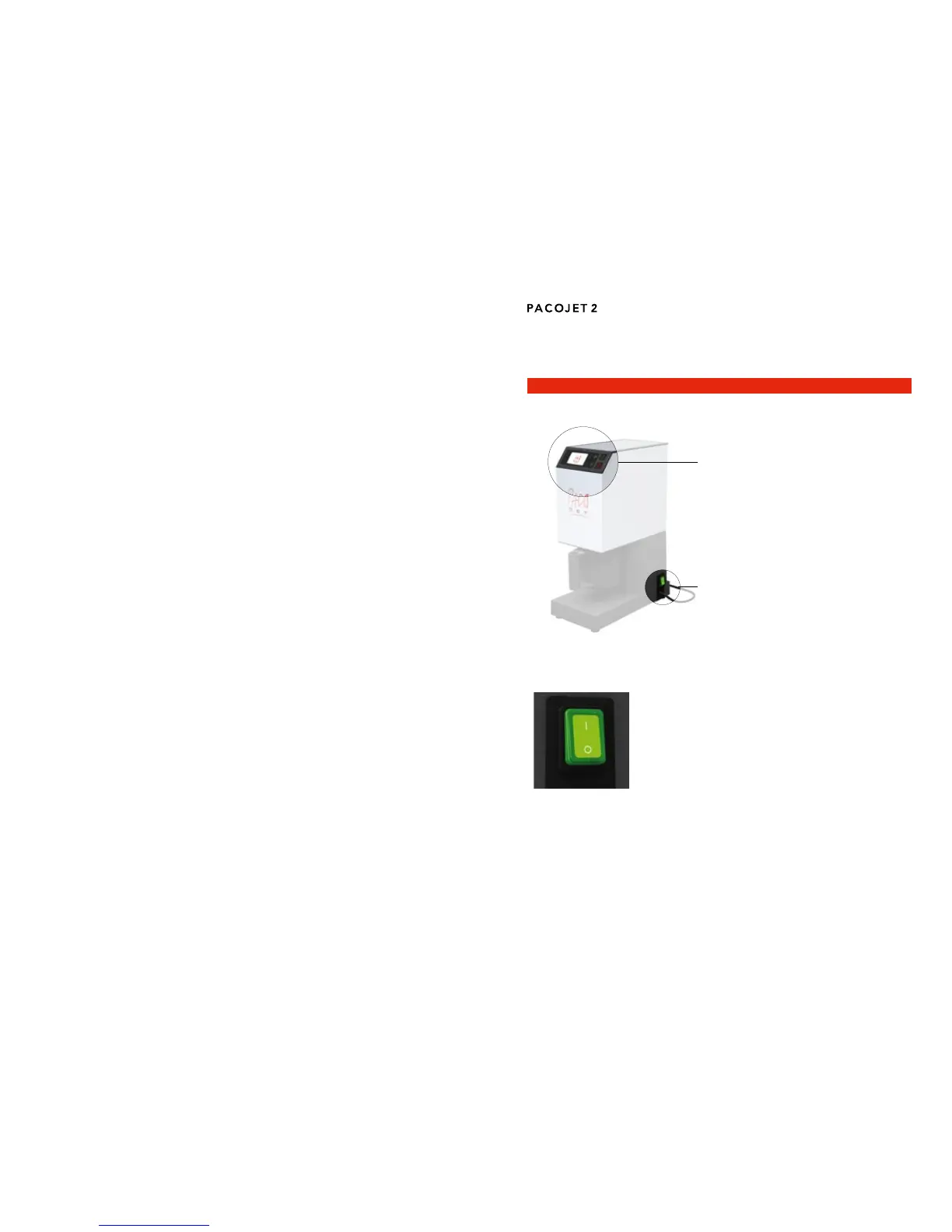
PACOJET 2 control components5
Review of machine controls5.1
ON/OFF switch5.2
The ON/OFF switch is located toward the back of
the lower, right side of the machine base. It is used
to turn the machine on or off:
“O” = OFF position = PACOJET 2 is off, the switch
is not illuminated.
“I” = ON position = PACOJET 2 is on, the switch is
illuminated.
PACOJET 2 must be switched on using the ON/
OFF switch to activate the colour display screen
and control panel.
Connecting the machine to an electrical power supply4.2
The electrical power cord is located on the lower, right side, toward the back
of the machine. It has a length of 1.5 m.
IMPORTANT! Î
The PACOJET 2 machine should only be used when the voltage and power
frequencyoftheelectricalsourceconformtothoseonthedataplate.Thevolt-
age of the electrical source must conform to that indicated on the data plate.
The data plate is located on the bottom side of the machine.
The PACOJET 2 machine should only be connected to an electrical source
that has been adequately grounded/earthed. Wall sockets and extension
cords must have functional ground fault circuit protectors.
Control panel
(5.3)
ON/OFF switch
(5.2)


 To Next Page