35
Performing a Blood Glucose Test
Preparing the Lancing Device
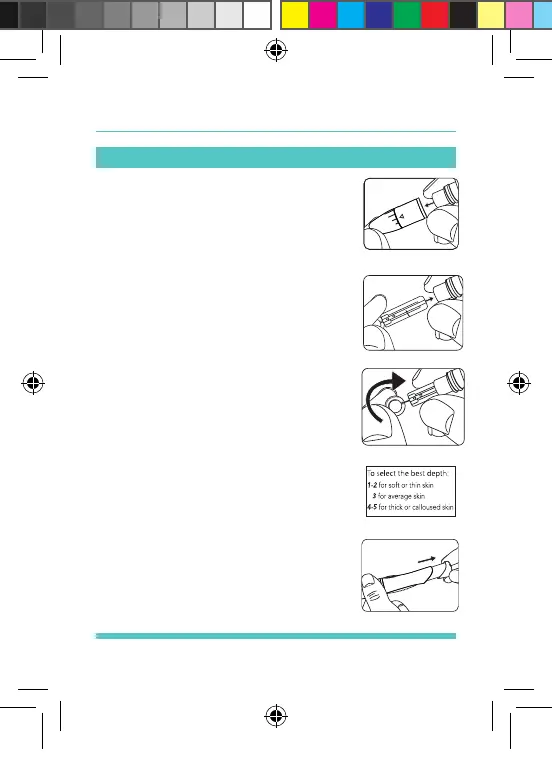
STEP 1: Twist off the Lancing Device
Cover. Insert a lancet into the Lancet
Carrier. See Figure 18.
STEP 2: Twist off the Lancet Needle
Cover until it separates from the
lancet. See Figure 19.
STEP 3: Replace the Lancing Device
Cover and set the puncture depth to
the desired number. The Adjustable
Comfort Tip offers 5 levels of skin
penetration. To select the desired
depth, twist the Adjustable Comfort
Tip in either direction until the level
line up with the Arrow. See Figure 20.
STEP 4: Pull back the Sliding Barrel
until it makes a click, indicating that
the Lancet Carrier is locked into
position. See Figure 21.
Figure 19
Figure 20
Figure 18
Figure 21
Palmdoc 2 User Man.indd 35 24/08/2017 10:49


 To Next Page