DIS-13
15. Removal of Back Case Unit
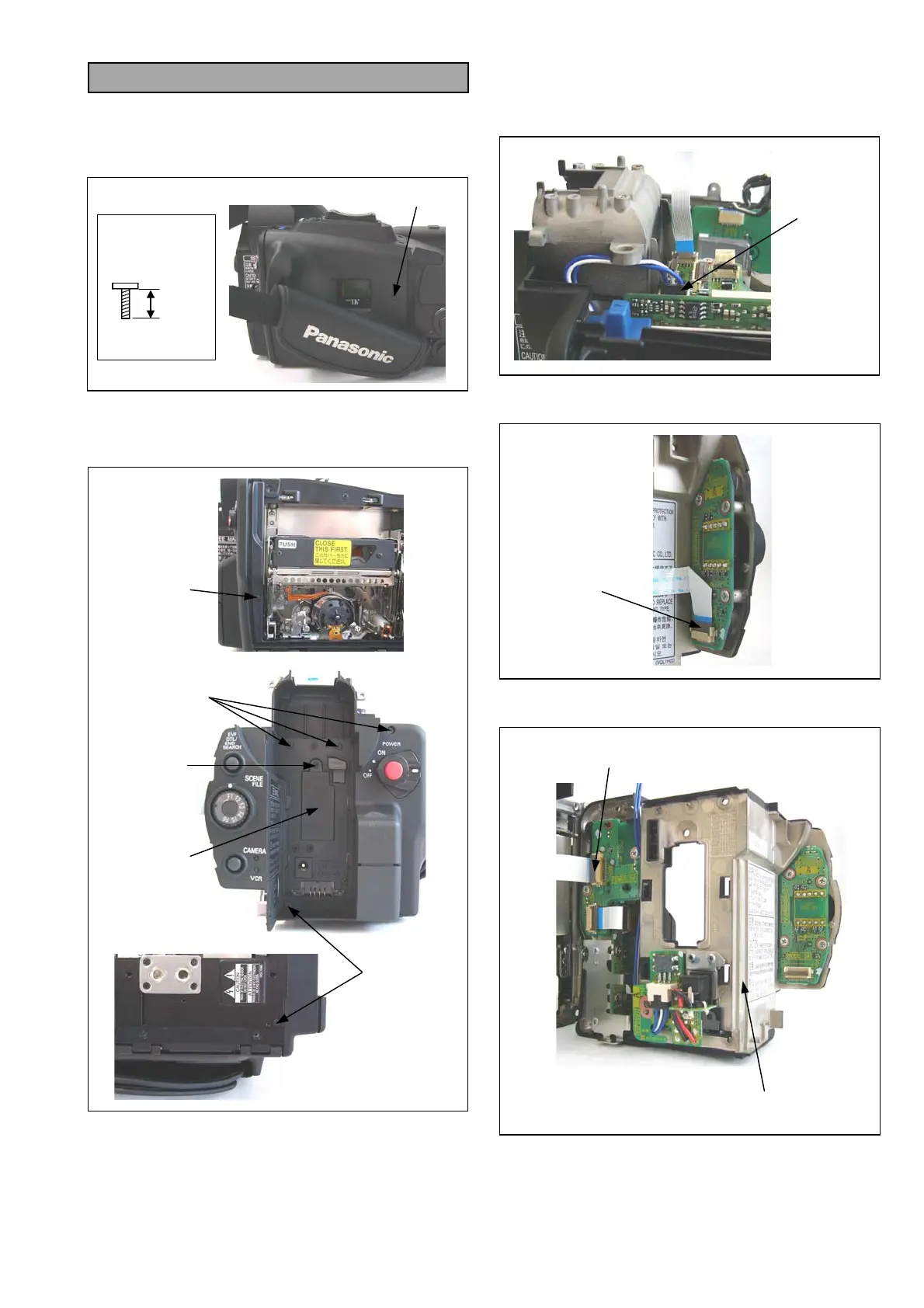
1. Remove the Side Case R S Unit.
2. Remove the CAMERA C.B.A..
3. Unscrew the screw (W) and open the cassette
cover.
4. Unscrew the screw (X) and remove the EVR
Cover.
5. Unscrew the 6 screws (Y).
6. Disconnect a connector P1501 on VTR C.B.A..
NOTE: When the connector P1501 is connected on
VTR C.B.A., make the condition about wire
is processed as shown in figure.
7. Disconnect a connector P152 on MODE SW
C.B.A..
8. Disconnect a connector P1501 on POWER SW
C.B.A. and remove the Back Case Unit.
BLACK
4mm
SCREW (W),
(X) & (Y)
SCREW (W)
EVR COVER
SCREW (Y)
SCREW (X)
SCREW (Y)
SCREW (Y)
P1501
P152
BACK CASE UNIT
P501














 To Next Page