EasyManua.ls Logo

Panasonic Bread Bakery SD-BT51P - Timer Settings and Notes; DOUGH Mode for Rolls; DOUGH Mode Operation

Panasonic Bread Bakery SD-BT51P
15 pages
Print Icon
To Next Page IconTo Next Page
To Previous Page IconTo Previous Page
Loading...
TO
USE
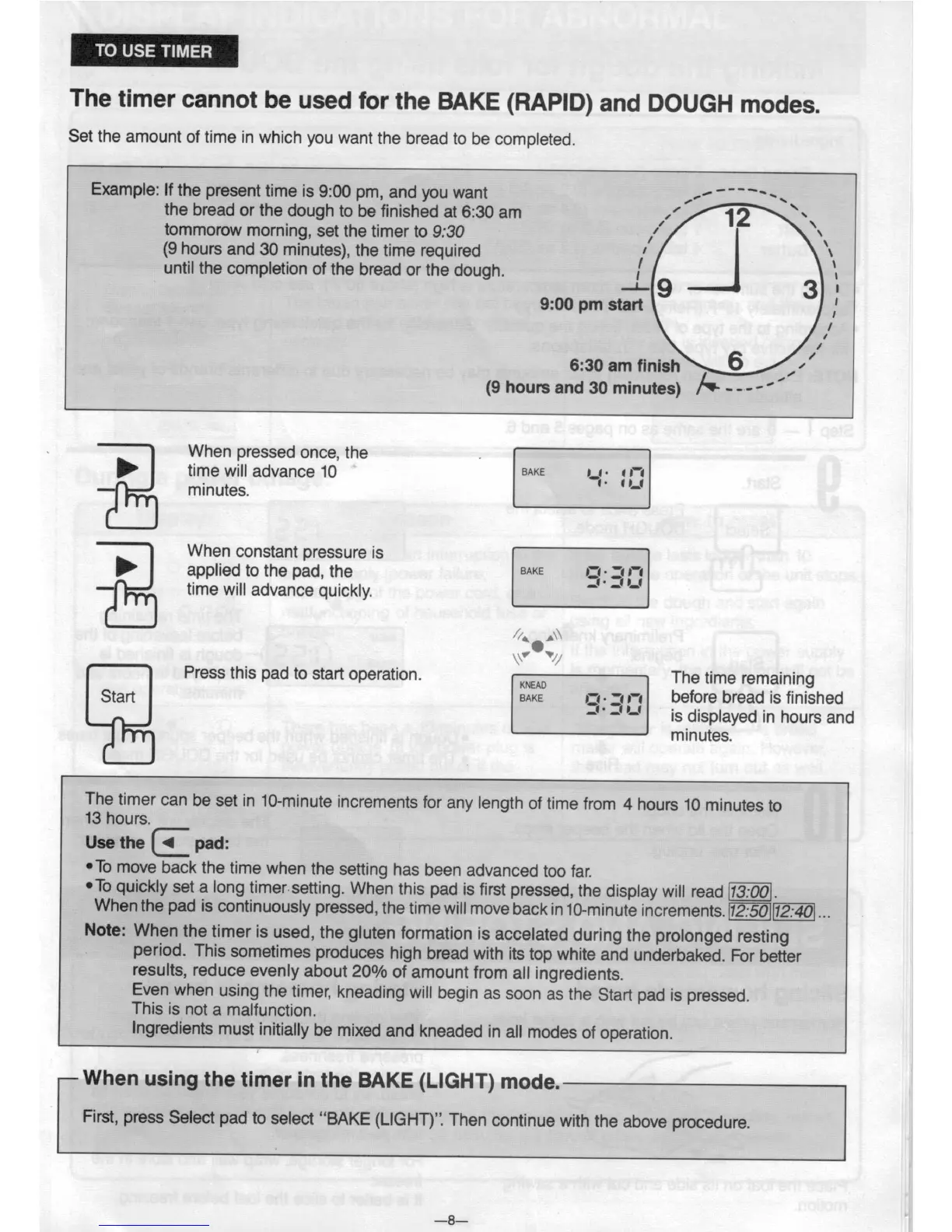
TIMER
The
timer
cannot
be used
for the
BAKE
(RAPID)
and
DOUGH
modes.
Set the
amount of
time in
which you
want
the bread
to be
completed.
tommorow
morning,
set
the timer to
9:30
(9
hours
and
30 minutes),
the time
required
until
the
completion
of the
bread
or the
dough.
Example:
If
the present
time
is 9:00
pm, and
you
want
,.~
"“‘~\
the
bread
or
the dough
to be
finished
at
6:30 am
9:00
pm s
I
6:30 am
finish
I,
/'
(9 hours
and
30
minutes)
/Q
- - -'
'
\
1'
\
I
\
I
\
§l~\
I
1
When
pressed
once,
the .
'
I 1-
'
i -
time
will
advance
10
BAKE
-
minutes.
>
applied
to the
pad,
the
BAKE
When
constant
pressure
is
time
will
advance
quickly.
'
//‘ ,\\
l_\v
v/,1
\ /
Press
this pad
to
start operation.
mm
The
time
remaining
Stan
BAKE
13- 3 '
before bread
is finished
-"-
-
is displayed
in hours
and
__
cw
-Q
-
in
-Q
-
an
an
minutes.
13
hours.
Use the | 4 pad:
This
is
not a
malfunction.
The
timer
can
be
set
in 10-minute
increments
for any
length
of time
from
4
hours
10
minutes
to
‘T0 move
back
the time
when
the
setting
has
been
advanced
too
far.
‘To quickly
set a
long timersetting.
When
this pad
is first
pressed,
the
display
will read
.
When
the pad
is continuously
pressed,
the
time
will move
back
in
10-minute
increments.
12:50
Note:
When
the
timer
is used,
the
gluten
formation
is accelated
during
the
prolonged
resting
.
period.
This
sometimes
produces
high
bread with
its top
white
and underbaked.
For
better
results, reduce
evenly
about
20%
of amount
from
all
ingredients.
Even
when
using
the
timer,
kneading
will begin
as
soon
as
the
Start
pad
is pressed.
Ingredients
must
initially
be
mixed
and
kneaded
in all
modes
of operation.
When
using
the timer
in
the BAKE
(LIGHT)
mode.
First,
press
Select
pad
to select
“BAKE
(LlGHT)”.
Then
continue
with
the
above
procedure.
_3_

Related product manuals