EasyManua.ls Logo

Panasonic Bread Bakery SD-BT51P - Completing the Baking Process (Steps 10-12); Using the Timer; Timer Functionality

Panasonic Bread Bakery SD-BT51P
15 pages
Print Icon
To Next Page IconTo Next Page
To Previous Page IconTo Previous Page
Loading...
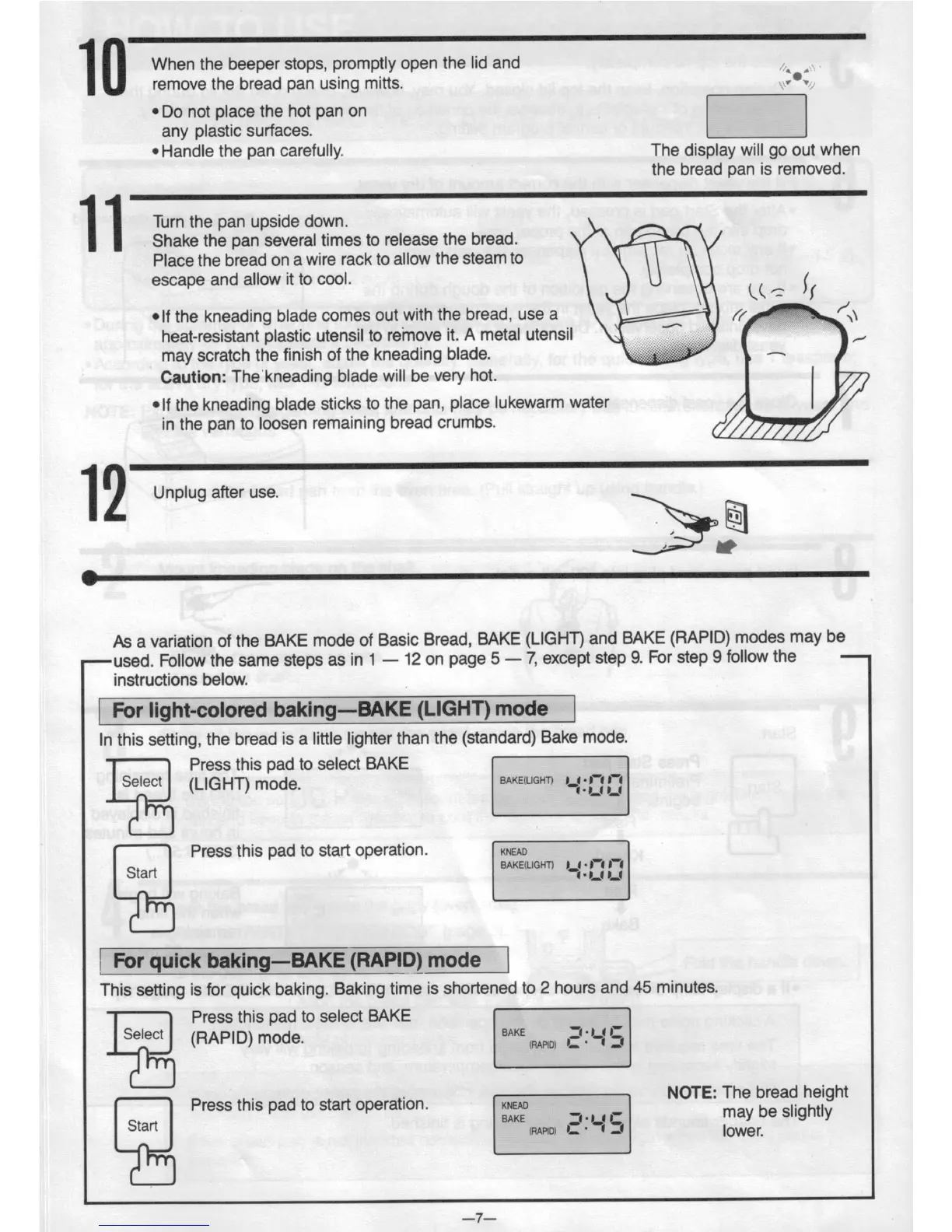
When the
beeper stops,
promptly
open the
lid and
remove
the bread pan
using
mitts.
.,,1'~/
~Do
not
place the hot
pan on
any
plastic
surfaces.
C2
° Handle
the
pan carefully.
The
display
will go gut
when
the
bread pan
is removed.
1 1
Turn the pan upside
down.
Shake
the pan
several
times to release
the bread.
55
Place the
bread
on a
wire rack
to allow
the
steam
to
escape
and
allow
it to cool.
fr
vlf
the kneading
blade
comes
out with
the bread,
use
a
//
/\\
heat-resistant
plastic
utensil to
remove
it. A
metal utensil
,_,
may
scratch
the finish
of the kneading
blade.
Caution:
Thekneading
blade
will be
very hot.
V
~lf
the kneading
blade
sticks
to the
pan,
place lukewarm
water
I
in the
pan
to loosen
remaining
bread
crumbs.
12
Unplug
alter use.
I I
§
As a variation
of the
BAKE
mode of
Basic
Bread,
BAKE
(LIGHT)
and BAKE
(RAPID)
modes
may be
——used.
Follow
the
same
steps as
in 1
12 on
page 5
7, except
step
9. For
step 9
follow the
-
instructions
below.
| For
light-colored
baking—BAKE
(LIGHT)
mode I
In
this setting,
the
bread is a
little lighter than
the
(standard)
Bake
mode.
Press this pad
to select
BAKE
(LIGHT)
mode.
B*KE<L'<="T>
''
Press
this pad to
start
operation.
KNEAD
Stan
BAKE(LlGHT) _, I '"
l For quick baking—BAKE
(RAPID) mode l
This
setting is
for quick
baking. Baking
time
is shortened
to 2 hours
and 45
minutes.
Press
this pad
to select
BAKE
Select
BAKE
1' '
.
.
NOTE:
The bread
height
Press this pad
to start operation.
:23:
be slightly
a
M0) -
-
lower.
4?
T‘:
J1
J1
_7_

Related product manuals