EasyManua.ls Logo

Panasonic G70 - Keys & Displays

Panasonic G70
109 pages
Print Icon
To Next Page IconTo Next Page
To Previous Page IconTo Previous Page
Loading...
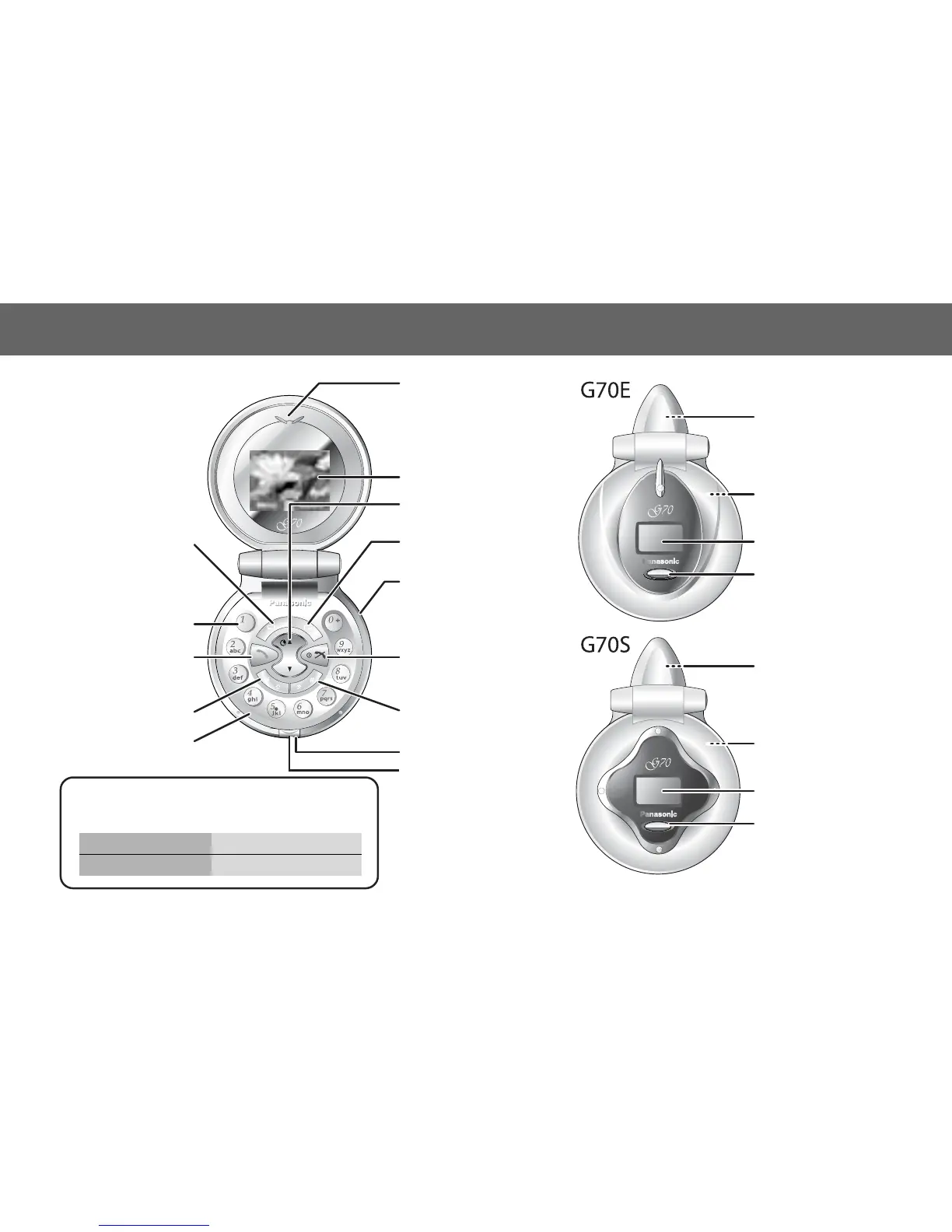
4 Keys & Displays
Keys & Displays
Back side:
Illumination
Light
Back side:
Speaker
Sub Display
Sub Panel Key/
Illumination
Light
Back side:
Illumination
Light
Back side:
Speaker
Sub Display
Sub Panel Key/
Illumination
Light
Earpiece
Main Display
Navigation Key
Selection/scroll/move key
Charging Connector/
Personal Handsfree
Connector
Power/End Key
Press and hold to switch
your phone on/off
Quiet Mode Setting
Key
Right Soft Key
Cancel/Exit Key
Microphone
Key Body Hook
Key Body
Asterisk Key
10 Key
Send Key
To answer a call or to
make on Outgoing Call
Left Soft Key
z Sub Panel Key/Illumination Light is flashing when
you are accessing the network.
z Back side Illumination Light is flashing like followings.
In call Flashing slowly
Incoming call Flashing quickly

Table of Contents

Related product manuals