EasyManua.ls Logo

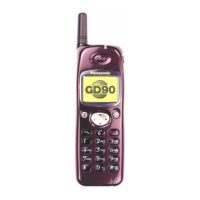
Panasonic GD90 - User Manual

Panasonic GD90
69 pages
Print Icon
To Next Page IconTo Next Page
Loading...
Order Number: MCUK990801C8
Issue 1
Revision 0
GD90 Personal Cellular Telephone
Handheld Portable
EB-GD90
Specification
Unless stated these specifications are with Battery Pack (EB-BSD90) fitted.
Battery life figures are dependent on network conditions.
900MHz 1800MHz
Frequency range Tx: 890 - 915 MHz
Rx: 935 - 960 MHz
Tx: 1710 - 1785 MHz
Rx: 1805 - 1880 MHz
Tx/Rx frequency separation 45 MHz 95 MHz
RF channel bandwidth 200 kHz
Number of RF channels 124 374
Speech coding Full rate/Half rate/Enhanced
Full rate
Full rate/Half rate
Operating temperature -10°C to +55°C
Type Class 4 Handheld Class 1 Handheld
RF Output Power 2 W maximum 1W maximum
Modulation GMSK (BT = 0.3)
Connection 8 ch/TDMA
Voice digitizing 13 kbps RPE-LTP / 13 kps ACLEP / 5.6 kps CELP / VSLEP
Transmission speed 270.3 kbps
Diversity Frequency hopping
Signal Reception Double superheterodyne
Intermediate Frequency 282MHz and 45MHz
Antenna Terminal Impedance 50
Antenna VSWR <2.1 : 1
Dimensions Height: 118 mm
Width: 42 mm
Depth: 16.5 mm
Volume 84.5 cc
Weight 88 g
Display Graphical chip on glass liquid crystal, Alphanumeric 16 x 3
characters, 5 icons and 6 x 1 characters
Illumination Green:
4 LEDs for the LCD
8 LEDs for the keyboards
1 LED Incoming call
Red:
1 LED Charging indicator
Keypad 17 keys, Navigation key
SIM Plug-in type only
External DC Supply Voltage 3.6V
Battery 3.6V
Standby Battery Life
DRX 9
95 hrs maximum
Conversation Battery Life
PL 7, DTX 50%
200minutes
WARNING
This service information is designed for experienced repair technicians only and is not designed for use by the general public. It does not contain warnings or
cautions to advise non-technical individuals of potential dangers in attempting to service a product.
Products powered by electricity should be serviced or repaired only by experienced professional technicians. Any attempt to service or repair the product or
products dealt with in this service manual by anyone else could result in serious injury or death.

Questions and Answers

  • M
    Melissa AndersonAug 16, 2025
    Why Panasonic Cell Phone calls cannot be made?
    • A
      Andrew WagnerAug 16, 2025
      Several reasons may prevent you from making calls. The phone may be locked; unlock it via Menu: Security: Phone Lock. Outgoing calls might be barred; disable this in Menu: Security: Call Bar. Or, the phone might not be registered to a network; move to an area with coverage and try again after the phone registers.
  • A
    Alexandra ThompsonAug 18, 2025
    What to do if Panasonic GD90 Cell Phone battery life is extremely short for a new battery pack?
    • B
      Bobby PhelpsAug 18, 2025
      The network you are using and the condition of the battery pack can affect battery life. Avoid areas of poor reception and ensure the battery is fully charged. If you're using NiMH batteries, make sure they are fully discharged before recharging.
  • L
    lrichmondAug 21, 2025
    What to do if Panasonic Cell Phone calls cannot be received?
    • M
      Mark FranklinAug 21, 2025
      There are a few potential reasons why you might not be receiving calls. First, ensure that your phone is switched on. Second, check if incoming calls are barred and disable this feature in Menu: Security: Call Bar. Finally, make sure your phone is registered to a network by moving to a coverage area.
  • E
    Elizabeth ChangAug 25, 2025
    Why Panasonic GD90 emergency calls cannot be made?
    • M
      Michael WhitakerAug 26, 2025
      If you cannot make emergency calls, it might be because you are not in a GSM coverage area. Check that the antenna symbol is displayed. Move to an area where the antenna symbol is visible on your phone's display.
  • R
    roberto37Aug 28, 2025
    What to do if Panasonic GD90 Cell Phone battery life is short for Ni- MH battery pack?
    • B
      bryceburgessAug 28, 2025
      The life of Ni-MH batteries is affected by improper charging. To maintain maximum performance, always use the phone until the Low Battery Warning appears, then fully recharge the battery pack. To revive the battery pack, use the phone until the Low Battery Warning and then fully recharge it three times. If the battery life is still short, replace the battery pack.
  • B
    Bill PrattAug 30, 2025
    How to fix Panasonic GD90 Cell Phone that will not switch on?
    • L
      Lindsey MannAug 31, 2025
      Check that the battery pack is fully charged and correctly connected to the telephone.
  • L
    Linda ElliottSep 2, 2025
    Why Panasonic Cell Phone telephone numbers cannot be recalled?
    • J
      Joseph CarterSep 2, 2025
      The inability to recall telephone numbers can occur if the phone is locked; unlock it via Menu: Security: Phone Lock. Also, check if Fixed Dial is switched on; if so, switch it off via Menu: Security: Fixed Dial.
  • M
    Mark BakerSep 6, 2025
    What to do if Panasonic Cell Phone battery level indicator does not light when charging?
    • K
      Katelyn AlvaradoSep 6, 2025
      If the battery level indicator does not light up when charging, it could be because the battery is deeply discharged. Leave the phone to charge for several minutes in temperatures between +5°C and +35°C.
  • E
    emilyhansenSep 9, 2025
    What to do if Panasonic GD90 Cell Phone battery life is short for an old battery pack?
    • K
      Kristen JohnsonSep 9, 2025
      If the battery life is short for an old battery pack, it likely means that the battery pack is worn out and needs to be replaced with a new one.
  • J
    Jennifer ReedSep 12, 2025
    How to fix Panasonic GD90 Cell Phone calls that cannot be made from Fixed Dial Store?
    • J
      jasonreyesSep 12, 2025
      Check your SIM supports Fixed Dial. Also, verify if Fixed Dial is switched on (Menu: Security: Fixed Dial). Finally, confirm that the telephone number is stored in the Fixed Dial.

Summary

INTRODUCTION

Purpose of this Manual

Explains the manual's scope for installation, operation, and servicing of the GSM telephone system.

OPERATING INSTRUCTIONS

Troubleshooting

Provides guidance for common problems and advised actions for users.

DISASSEMBLY; REASSEMBLY INSTRUCTIONS

Disassembly

Details the step-by-step process for disassembling the telephone components.

TECHNICAL SPECIFICATIONS

Tx Characteristics

Specifies transmit characteristics including frequency error, modulation, and RF spectrum.

Rx Characteristics

Details receive characteristics such as sensitivity under various propagation conditions.

TEST AND MEASUREMENT

Complete Unit Test Setup

Details the setup for testing the complete unit with various equipment.

Adjustment Mode

Covers calibration procedures for RF performance.

I and Q Values

Explains procedures for adjusting I and Q values to improve modulation.

Panasonic GD90 Specifications

General IconGeneral
BrandPanasonic
ModelGD90
CategoryCell Phone
LanguageEnglish

Related product manuals