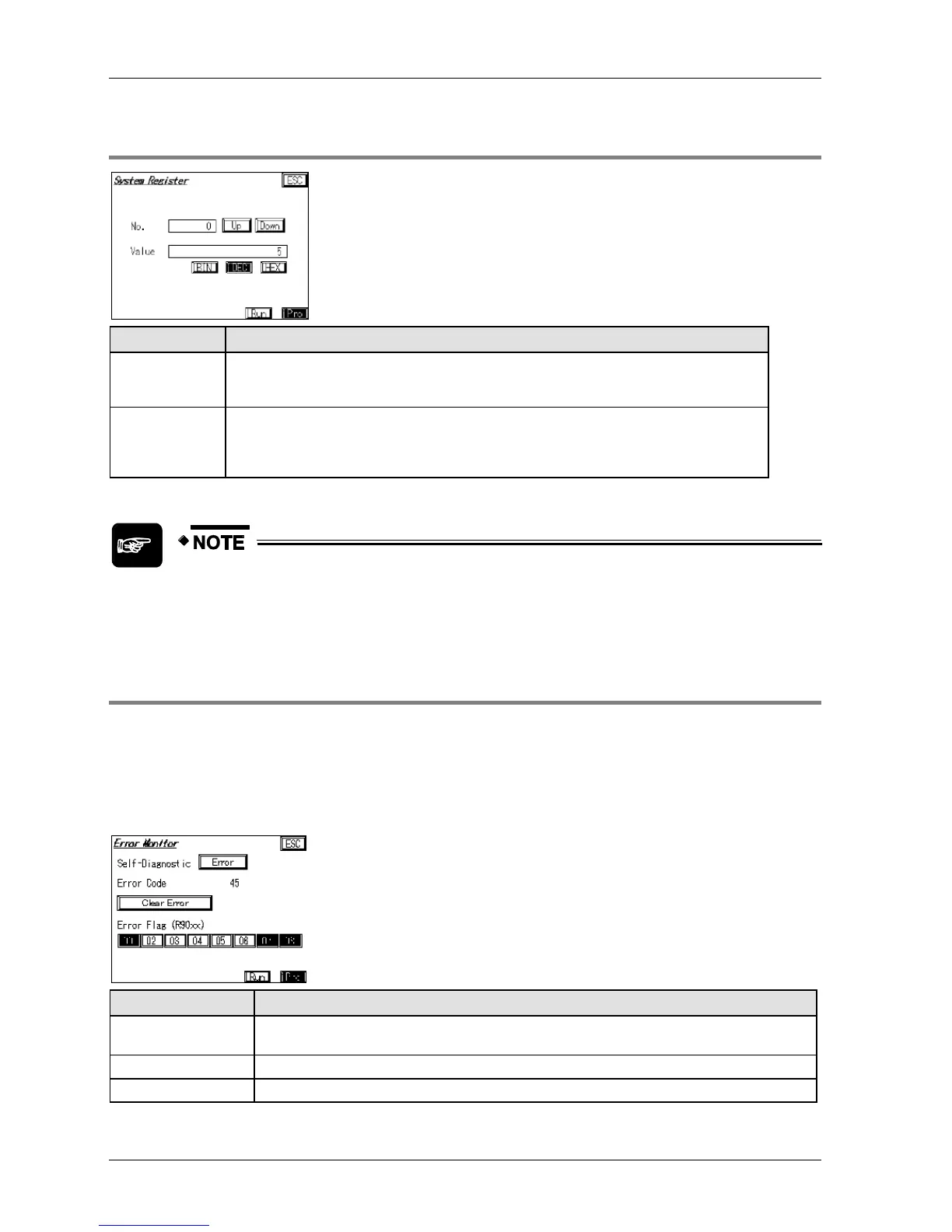
2.7.3.1 System Register Monitor Screen
Displays the number of the system register. To enter a number, touch the number field,
and wait for the keyboard to display. Alternatively, use the [Up]/[Down] buttons to select
a number.
Displays the value of the system register selected. To enter a value, touch the value
field, and wait for the keyboard to display. Values can be displayed in binary, decimal,
or hexadecimal format. Use the BIN/DEC/HEX buttons to change the display format.
The currently selected display format is highlighted.
When a password has been set on the PLC, the password input screen is
displayed. The appearance of the password input screen depends on whether
the password has 4 or 8 digits (see p. 90).
2.7.3.2 Error Monitor Screen
PLCs from the FP series are equipped with a self-diagnostic function which monitors the
operation of the PLC. Use this screen to view self-diagnostic errors.
This is what the error monitor screen looks like when an error has occurred. In this example,
the error code is 45, and the following error flags have been set: R9000 (self-diagnostic error
flag), R9007 (operation error, hold), and R9008 (operation error, non-hold).
Displays "No error" during normal operation and "Error" (flashing) when an error has
occurred.
Displays the error code. Please refer to the PLC manual for details.
Use this button to clear errors with error code 43 and higher.



 To Next Page