1.4 During a Conversation
58 User Manual
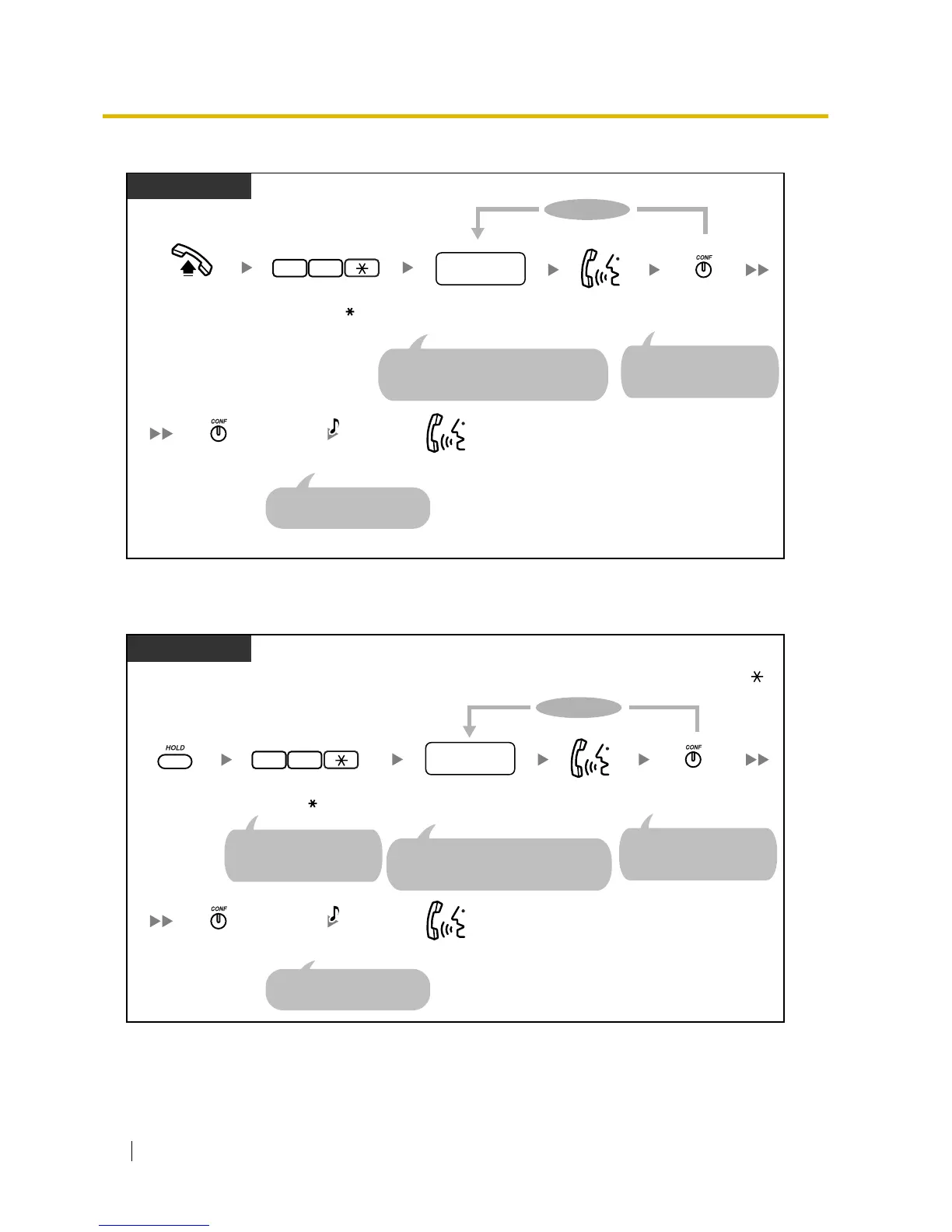
To establish a 5-party conference call
To change to a 5-party conference call during a 3-party conference call with one or 2 outside
parties
Press CONF.
PT
Talk.
To continue
Dial desired
phone number.
desired
phone no.
Press CONF.
Talk.
A 5-party conference call
is now established.
Off-hook.
22
Enter 22 .
C.Tone
(Optional)
For an outside phone number, press the CO
button or seize an outside (CO) line before
dialling the phone number.
The current call is placed
on hold in the parking zone
automatically.
*
Press CONF.
PT
Talk.
To continue
Dial desired
phone number.
desired
phone no.
Press CONF.
Talk.
A 5-party conference call
is now established.
22
Enter 22 .
C.Tone
(Optional)
For an outside phone number, press the CO
button or seize an outside (CO) line before
dialling the phone number.
The current call is placed
on hold in the parking zone
automatically.
During a 3-party conference call with one or 2 outside parties established without entering "22 "
Press HOLD.
The current call is placed
on hold in the parking zone
automatically.
*
*












 To Next Page