Useful Information
32
For assistance, please visit http://www.panasonic.com/help
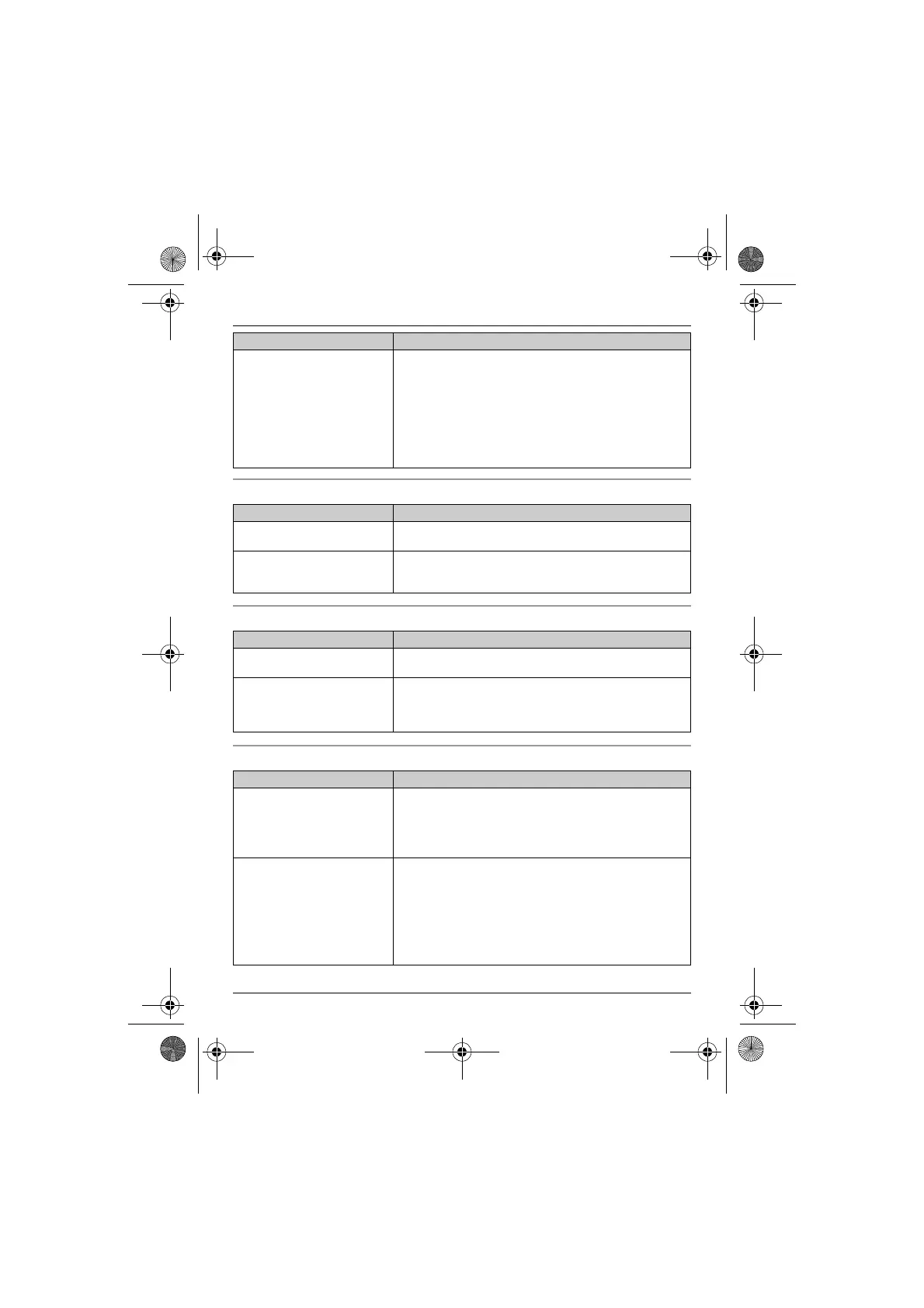
Programmable settings
Battery recharge
Making/answering calls, intercom
I cannot hear a dial tone. L The base unit’s AC adaptor or telephone line cord is not
connected. Check the connections.
L Disconnect the base unit from the telephone line and
connect the line to a known working telephone. If the
working telephone operates properly, contact our service
personnel to have the unit repaired. If the working
telephone does not operate properly, contact your service
provider/
telephone company.
Problem Cause/solution
The display is in a language I
cannot read.
L Change the display language (page 11).
I cannot register a handset to a
base unit.
L The maximum number of handsets (6) is already
registered to the base unit. Cancel unused handset
registrations from the base unit (page 20).
Problem Cause/solution
The handset beeps and/or
7 flashes.
L Battery charge is low. Fully charge the batteries (page 8).
I fully charged the batteries, but
7 still flashes or the
operating time seems to be
shorter.
L Clean the battery ends (S, T) and the charge contacts
with a dry cloth and charge again.
L It is time to replace the batteries (page 8).
Problem Cause/solution
w is flashing. L The handset is too far from the base unit. Move closer.
L The base unit’s AC adaptor is not properly connected.
Reconnect AC adaptor to the base unit.
L The handset is not registered to the base unit. Register it
(page 20).
Noise is heard, sound cuts in
and out.
L You are using the handset or base unit in an area with
high electrical interference. Re-position the base unit and
use the handset away from sources of interference.
L Move closer to the base unit.
L If you use a DSL/ADSL service, we recommend
connecting a DSL/ADSL filter between the base unit and
the telephone line jack. Contact your DSL/ADSL provider
for details.
Problem Cause/solution
TG122x.book Page 32 Wednesday, September 29, 2010 2:13 PM








 To Next Page