Getting Started
8
For assistance, please visit http://www.panasonic.com/help
Setting up
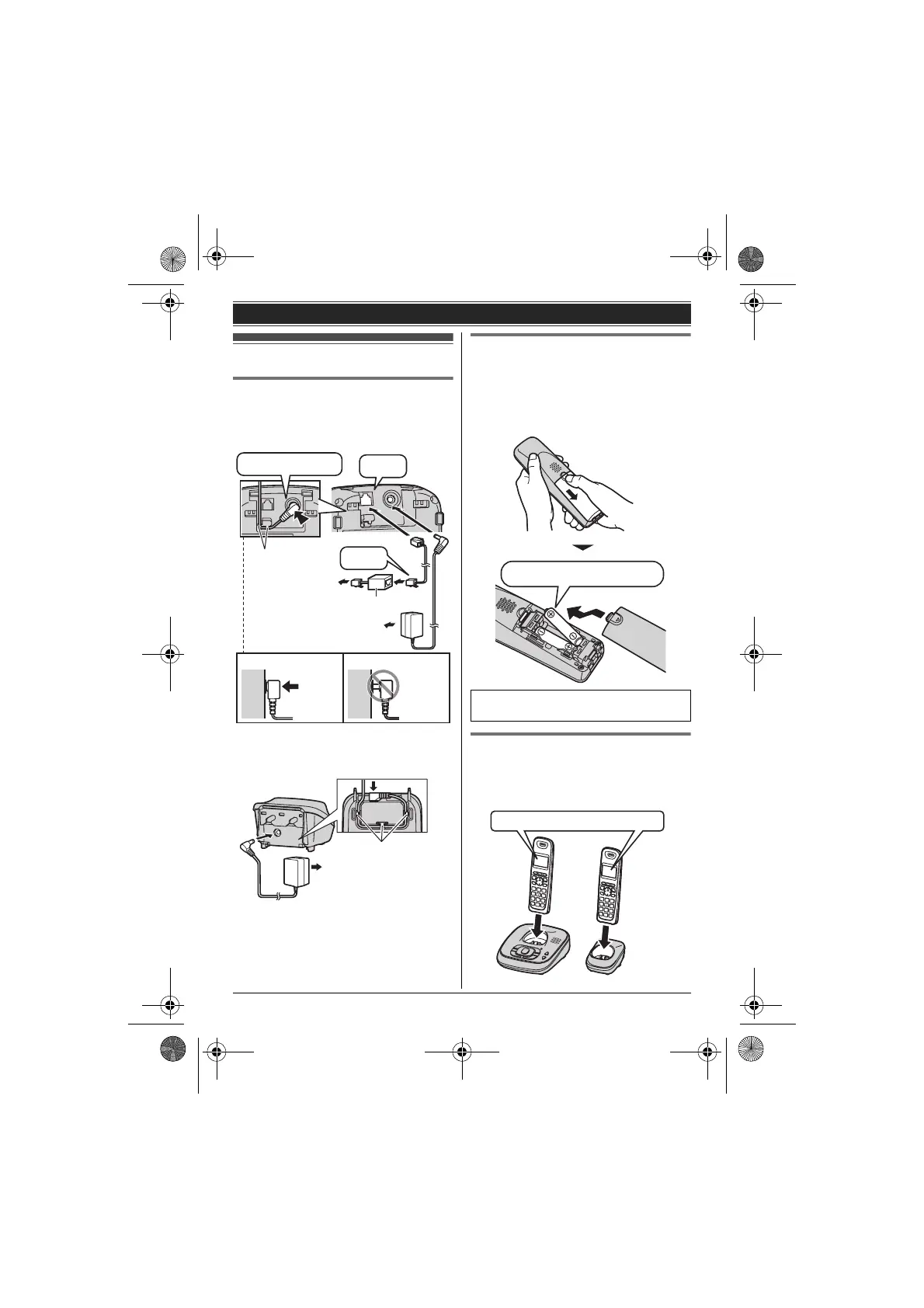
Connections
L Use only the supplied Panasonic AC
adaptor PNLV226.
■ Base unit
*DSL/ADSL filter (not supplied) is required if
you have DSL/ADSL service.
■ Charger
Battery installation
L USE ONLY Ni-MH batteries AAA (R03)
size.
L Do NOT use Alkaline/Manganese/Ni-Cd
batteries.
L Confirm correct polarities (S, T).
Battery charge
Charge for about 7 hours.
L When the batteries are fully charged,
“Fully charged” is displayed.
DSL/ADSL filter*
Hooks
“Click”
Press plug firmly.
(120 V AC, 60 Hz)
To single-line
telephone jack
(RJ11C)
“Click”
Correct
Wrong
(120 V AC, 60 Hz)
Hooks
L When the date and time setting is
displayed, see page 11.
Rechargeable Ni-MH ONLY
Confirm
“Charging” is displayed.
TG122x.book Page 8 Wednesday, September 29, 2010 2:13 PM








 To Next Page