EasyManua.ls Logo

Panasonic KX-TG2433BX - User Manual

Panasonic KX-TG2433BX
64 pages
Print Icon
To Next Page IconTo Next Page
Loading...
This unit is compatible with Caller ID. To use this feature, you must
subscribe to the appropriate service offered by your service provider.
Please read these Operating Instructions before using the unit and save
for future reference.
Charge the battery for 6 hours before initial use.
Digital Cordless Answering System
Model No.
KX-TG2433BX
Operating Instructions
Digital Cordless Answering System
with Dual Handsets
Model No.
KX-TG2434BX
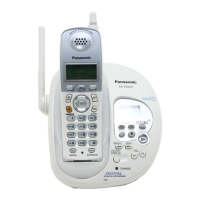
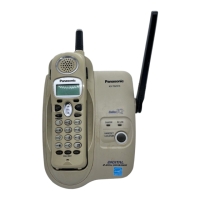
Model shown is KX-TG2433BX.
TG2433BX_2434BX(e).book Page 1 Thursday, March 31, 2005 10:57 AM

Table of Contents

Questions and Answers

  • A
    Ashley PrinceSep 18, 2025
    Why does my Panasonic Cordless Telephone exit the phonebook when searching?
    • K
      Kyle WrightSep 22, 2025
      If the display exits the phonebook while searching on your Panasonic Cordless Telephone, the handset automatically exits after 1 minute of inactivity.
  • M
    Melinda AllenAug 25, 2025
    What to do if my Panasonic Cordless Telephone says 'No link to base'?
    • S
      sturnerAug 25, 2025
      If the display shows “No link to base. Move closer to base, try again.” and an alarm tone sounds on your Panasonic Cordless Telephone, move closer to the base and try again. Ensure the base unit’s AC adaptor is plugged in and raise the base unit antenna. If the issue persists, register the handset again.
  • E
    Erin DavisAug 25, 2025
    How to turn on ringer on Panasonic KX-TG2433BX Cordless Telephone?
    • B
      Brittany IngramAug 26, 2025
      If the handset does not ring on your Panasonic Cordless Telephone, adjust the ringer volume because it may be turned off.
  • P
    pjacksonAug 27, 2025
    Why can't I hear a dial tone on my Panasonic KX-TG2433BX Cordless Telephone?
    • R
      Roger GonzalezAug 27, 2025
      If you cannot hear a dial tone on your Panasonic Cordless Telephone, confirm that the telephone line cord is connected. Disconnect the unit and connect a known working telephone. If the working telephone operates properly, contact service personnel to have the unit repaired. If not, contact your telephone company.
  • R
    Renee JonesSep 23, 2025
    Why does my Panasonic KX-TG2433BX Cordless Telephone exit the caller list when searching?
    • K
      Kathryn ThompsonSep 23, 2025
      If the display exits the caller list while searching on your Panasonic Cordless Telephone, the handset automatically exits after 1 minute of inactivity.
  • F
    Frank RogersSep 23, 2025
    Why is the date and time wrong on my Panasonic Cordless Telephone messages?
    • P
      Patrick SmithSep 23, 2025
      If, when you play back messages or turn on the answering system, the base unit and handset announce the day and time incorrectly on your Panasonic Cordless Telephone, set the date and time again.
  • J
    Joseph GonzalezSep 10, 2025
    What does flashing 'E' mean on my Panasonic Cordless Telephone?
    • K
      Kaitlin LeeSep 10, 2025
      If “E” flashes and the ANSWER ON indicator flashes rapidly and no new messages are recorded on your Panasonic Cordless Telephone, the message memory is full. Erase unnecessary messages.
  • K
    Kimberly GibbsSep 12, 2025
    Is it normal for the charge indicator to stay on after charging my Panasonic KX-TG2433BX?
    • T
      Tonya HoffmanSep 12, 2025
      If the CHARGE indicator does not go out after the battery has been charged on your Panasonic Cordless Telephone, this is normal.
  • H
    Hailey BrownSep 3, 2025
    Why is my Panasonic KX-TG2433BX still showing 'Recharge battery' after charging?
    • P
      Pamela Gonzalez MDSep 4, 2025
      If you charged the battery fully, but “Recharge battery” is still displayed and/or 7 continues to flash, or “Charge for 6h” and 8 are displayed on your Panasonic Cordless Telephone, clean the charge contacts and charge again. The battery may need to be replaced. If you install a new battery, fully charge it.
  • K
    Keith RiveraSep 1, 2025
    Why can't I store a number in my Panasonic KX-TG2433BX Cordless Telephone phonebook?
    • M
      Melissa BonillaSep 1, 2025
      If you cannot store an item in the phonebook on your Panasonic Cordless Telephone, you cannot store an item while the handset is in talk, speakerphone or intercom mode, or while listening to messages. Do not pause for over 1 minute while storing. Check if dial lock is turned on.

Summary

Introduction

Your Phone

Introduces the Panasonic cordless telephone models KX-TG2433BX and KX-TG2434BX.

Accessory Information

Included Accessories

Lists all accessories that come with the telephone unit.

Additional;Replacement Accessories

Details optional accessories and their order numbers for purchase.

Important Safety Instructions

General Safety Precautions

Provides essential warnings for safe operation, handling, and environment.

Installation Safety

Specific safety guidelines for installing the telephone unit and lines.

Battery Safety

Crucial instructions for safe handling, charging, and disposal of batteries.

Medical Safety

Precautions regarding RF energy exposure and its effects on medical devices.

For Best Performance

Base Unit Location and Noise

Recommendations for optimal base unit placement to ensure clear communication.

Preparation

Connections

Step-by-step guide for connecting the base unit and charger to power and phone lines.

Battery Installation

Instructions for inserting the battery into the handset.

Battery Charge

Details the initial charging process, charge indicators, and battery strength display.

Battery Replacement

Guidance on when and how to replace the handset battery due to diminished performance.

Setting the Date and Time

Procedure to set the unit's date and time for accurate call logging and message timestamps.

Controls and Displays

Base Unit Controls

Identifies and explains the buttons and indicators on the base unit.

Handset Controls

Identifies and explains the buttons and indicators on the handset.

Display Information

Explains various display items, symbols, and messages on the unit.

Navigator Key Usage

Instructions on using the handset's navigator key for menu navigation.

Making and Answering Calls

Making Calls

Step-by-step guide to initiating phone calls from the handset.

Answering Calls

Instructions on how to receive and end incoming calls.

Useful Call Features

Covers features like Hold, Mute, Voice Enhancer, and Clarity Booster for call management.

Special Call Services

Explains how to use Call Waiting and Temporary Tone Dialing services.

Phonebook

Adding and Managing Entries

Procedures for adding, editing, and erasing contact information.

Calling from Phonebook

How to search for and dial numbers stored in the phonebook.

Copying Phonebook Items

Instructions for copying phonebook entries between handsets (KX-TG2434BX only).

Caller ID Service

Using Caller ID

Overview of Caller ID compatibility and features, including caller number display.

Caller List Management

Instructions for viewing, editing, and erasing call log entries.

Intercom Features

Intercom Calls

Guide to making and receiving intercom calls between units.

Call Transfer and Conference

Explains how to transfer calls and set up conference calls between handsets.

Programmable Settings

Guide to Handset Programming

Chart and instructions for accessing various programmable functions.

Ringer Settings

How to adjust handset ringer volume and tone.

Call Options

Configuration of Auto Talk and Voice Enhancer features.

Telephone Settings

Adjusting dialing mode, flash time, and line mode for telephone service.

Security and Registration

Covers Dial Lock, Key Tone settings, and handset re-registration.

Time Adjustment

Setting up automatic time adjustment via Caller ID service.

Programming via Direct Commands

Using feature codes to directly access and program settings.

Answering System Features

Recording and Managing Greetings

Steps for recording, playing back, and erasing custom greeting messages.

Turning Answering System On;Off

How to activate, deactivate, and screen calls with the answering system.

Screening and Listening to Messages

Procedures for listening to callers and managing recorded messages.

Memory Capacity

Information on the total recording capacity and message limits.

Remote Operation

How to access and operate the answering system remotely using a touch-tone phone.

Answering System Settings

Configuration options including remote code and ring count.

Callers Recording Time

Setting the maximum recording time allowed for incoming messages.

Message Alert

Enabling/disabling the message indicator flash on the handset.

Useful Information

Accessories and Mounting

Details on using the belt clip, connecting a headset, and wall mounting the unit.

Troubleshooting

Solutions for common problems encountered with the unit's operation.

Technical Information

Specifications for the base unit, handset, and charger, including dimensions and power.

Panasonic KX-TG2433BX Specifications

General IconGeneral
Frequency1.9 GHz
Number of Handsets3
Caller IDYes
Phonebook Capacity50 entries
Standby TimeUp to 7 days
DisplayLCD
SpeakerphoneYes
Call Waiting Caller IDYes
Battery TypeNi-MH
Power SourceAC Adapter
ColorBlack
TypeCordless Telephone
IntercomYes
Answering SystemDigital Answering System

Related product manuals