Programming
23
For assistance, please visit http://www.panasonic.com/help
*1 If “System setting” column is checked, you do not need to program the same item
using another handset.
*2 If you subscribe to Caller ID service and want to view the caller’s information after
lifting up the handset to answer a call, turn off this feature.
*3 Turn this feature off if you prefer not to hear key tones while you are dialing or
pressing any keys, including confirmation tones and error tones.
*4 If you subscribe to a distinctive ring service (such as IDENTA-RING), select a tone
(tone 1 to 3). If you select a melody, you cannot distinguish lines by their ringers.
*5 If you select one of the melody ringer tones, the ringer tone will continue to play for
several seconds even if the caller has already hung up. You may either hear a dial
tone or no one on the line when you answer the call.
*6 The flash time depends on your telephone exchange or host PBX. Contact your
PBX supplier if necessary. The setting should stay at “700ms” unless pressing
{FLASH} fails to pick up the waiting call.
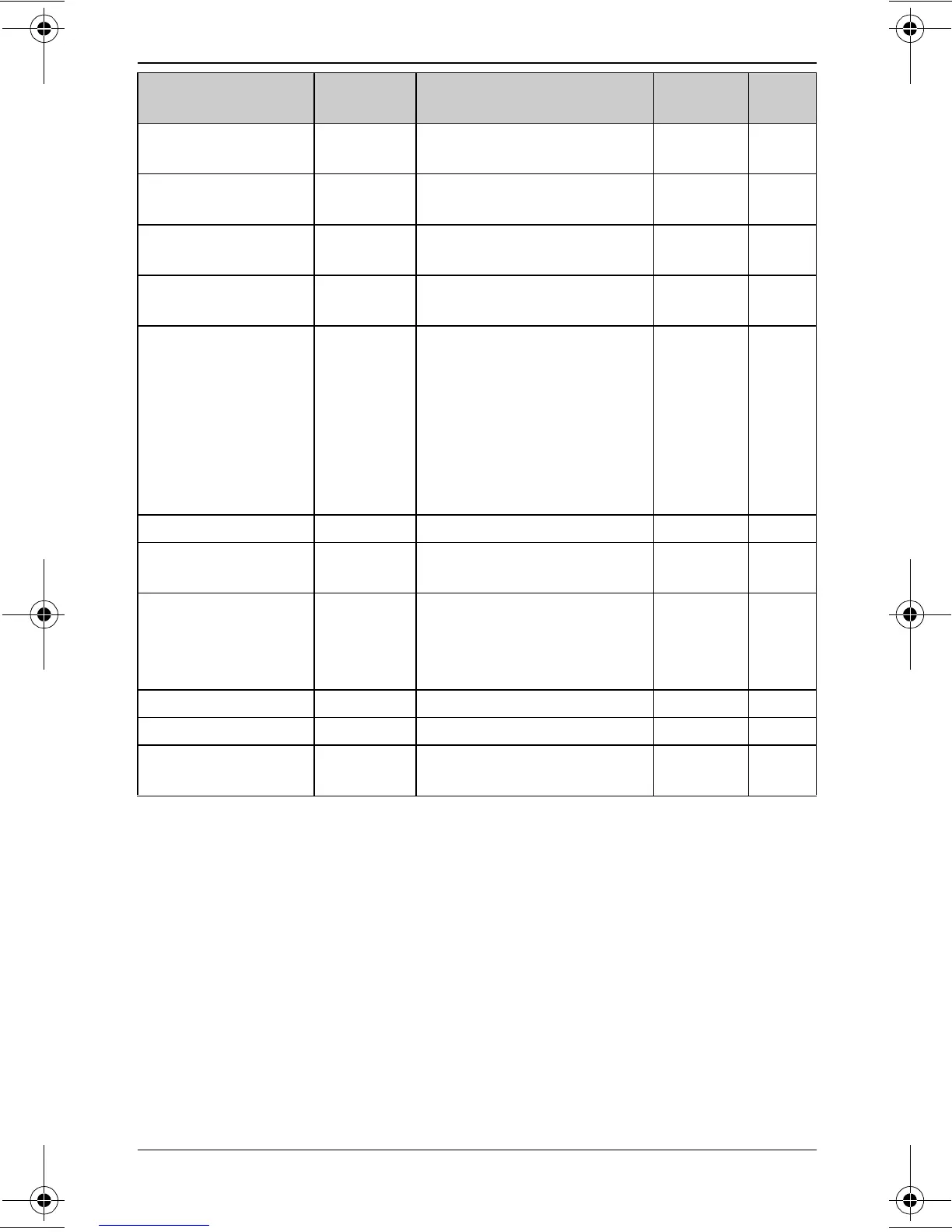
Ring count {2}{1}{1}{2}–{7}: 2–7 rings <4>
{0}: Toll saver
r 34
Ringer tone
*4,
*5
(Handset)
{1}{6}{1}{1}–{3}: Tone <1>–3
{4}–{7}: Melody 1–4
––
Ringer volume
(Handset)
{1}{6}{0}{1}: Low {2}: Medium
{3}: <High> {0}: Off
––
Set dial mode {1}{2}{0}{1}: Pulse
{2}: <Tone>
r 14
Set flash
time
*6
{1}{2}{1}{1}: <700ms>
{2}: 600ms
{3}: 400ms
{4}: 300ms
{5}: 250ms
{6}: 110ms
{7}: 100ms
{8}: 90ms
r 16
Set line mode
*7
{1}{2}{2}{1}: A {2}: <B> r –
Store VM
access#
{3}{3}{1} – r 36
Time
adjustment
*8
(Caller ID
subscribers only)
{2}{2}{6}{1}: <Caller ID
[auto]>
{0}: Manual
r –
V.M. access {3}{3}{0} ––37
VM tone detect {3}{3}{2}{1}: <On> {0}: Off r 36
Voice prompt
(Change language)
{1}{1}{2}{1}: <English>
{2}: Español
r 14
Feature Feature
code
Setting code System
setting
*1
Page
TG43xx_OI.book Page 23 Tuesday, December 11, 2007 2:04 PM




 To Next Page