EasyManua.ls Logo

Panasonic KX-TG4031C - User Manual

Panasonic KX-TG4031C
52 pages
Print Icon
To Next Page IconTo Next Page
Loading...
Thank you for purchasing a Panasonic product.
Please read these operating instructions before using the unit and save
them for future reference.
This unit is compatible with Call Display. You must subscribe to the
appropriate service offered by your service provider/telephone company.
For assistance, please call 1-800-561-5505 or visit us at
www.panasonic.ca
Before initial use, see “Getting
Started” on page 9.
Operating Instructions
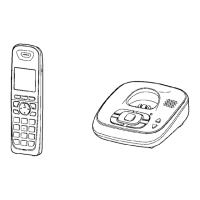
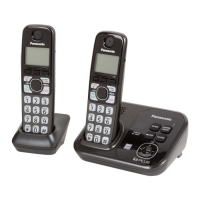
Model shown is KX-TG4031.
Expandable Digital Cordless
Answering System
Model No. KX-TG4031C
KX-TG4032C
KX-TG4033C
KX-TG4034C
TG403xC(e).book Page 1 Wednesday, January 13, 2010 1:44 PM

Questions and Answers

  • A
    Ann AndersonSep 8, 2025
    What does it mean when the indicator on my Panasonic KX-TG4031C handset flashes slowly?
    • D
      davidboydSep 8, 2025
      If the indicator on the handset of your Panasonic Answering Machine flashes slowly, it means new messages or new Voice Mail messages have been recorded. Listen to the new messages or listen to the new Voice Mail messages.
  • M
    Matthew BryanAug 23, 2025
    Why can't I operate my Panasonic KX-TG4031C Answering Machine remotely?
    • L
      Lawrence McknightAug 23, 2025
      If you cannot operate your Panasonic Answering Machine remotely, verify the following: * The remote access code is set. If not, set the remote access code. * You are entering the correct remote access code. If you've forgotten it, check the remote access code setting to see your current code. * Press each key firmly. * The answering system is turned on. If not, turn it on.
  • W
    William HillAug 25, 2025
    Why is my Panasonic KX-TG4031C handset beeping and flashing?
    • J
      jenniferhoganAug 25, 2025
      If the handset of your Panasonic Answering Machine beeps and flashes, it means the battery charge is low. Fully charge the batteries.
  • J
    johnbowmanAug 27, 2025
    Why doesn't my Panasonic Answering Machine handset ring?
    • R
      Ryan VanceAug 27, 2025
      If the handset on your Panasonic Answering Machine isn't ringing, check if the ringer volume is turned off and adjust it. Also, ensure that night mode is turned off.
  • T
    Tanya StarkAug 27, 2025
    Why doesn't my Panasonic KX-TG4031C base unit ring?
    • J
      John BrownAug 28, 2025
      If the base unit of your Panasonic Answering Machine does not ring, the ringer volume might be turned off. Adjust the ringer volume.
  • T
    timothy39Sep 22, 2025
    What to do if liquid entered my Panasonic Answering Machine?
    • M
      Miguel ElliottSep 22, 2025
      If liquid or other form of moisture has entered the handset/base unit of your Panasonic Answering Machine: 1. Disconnect the AC adaptor and telephone line cord from the base unit. 2. Remove the batteries from the handset and leave to dry for at least 3 days. 3. After the handset/base unit are completely dry, reconnect the AC adaptor and telephone line cord. 4. Insert the batteries and charge fully before use.
  • A
    Allison PerrySep 16, 2025
    Why has the time shifted on my Panasonic KX-TG4031C?
    • P
      Phillip ConnerSep 16, 2025
      If the time on your Panasonic Answering Machine has shifted, it could be due to incorrect time information from incoming Call Display changes the time. Set the time adjustment to “Manual” (off).
  • H
    hjohnstonSep 18, 2025
    Why can't I operate the answering system on my Panasonic Answering Machine?
    • J
      Jessica StephensSep 18, 2025
      If you cannot operate the answering system on your Panasonic Answering Machine, it could be because someone else is using the unit; wait for them to finish, or a caller is leaving a message; wait for the caller to finish. Also, ensure that the handset is not too far from the base unit; move closer.
  • M
    Michael WilsonSep 7, 2025
    What to do if my Panasonic Answering Machine batteries still flash after charging?
    • S
      Shaun RogersSep 7, 2025
      If, after fully charging the batteries of your Panasonic Answering Machine, the – ) still flashes, – 0 is displayed, or the operating time seems shorter, try cleaning the battery ends (S, T) and the charge contacts with a dry cloth and charge again. If the problem persists, it may be time to replace the batteries.
  • S
    Shawn PerezSep 4, 2025
    Why is '_' displayed on my Panasonic Answering Machine?
    • R
      Robert JonesSep 4, 2025
      The “_” displayed on your Panasonic Answering Machine indicates a problem with the connection between the handset and the base unit. This could be due to: * The handset being too far from the base unit; move closer. * The base unit’s AC adaptor not being properly connected; reconnect it. * The handset not being registered to the base unit; register it.

Summary

Panasonic Cordless Answering System Introduction

Important Safety Information

Power Connection Safety

Precautions for connecting the AC adaptor and power outlets to prevent fire or electric shock.

Installation Safety

Guidelines for safe installation, avoiding moisture, and preventing interference with automatic devices.

Operating Safeguards

Instructions for safe operation, including cleaning, not disassembling, and avoiding liquid contact.

Battery Safety and Performance

Battery Usage and Safety

Recommendations for using Ni-MH batteries, warnings against mixing, mutilation, and short-circuiting.

Initial Setup and Connections

Connecting the Base Unit and Charger

Step-by-step guide for connecting the base unit and charger to the power outlet and telephone line.

Battery Installation and Charging

Instructions for installing Ni-MH batteries and charging them for approximately 7 hours.

Handset and Base Unit Controls

Making and Answering Calls

Making Phone Calls

Steps for making a call using the handset, speakerphone, or redial list.

Answering Incoming Calls

How to answer a call when the unit rings, including the any-key answer feature.

Useful Call Features

Shared Phonebook Management

Adding and Editing Phonebook Entries

Step-by-step guide to adding new contacts, entering names and numbers, and correcting mistakes.

Phonebook Operations

Editing and Erasing Phonebook Entries

Steps to modify existing entries or delete individual or all entries from the phonebook.

Chain Dial Feature

Programmable Settings Overview

Programming via Direct Commands

Direct Command Codes for Features

A table listing feature codes for accessing and setting various functions like caller list and answering system.

Special Programming Features

Setting the Alarm Function

Instructions for setting the alarm to sound once or daily, including options to turn it off.

Night Mode Configuration

How to activate and set the time periods for night mode to prevent incoming call rings.

Handset Naming and Call Blocking

Storing Unwanted Callers

Methods to add phone numbers to the call block list, either from the caller list or by direct entry.

Unit Registration and Management

Registering Handsets to the Base Unit

Steps to re-register supplied or additional handsets to the base unit for proper system operation.

Using the Call Display Service

Call Display Features and Information

Details on how caller name and number are displayed, handling of unavailable information, and missed calls.

Advanced Call Display Features

Call Waiting Deluxe and Caller List

Viewing and Calling from the Caller List

Steps to view the caller list, search for entries, and make a call back to a logged number.

Managing Caller Information

Storing Caller Information to Phonebook

Procedure to save caller information directly from the caller list into the phonebook.

Answering System Basics

Answering System Functionality

Overview of the answering system's capabilities, memory capacity, and how it operates when messages are full.

Turning the Answering System On;Off

Instructions for enabling or disabling the answering system using the base unit or handset.

Answering System Operations

Recording and Playing Greeting Messages

Steps for recording your own greeting message or playing back pre-recorded messages.

Listening to Messages via Base Unit

How to play back new and all messages using the base unit, including playback controls.

Answering System via Handset

Listening to Messages Using the Handset

Instructions for listening to new or all messages using the handset, and operating the system during playback.

Remote Operation and System Settings

Remote Operation of Answering System

Guide to accessing the answering system remotely via phone to listen to messages or change settings.

Setting and Using Remote Access Code

How to set, change, and use a 3-digit remote access code for secure remote operation.

Answering System Configuration

Setting the Number of Rings

How to change the number of rings before the unit answers, including 'Toll saver' option.

Voice Mail Service Integration

Storing Voice Mail Access Number

Procedure to store the Voice Mail access number for automatic activation of message alerts.

Managing Voice Mail Notifications

Listening to Voice Mail Messages

How the unit indicates new Voice Mail messages and steps to listen to them using the handset.

Intercom and Call Transfer

Wall Mounting Instructions

Wall Mounting and Charger Installation

Troubleshooting Error Messages

Display Error Messages and Solutions

Lists common error messages displayed on the unit and provides corresponding causes and solutions.

General Troubleshooting Guide

Handset and Unit Operation Issues

Solutions for problems like handset not turning on, unit not working, or no dial tone.

Troubleshooting Specific Issues

Call and Intercom Issues

Troubleshooting for problems like poor noise, handset not ringing, no dial tone, and inability to make calls.

Call Display Troubleshooting

Advanced Troubleshooting

Answering System Operational Issues

Solutions for problems with the answering system not recording messages, inability to operate it, or remote operation failures.

Handling Liquid Damage

Panasonic KX-TG4031C Specifications

General IconGeneral
Number of Handsets1
Expandable up to6
Recording Time18 Minutes
Caller IDYes
Call Waiting Caller IDYes
SpeakerphoneYes
DisplayLCD
Backlit DisplayYes
RangeUp to 1000 feet
TypeCordless Phone
Answering SystemDigital
Phonebook Capacity50 entries

Related product manuals