Installation 2
Inserting of the batteries into
the main unit
z
Prepare 2 LR6 (AA Alkaline battery).
Use of batteries not specied will signicantly shorten the usage time.
z
Panasonic batteries are recommended.
1
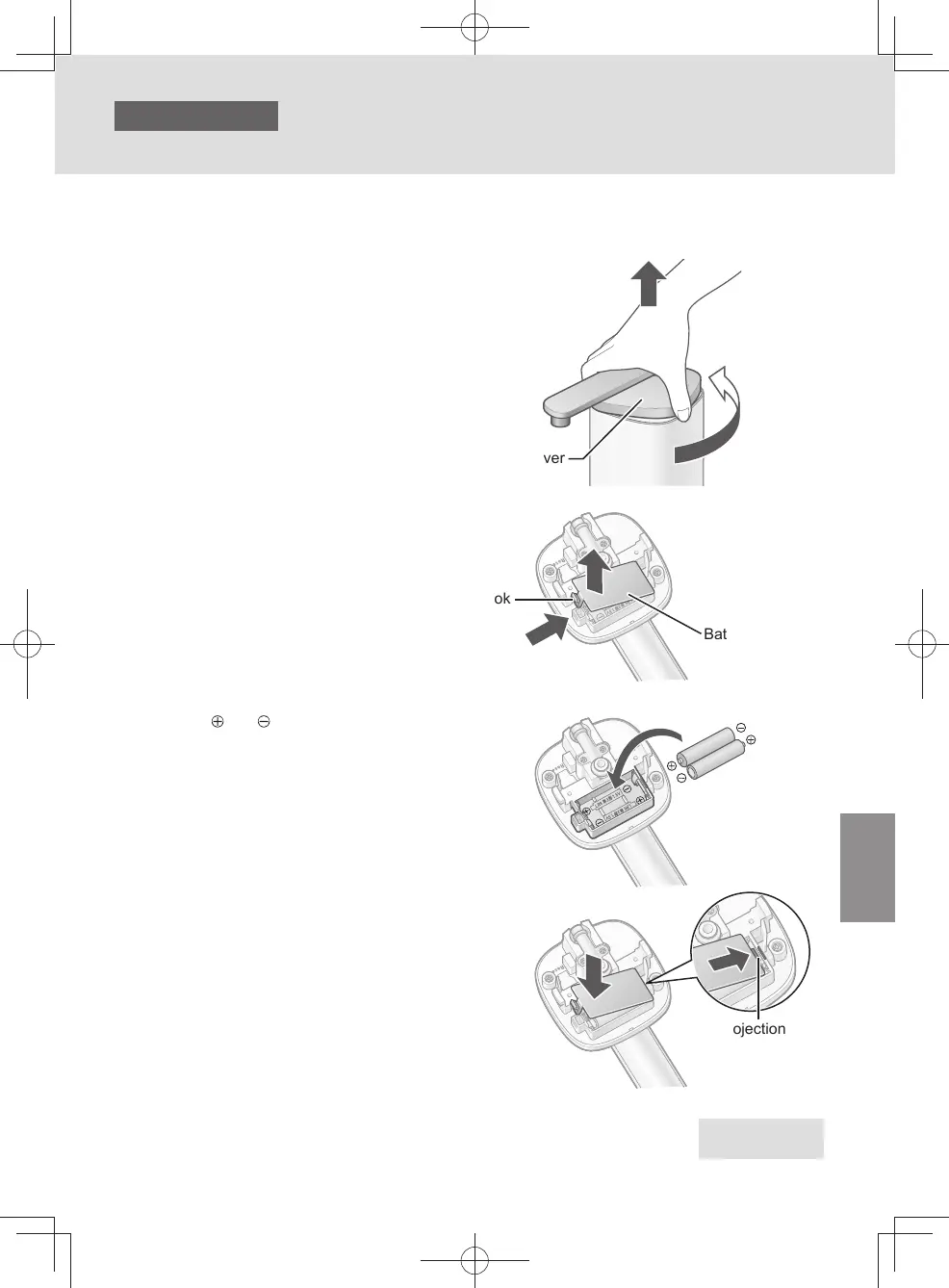
Remove the cover.
❶
Turn the cover until it comes in contact with the
stopper.
❷
Raise the cover.
z
Do not hold the outlet pipe to turn the cover.
(Doing so may cause malfunction.)
❶
❷
Cover
2
Remove the battery cover and replace
the batteries.
❶
Push the hook.
❷
Remove it.
Battery cover
❶
❷
Hook
❸
Check and , and insert the
batteries all the way.
❸
❹
Insert the projection of the battery cover into the
hole.
❺
Close the cover.
❺
Projection
❹
Proceed to Step 3
on the next page
EN7
TK-CS500_01_EN.indd 6TK-CS500_01_EN.indd 6 2024/03/21 14:52:312024/03/21 14:52:31



 To Next Page