Installation 2
Inserting of the batteries into
the main unit
(continued)
3
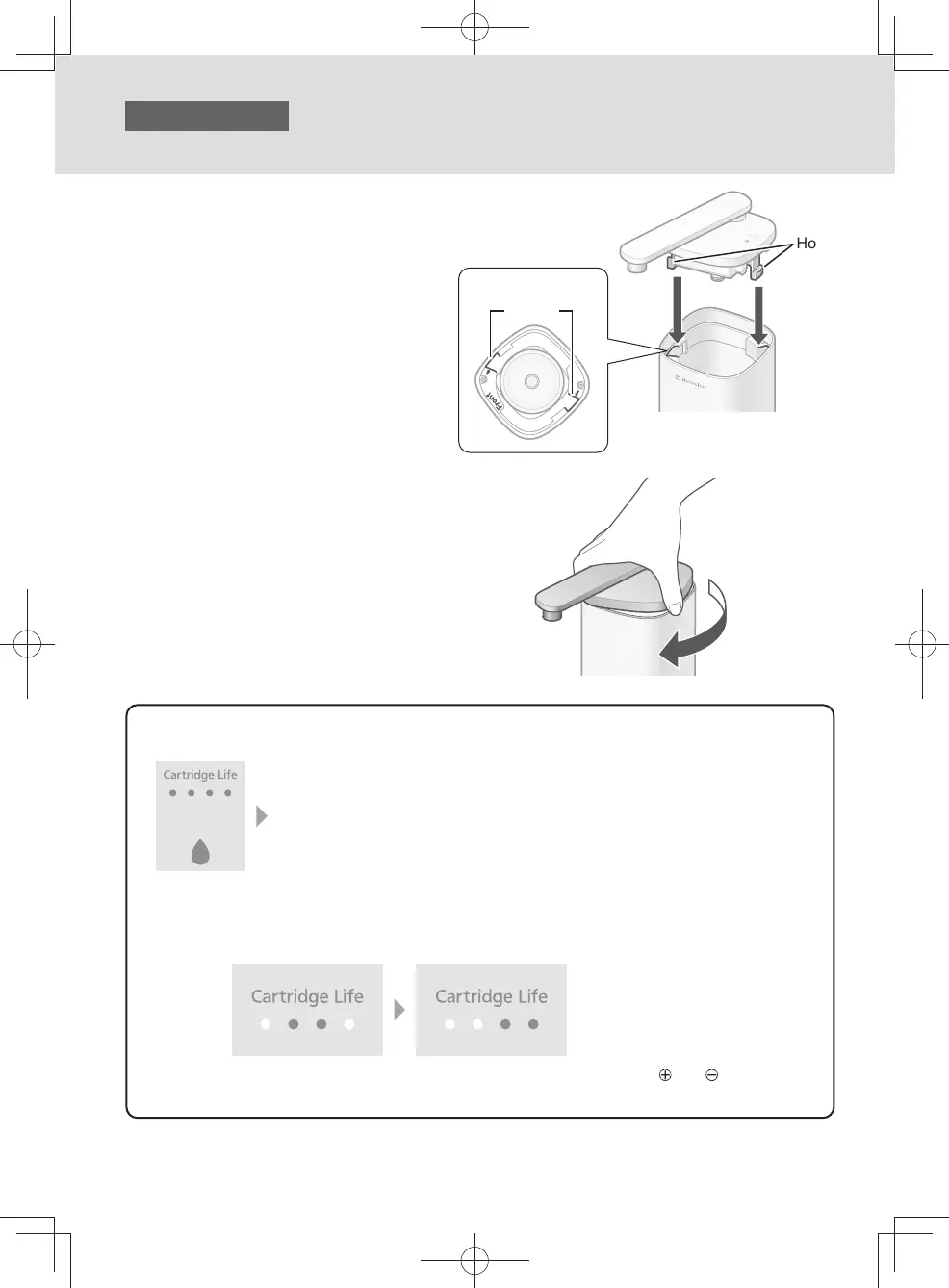
Attach the cover.
❶
Match the two hooks of the cover with the two
cutouts of the main unit.
Hook
❶ ❶
Top view
Cutout
❷
Turn the cover until it stops.
❷
z
If the indicator remains o while puried water is running, replace the batteries with new ones.
It is time to replace the batteries.
Replace them with new ones.
< All o >
z
Approximate battery life: About 1 year
z
Panasonic batteries are recommended.
z
Replacing the batteries does not reset the remaining amount (approximate) of the cartridge.
The indicator will show the remaining amount just before the replacement.
(Example)
z
Disposal of batteries: Insulate the batteries by applying adhesive tape to
and .
Follow your local disposal rule to dispose of them.
EN8
TK-CS500_01_EN.indd 7TK-CS500_01_EN.indd 7 2024/03/21 14:52:322024/03/21 14:52:32



 To Next Page