EasyManua.ls Logo

Panasonic NV-RX3A - Attaching the Charged Battery Pack

Panasonic NV-RX3A
64 pages
Print Icon
To Next Page IconTo Next Page
To Previous Page IconTo Previous Page
Loading...
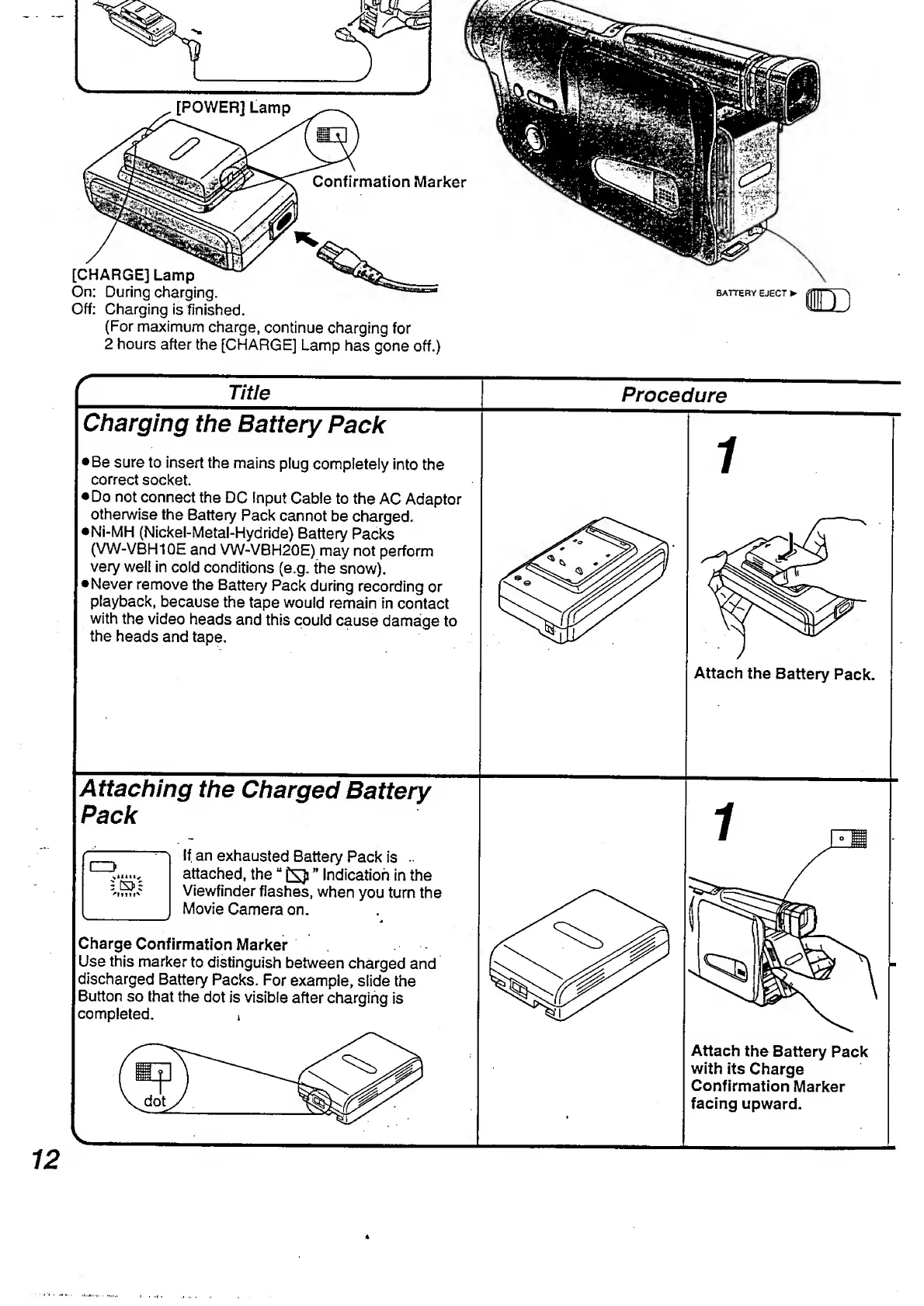
[POWER]
Lamp
Confirmation
Marker
[CHARGE]
Lamp
On:
During
charging.
Off:
Charging
is
finished.
(For
maximum
charge,
continue
charging
for
2
hours
after
the
[CHARGE]
Lamp
has
gone
off.)
BATTERY
EJECT
r
Title
Procedure
Charging
the
Battery
Pack
Be
sure
to
insert
the
mains
plug
completely
into
the
correct
socket.
Do
not
connect
the
DC
input
Cable
to
the
AC
Adaptor
otherwise
the
Battery
Pack
cannot
be
charged.
•Ni-MH
(Nickel-Metal-Hydride)
Battery
Packs
(VW-VBH10E
and
VW-VBH20E)
may
not
perform
very
well
in
cold
conditions
(e.g.
the
snow).
•Never
remove
the
Battery
Pack
during
recording
or
playback,
because
the
tape
would
remain
in
contact
with
the
video
heads
and
this
could
cause
damage
to
the
heads
and
tape.
i
Attach
the
Battery
Pack.
Attaching
the
Charged
Battery
Pack
C=3
^
1
i
4
11S
'Min'
If
an
exhausted
Battery
Pack
is
..
attached,
the
£53
Indication
in
the
Viewfinder
flashes,
when
you
turn
the
Movie
Camera
on.
Charge
Confirmation
Marker
Use
this
marker
to
distinguish
between
charged
and
discharged
Battery
Packs.
For
example,
slide
the
Button
so
that
the
dot
is
visible
after
charging
is
completed.
1
Attach
the
Battery
Pack
with
its
Charge
Confirmation
Marker
facing
upward.
12

Table of Contents

Related product manuals