EasyManua.ls Logo

Panasonic NV-RX3A - Inserting and Deleting the Date and Time; Setting the Date and Time

Panasonic NV-RX3A
64 pages
Print Icon
To Next Page IconTo Next Page
To Previous Page IconTo Previous Page
Loading...
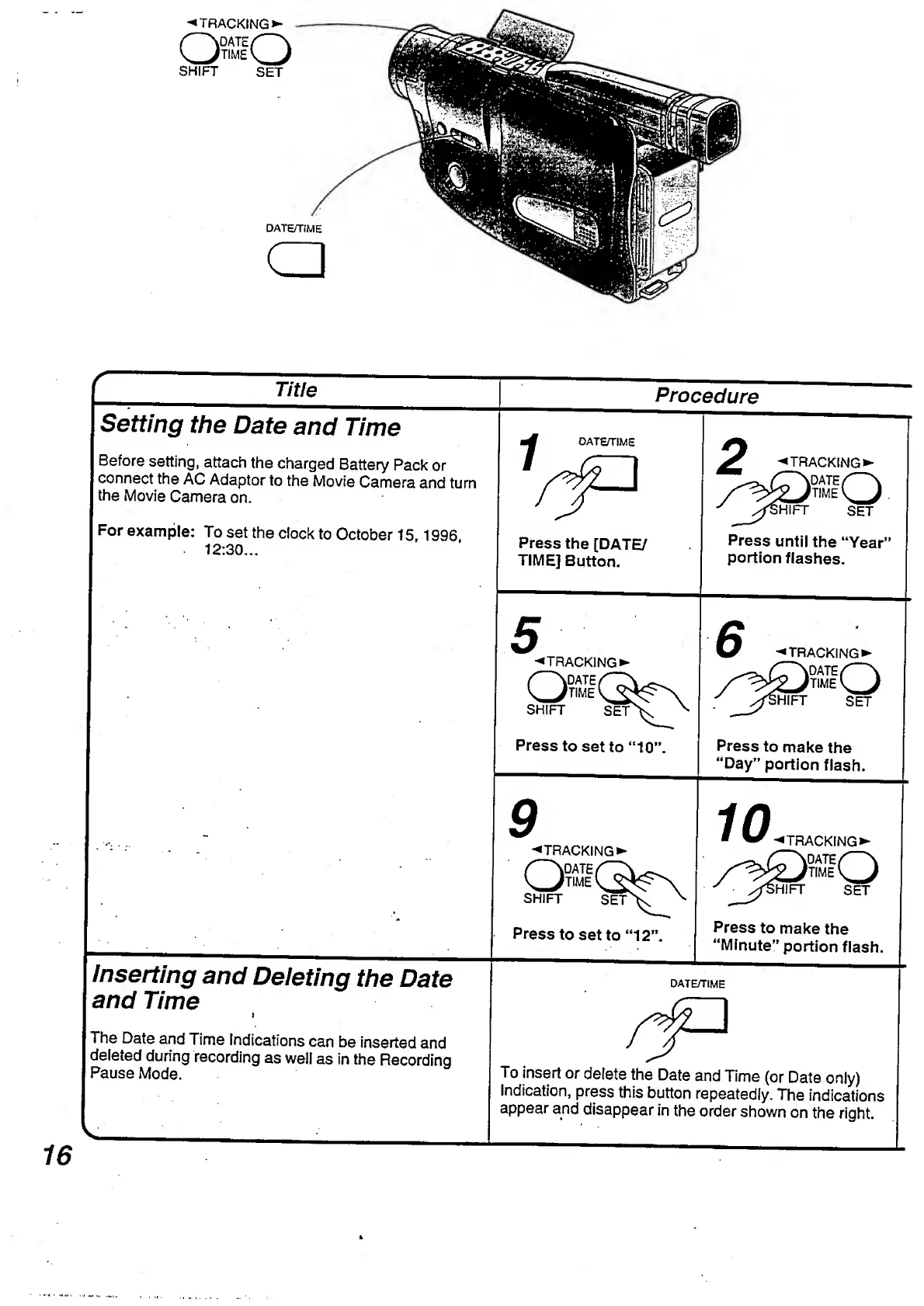
^TRACKING*-
Q
fO
SHIFT
SET
DATE/TIME
a
__
T
itle
_
Setting
the
Date
and
Time
Before
setting,
attach
the
charged
Battery
Pack
or
connect
the
AC
Adaptor
to
the
Movie
Camera
and
turn
the
Movie
Camera
on.
For
example:
To
set
the
clock
to
October
15,1996
12:30...
Procedure
DATE/TIME
Press
the
[DATE/
TIME]
Button.
^TRACKING
HIFT
SET
Press
until
the
“Year’
portion
flashes.
Inserting
and
Deleting
the
Date
and
Time
i
The
Date
and
Time
Indications
can
be
inserted
and
deleted
during
recording
as
well
as
in
the
Recording
Pause
Mode.
5
-*TRA
o
^TRACKING
QSG
SHIFT
SET
Press
to
set
to
“10’
9
^TRA
a
^TRACKING
OnG
SHIFT
SET
Press
to
set
to
“12'
^TRACKING
DKiQ
IHIFT
SET
Press
to
make
the
“Day”
portion
flash.
10
TRACKING)
Press
to
make
the
“Minute"
portion
flash.
DATE/TIME
To
insert
or
delete
the
Date
and
Time
(or
Date
only)
Indication,
press
this
button
repeatedly.
The
indicatior
appear
and
disappear
in
the
order
shown
on
the
right.

Table of Contents

Related product manuals