EasyManua.ls Logo

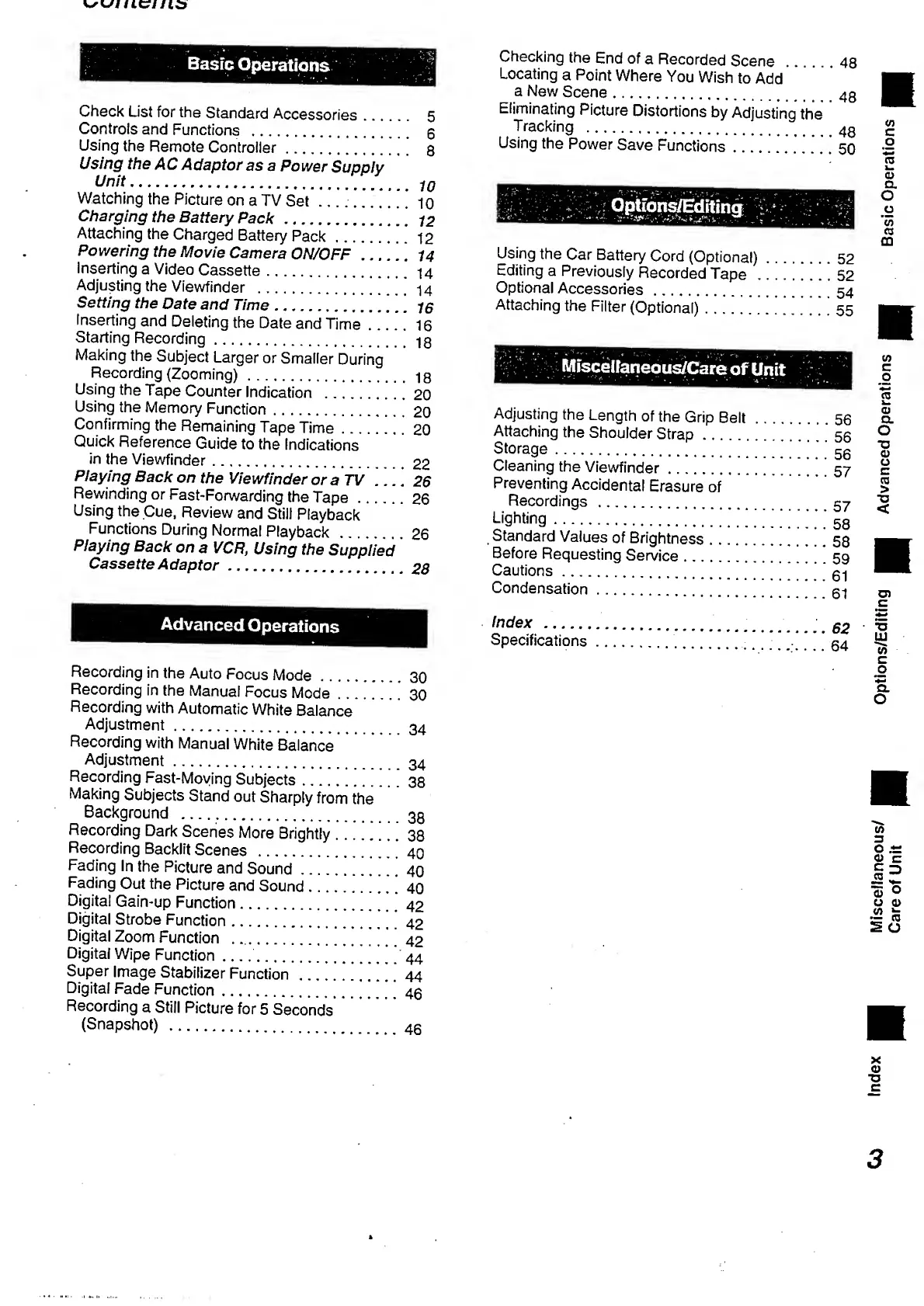
Panasonic NV-RX3A - Table of Contents

Panasonic NV-RX3A
64 pages
Print Icon
To Next Page IconTo Next Page
To Previous Page IconTo Previous Page
Loading...
Basic
Operations
Check
List
for
the
Standard
Accessories.
5
Controls
and
Functions
.
6
Using
the
Remote
Controller.
8
Using
the
AC
Adaptor
as
a
Power
Supply
Unit
.
10
Watching
the
Picture
on
a
TV
Set_..._10
Charging
the
Battery
Pack
.
72
Attaching
the
Charged
Battery
Pack.*
*
*
12
Powering
the
Movie
Camera
ON/OFF
......
14
Inserting
a
Video
Cassette.’
14
Adjusting
the
Viewfinder
.’
’'
14
Setting
the
Date
and
Time
.
*
*
75
inserting
and
Deleting
the
Date
and
Time.
1
6
Starting
Recording.18
Making
the
Subject
Larger
or
Smaller
During
Recording
(Zooming).18
Using
the
Tape
Counter
Indication
.20
Using
the
Memory
Function.
2
0
Confirming
the
Remaining
Tape
Time.
2
0
Quick
Reference
Guide
to
the
indications
in
the
Viewfinder.
2
2
Playing
Back
on
the
Viewfinder
or
a
TV
_
2
6
Rewinding
or
Fast-Forwarding
the
Tape.26
Using
the
Cue,
Review
and
Still
Playback
Functions
During
Norma!
Playback
.
2
6
Playing
Back
on
a
VCR,
Using
the
Supplied
Cassette
Adaptor
.
Advanced
Operations
Recording
in
the
Auto
Focus
Mode.
3
0
Recording
in
the
Manual
Focus
Mode.
3
0
Recording
with
Automatic
White
Balance
Adjustment.
Recording
with
Manual
White
Balance
Adjustment.
Recording
Fast-Moving
Subjects.
3
8
Making
Subjects
Stand
out
Sharply
from
the
Background
.
33
Recording
Dark
Scenes
More
Brightly.
3
8
Recording
Backlit
Scenes
.*'*
40
Fading
In
the
Picture
and
Sound..''
40
Fading
Out
the
Picture
and
Sound.*
40
Digital
Gain-up
Function.42
Digital
Strobe
Function.42
Digital
Zoom
Function
...'
42
Digital
Wipe
Function..44
Super
Image
Stabilizer
Function.*
*.
44
Digital
Fade
Function.4@
Recording
a
Still
Picture
for
5
Seconds
(Snapshot)
..
Checking
the
End
of
a
Recorded
Scene
..
48
Locating
a
Point
Where
You
Wish
to
Add
a
New
Scene..
Eliminating
Picture
Distortions
by
Adjusting
the
Tracking
.
.
Using
the
Power
Save
Functions.
5
0
Options/Editing
Using
the
Car
Battery
Cord
(Optional).
5
2
Editing
a
Previously
Recorded
Tape
.
5
2
Optional
Accessories.54
Attaching
the
Filter
(Optional).
.
55
Misceifaneous/Care
of
Unit
Adjusting
the
Length
of
the
Grip
Belt
...
Attaching
the
Shoulder
Strap
Storage.
.
5
6
.
5
6
56
Cleaning
the
Viewfinder
.
.
5
7
Preventing
Accidental
Erasure
of
Recordings
.
.
5
7
Lighting.
56
Standard
Values
of
Brightness
.
5
8
Before
Requesting
Sen/ice
.
.
5
9
Cautions.
61
Condensation.
fil
Index
.
co
Specifications.
.
--
6
4
3
'
ndeX
c“u
n
nT
S/
Options/Editing
Hj
Advanced
Operations
H
Basic
Operations

Table of Contents

Related product manuals