EasyManua.ls Logo

Panasonic NV-RX3A - Attaching the Shoulder Strap; Storage

Panasonic NV-RX3A
64 pages
Print Icon
To Next Page IconTo Next Page
To Previous Page IconTo Previous Page
Loading...
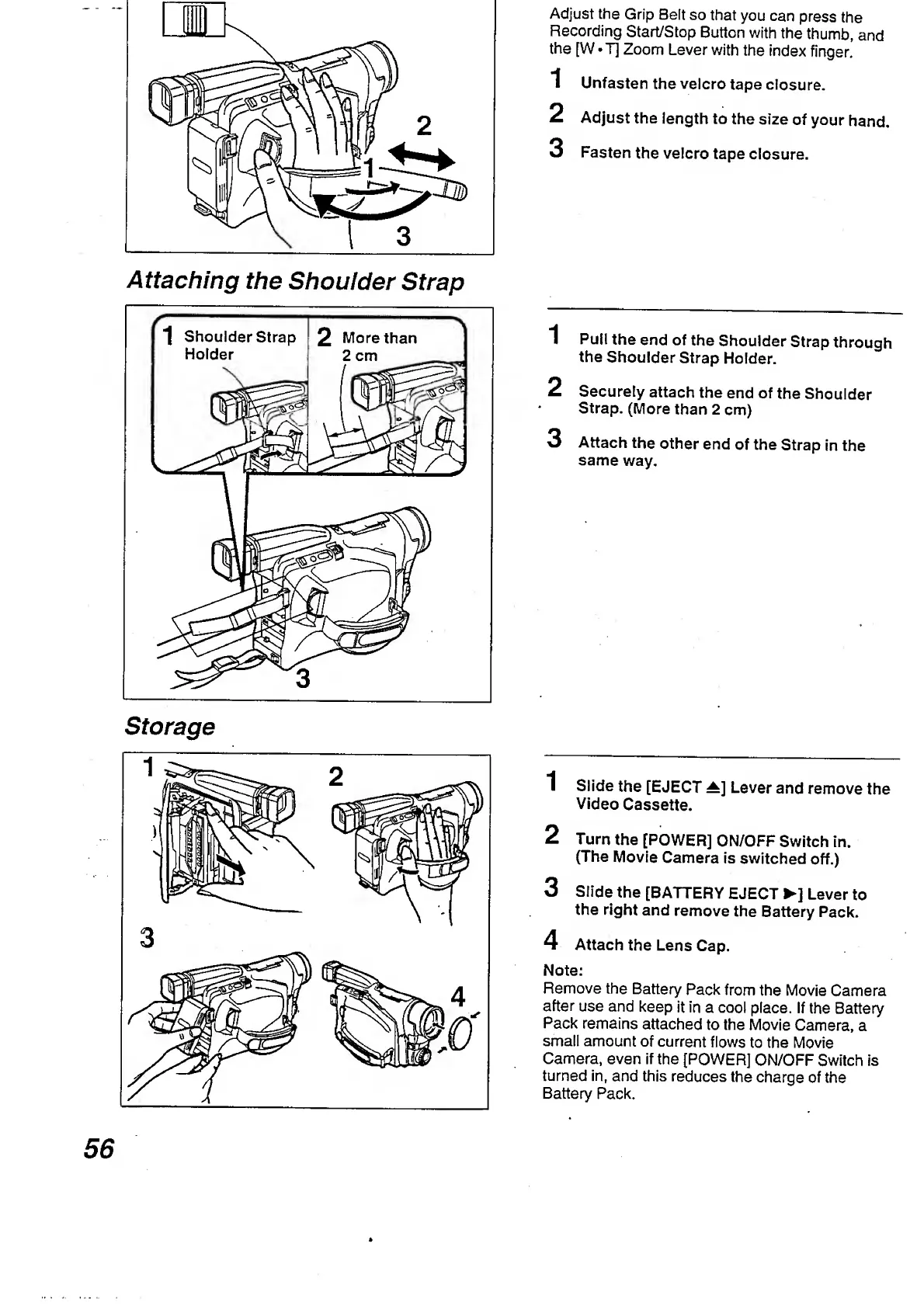
Attaching
the
Shoulder
Strap
Storage
Adjust
the
Grip
Beft
so
that
you
can
press
the
Recording
Start/Stop
Button
with
the
thumb,
and
the
[W
T]
Zoom
Lever
with
the
index
finger.
1
Unfasten
the
velcro
tape
closure.
2
Adjust
the
length
to
the
size
of
your
hand.
3
Fasten
the
velcro
tape
closure.
1
Pull
the
end
of
the
Shoulder
Strap
through
the
Shoulder
Strap
Holder.
2
Securely
attach
the
end
of
the
Shoulder
Strap.
(More
than
2
cm)
3
Attach
the
other
end
of
the
Strap
in
the
same
way.
1
Slide
the
[EJECT
±]
Lever
and
remove
the
Video
Cassette.
2
Turn
the
[POWER]
ON/OFF
Switch
in.
(The
Movie
Camera
is
switched
off.)
3
Slide
the
[BATTERY
EJECT
]
Lever
to
the
right
and
remove
the
Battery
Pack.
4
Attach
the
Lens
Cap.
Note:
Remove
the
Battery
Pack
from
the
Movie
Camera
after
use
and
keep
it
in
a
cool
place.
If
the
Battery
Pack
remains
attached
to
the
Movie
Camera,
a
small
amount
of
current
flows
to
the
Movie
Camera,
even
if
the
[POWER]
ON/OFF
Switch
is
turned
in,
and
this
reduces
the
charge
of
the
Battery
Pack.
56

Table of Contents

Related product manuals