EasyManua.ls Logo

Panasonic NV-RX3A - Page 17

Panasonic NV-RX3A
64 pages
Print Icon
To Next Page IconTo Next Page
To Previous Page IconTo Previous Page
Loading...
A
built-in
rechargeable
lithium
battery
inside
the
Movie
Camera
maintains
the
operation
of
the
built-in
clock
when
the
Movie
Camera
is
not
in
operation.
Whenever
the
Movie
Camera
is
in
operation,
it
automatically
recharges
this
battery.
However,
if
you
don’t
use
the
Movie
Camera
for
a
very
long
time,
the
lithium
battery
can
become
exhausted.
In
this
case,
the
Indication
in
the
Viewfinder
flashes.
If
the
“(§)”
Indication
in
the
Viewfinder
flashes
for
approx.
10
seconds
when
you
turn
the
Movie
Camera
on,
the
lithium
battery
is
exhausted
and
must
be
charged
it
as
follows.
1
Connect
the
Movie
Camera
(with
power
off
condition)
to
the
AC
Adaptor
and
wait
for
approx.
4
hours
(NV-RX7A)
or
8
hours
(NV-RX3A).
NV-RX3A
only:
•After
charging
the
lithium
battery,
the
Indication
still
flashes
to
remind
you
to
set
the
date
and
time
as
explained
below.
•After
charging
the
lithium
battery
in
this
way,
it
can
maintain
the
operation
of
the
clock
for
approx,
three
months.
Information
for
your
safety
WARNING
THE
LITHIUM
BATTERY
IN
THIS
UNIT
MUST
ONLY
BE
REPLACED
BY
QUALIFIED
PERSONNEL.
IF
THIS
IS
NECESSARY,
CONTACT
THE
PANASONIC
CUSTOMER
CARE
CENTRE
ON
132600
FOR
YOUR
NEAREST
AUTHORISED
SERVICE
CENTRE
O&KSrx
SHIFT
SETV
V
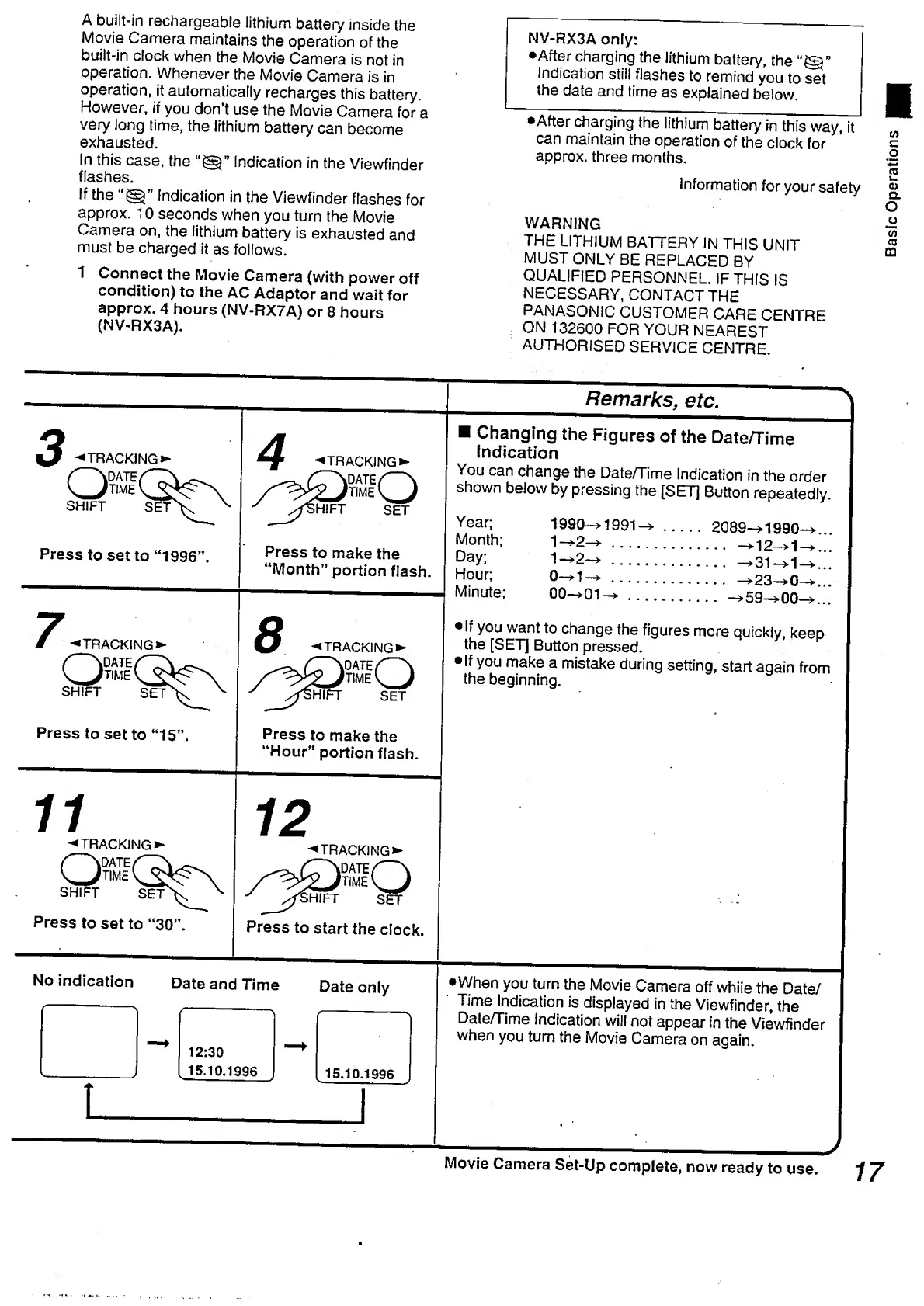
Press
to
set
to
“1996’
7
.
TRACKING
O
DATE
TIME
_
SHIFT
SET
Press
to
set
to
“15”.
11
-«l
o
SHIFT
Press
to
set
to
“30”.
'TRACKING
kDATE
'time
SHIFT
SET
"
/fSHIFT
SET
Press
to
make
the
“Month”
portion
flash.
8
'TRACKING'
Press
to
make
the
“Hour”
portion
flash.
12
'TRACKING'
Press
to
start
the
clock.
No
indication
Date
and
Time
Date
only
-
-
f---1
-*•
12:30
->
_
15.10.1996
15.10.1996
_l
Changing
the
Figures
of
the
Date/Time
indication
You
can
change
the
Date/Time
Indication
in
the
order
shown
below
by
pressing
the
[SET]
Button
repeatedly.
Year;
Month;
Day;
Hour;
Minute;
1990—>
1991
1
2
-
+
....
1
-
*
2
-
>
....
0
-
*
1
^
....
.
2089—>1990-
.
—>
1
2
—>
1
-
.
—>31—>1-
>23—>0-
00
-*
0
1
~
*.—>
5
9
—>
0
0
-
If
you
want
to
change
the
figures
more
quickly,
keep
the
[SET]
Button
pressed.
•If
you
make
a
mistake
during
setting,
start
again
from
the
beginning.
•When
you
turn
the
Movie
Camera
off
while
the
Date/
Time
Indication
is
displayed
in
the
Viewfinder,
the
Date/Time
indication
will
not
appear
in
the
Viewfinder
when
you
turn
the
Movie
Camera
on
again.
J
Movie
Camera
Set-Up
complete,
now
ready
to
use.
“f
Y
Basic
Operations

Table of Contents

Related product manuals