EasyManua.ls Logo

Panasonic NV-RX3A - Page 19

Panasonic NV-RX3A
64 pages
Print Icon
To Next Page IconTo Next Page
To Previous Page IconTo Previous Page
Loading...
Intro
Scan
Functions
that
make
it
easy
to
locate
the
beginning
of
scenes
marked
with
index
signals.
This
Movie
Camera
automatically
records
an
index
signal
in
the
following
cases:
•When
recording
is
started
for
the
first
time
after
attaching
the
Battery
Pack.
•When
recording
is
restarted
after
exchanging
the
Video
Cassette
or
after
pressing
the
[VCR/
CAMERA]
Button.
The
“INDEX”
Indication
flashes
briefly
in
the
Viewfinder
while
the
Movie
Camera
records
an
index
signal.
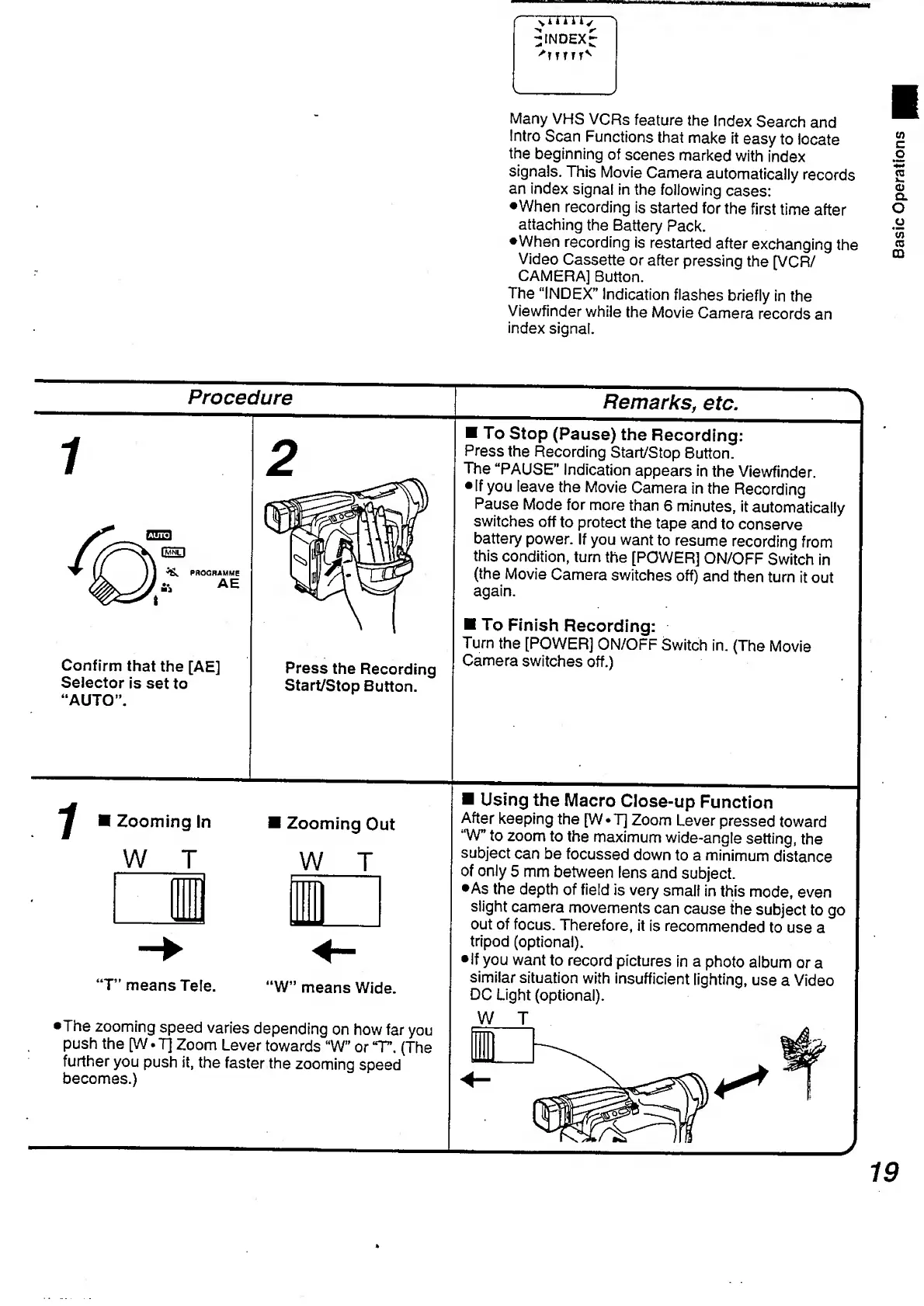
Procedure
k
twin
PROGRAMME
a*
AE
Confirm
that
the
[AE]
Selector
is
set
to
“AUTO”.
Press
the
Recording
Start/Stop
Button.
_
Remark
s,
etc
.
To
Stop
(Pause)
the
Recording:
Press
the
Recording
Start/Stop
Button.
The
“PAUSE”
Indication
appears
in
the
Viewfinder.
If
you
leave
the
Movie
Camera
in
the
Recording
Pause
Mode
for
more
than
6
minutes,
it
automatically
switches
off
to
protect
the
tape
and
to
conserve
battery
power.
If
you
want
to
resume
recording
from
this
condition,
turn
the
[POWER]
ON/OFF
Switch
in
(the
Movie
Camera
switches
off)
and
then
turn
it
out
again.
To
Finish
Recording:
Turn
the
[POWER]
ON/OFF
Switch
in.
(The
Movie
Camera
switches
off.)
^
Zooming
In
W
T
Zooming
Out
W
T
T”
means
Tele.
‘W”
means
Wide.
•The
zooming
speed
varies
depending
on
how
far
you
push
the
[W.
7]
Zoom
Lever
towards
“W”
or
‘T\
(The
further
you
push
it,
the
faster
the
zooming
speed
becomes.)
Using
the
Macro
Close-up
Function
After
keeping
the
[W*T]
Zoom
Lever
pressed
toward
“W"
to
zoom
to
the
maximum
wide-angle
setting,
the
subject
can
be
focussed
down
to
a
minimum
distance
of
only
5
mm
between
lens
and
subject.
•As
the
depth
of
field
is
very
small
in
this
mode,
even
slight
camera
movements
can
cause
the
subject
to
go
out
of
focus.
Therefore,
it
is
recommended
to
use
a
tripod
(optional).
•If
you
want
to
record
pictures
in
a
photo
album
or
a
similar
situation
with
insufficient
lighting,
use
a
Video
DC
Light
(optional).
W
T
19
Basic
Operations

Table of Contents

Related product manuals