EasyManua.ls Logo

Panasonic NV-RX3A - Page 22

Panasonic NV-RX3A
64 pages
Print Icon
To Next Page IconTo Next Page
To Previous Page IconTo Previous Page
Loading...
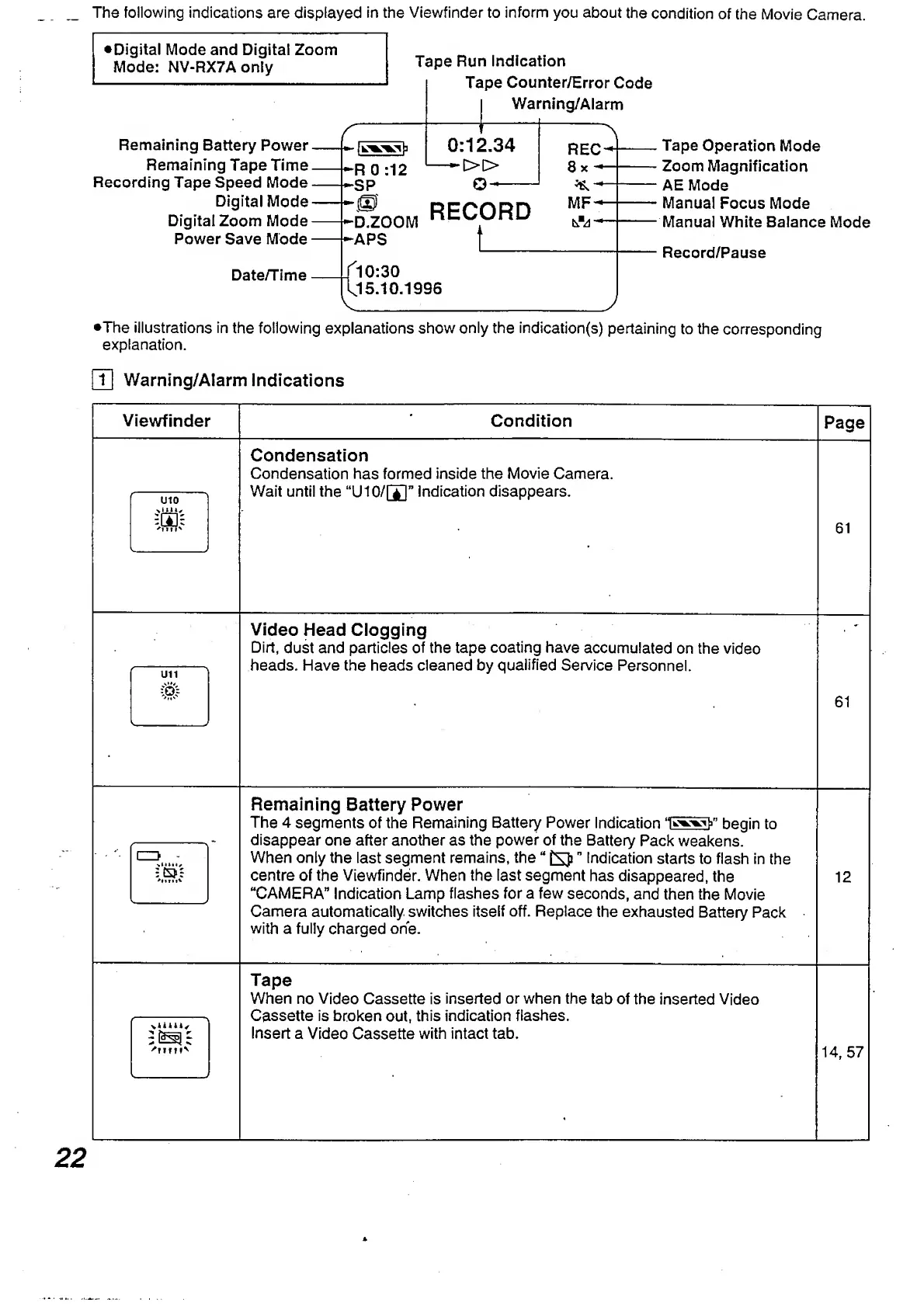
The
following
indications
are
displayed
in
the
Viewfinder
to
inform
you
about
the
condition
of
the
Movie
Camera.
^Digital
Mode
and
Digital
Zoom
Mode:
NV-RX7Aonly
Remaining
Battery
Power
Remaining
Tape
Time
Recording
Tape
Speed
Mode
Digital
Mode
Digital
Zoom
Mode
Power
Save
Mode
Tape
Run
Indication
Tape
Counter/Error
Code
Warning/Alarm
0:12.34
»
D.ZOOM
APS
RECORD
t_
REC
3x~
^
-*
MF-
Tape
Operation
Mode
Zoom
Magnification
AE
Mode
Manual
Focus
Mode
Manual
White
Balance
Mode
Record/Pause
Date/Time
10:30
15.10.1996
j
•The
illustrations
in
the
following
explanations
show
only
the
indication(s)
pertaining
to
the
corresponding
explanation.
pil
Warning/Alarm
Indications
Viewfinder
Condition
Page
U10
vLLLi'
;gc;
'itm*
_
_
Condensation
Condensation
has
formed
inside
the
Movie
Camera.
Wait
until
the
“U10/[J]
n
indication
disappears.
61
U11
iOi
-
J
Video
Head
Clogging
Dirt,
dust
and
particles
of
the
tape
coating
have
accumulated
on
the
video
heads.
Have
the
heads
cleaned
by
qualified
Service
Personnel.
61
\
1
>
zW:
'Ilf
It''
-
Remaining
Battery
Power
The
4
seaments
of
the
Remainina
Batterv
Power
Indication
‘WVit/’
hegin
to
disappear
one
after
another
as
the
power
of
the
Battery
Pack
weakens.
When
only
the
last
segment
remains,
the
Indication
starts
to
flash
in
the
centre
of
the
Viewfinder.
When
the
last
segment
has
disappeared,
the
“CAMERA"
Indication
Lamp
flashes
for
a
few
seconds,
and
then
the
Movie
Camera
automatically
switches
itself
off.
Replace
the
exhausted
Battery
Pack
with
a
fully
charged
one.
12
'?
TTM
N
Tape
When
no
Video
Cassette
is
inserted
or
when
the
tab
of
the
inserted
Video
Cassette
is
broken
out,
this
indication
flashes.
Insert
a
Video
Cassette
with
intact
tab.
14,
57

Table of Contents

Related product manuals