EasyManua.ls Logo

Panasonic NV-RX3A - Page 24

Panasonic NV-RX3A
64 pages
Print Icon
To Next Page IconTo Next Page
To Previous Page IconTo Previous Page
Loading...
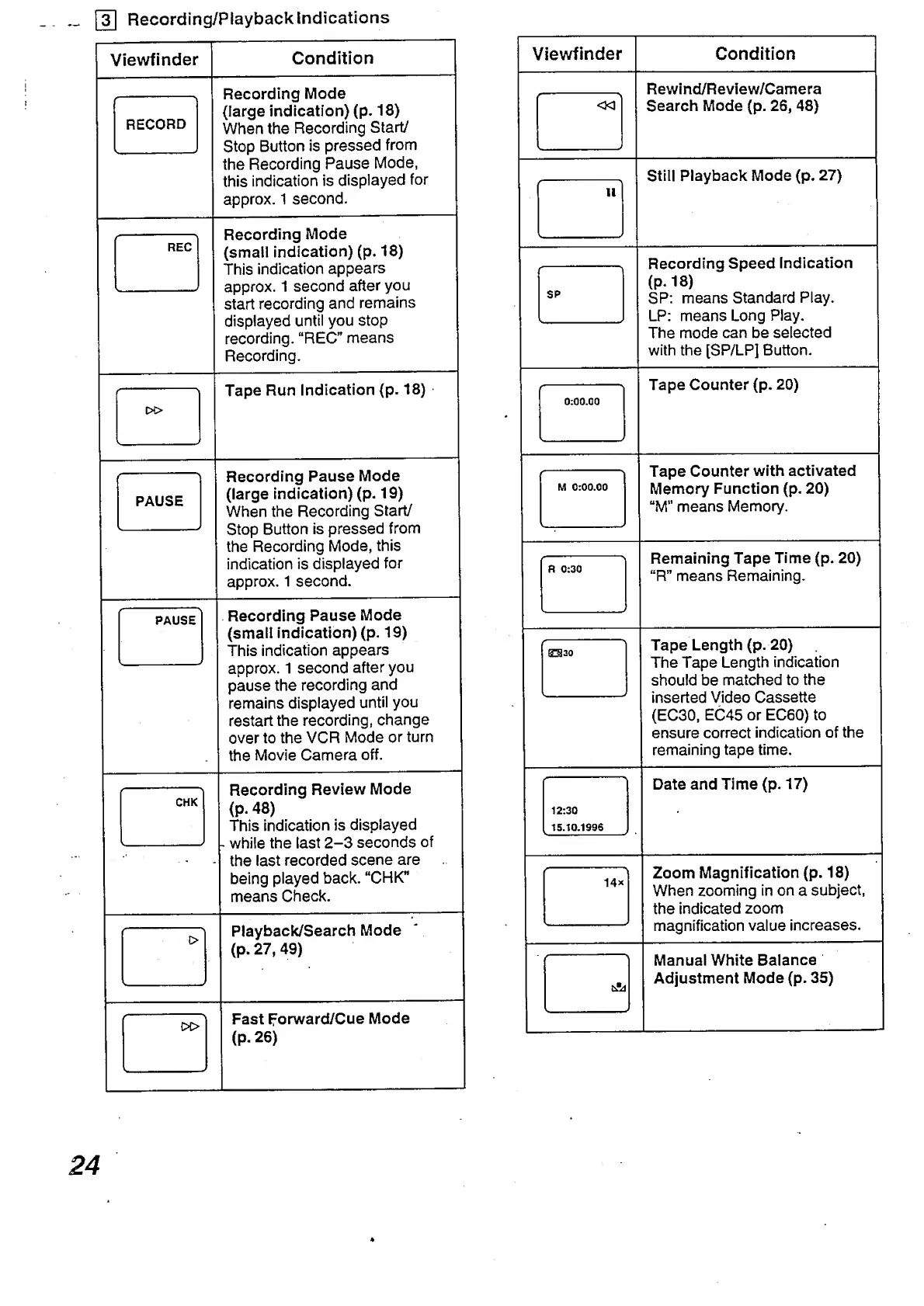
Recording/Playback
Indications
Viewfinder
Condition
RECORD
Recording
Mode
(large
indication)
(p.
18)
When
the
Recording
Start/
Stop
Button
is
pressed
from
the
Recording
Pause
Mode,
this
indication
is
displayed
for
approx.
1
second.
f
REC
-
_
„__/
Recording
Mode
(small
indication)
(p.
18)
This
indication
appears
approx.
1
second
after
you
start
recording
and
remains
displayed
until
you
stop
recording.
“REC”
means
Recording.
w>
Tape
Run
Indication
(p.
18)
'-
PAUSE
Recording
Pause
Mode
(large
indication)
(p.
19)
When
the
Recording
Start/
Stop
Button
is
pressed
from
the
Recording
Mode,
this
indication
is
displayed
for
approx.
1
second.
PAUSE
s_
Recording
Pause
Mode
(small
indication)
(p.
19)
This
indication
appears
approx.
1
second
after
you
pause
the
recording
and
remains
displayed
until
you
restart
the
recording,
change
over
to
the
VCR
Mode
or
turn
the
Movie
Camera
off.
CHK
Recording
Review
Mode
(p.
48)
This
indication
is
displayed
while
the
last
2-3
seconds
the
last
recorded
scene
are
being
played
back.
“CHK”
means
Check.
Playback/Search
Mode
(p.
27,
49)
Fast
Forward/Cue
Mode
(P-
26)
of
Viewfinder
Condition
<30
\-
_
J
Rewind/Review/Camera
Search
Mode
(p.
26,
48)
f
11
Still
Playback
Mode
(p.
27)
Recording
Speed
Indication
(P*
18)
SP:
means
Standard
Play.
LP:
means
Long
Play.
The
mode
can
be
selected
with
the
[SP/LP]
Button.
Tape
Counter
(p.
20)
Tape
Counter
with
activated
Memory
Function
(p.
20)
“M"
means
Memory.
Remaining
Tape
Time
(p.
20)
“R”
means
Remaining.
Tape
Length
(p.
20)
The
Tape
Length
indication
should
be
matched
to
the
inserted
Video
Cassette
(EC30,
EC45
or
EC60)
to
ensure
correct
indication
of
the
remaining
tape
time.
Date
and
Time
(p.
17)
Zoom
Magnification
(p.
18)
When
zooming
in
on
a
subject,
the
indicated
zoom
magnification
value
increases.
Manual
White
Balance
Adjustment
Mode
(p.
35)
24

Table of Contents

Related product manuals