Connections
34 - ENGLISH
Getting Started
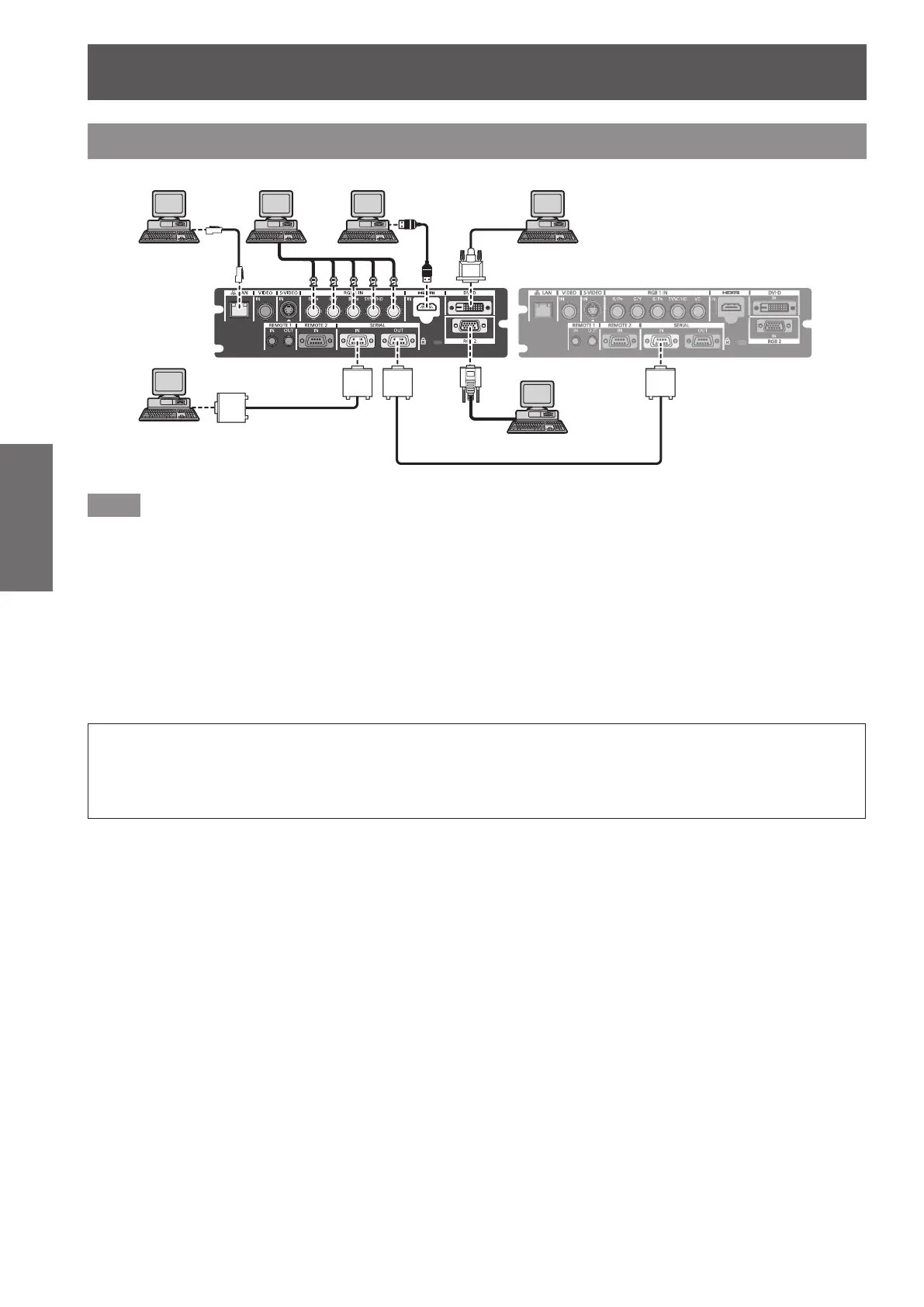
Connecting example: Computers
&RPSXWHU
&RQWURO
FRPSXWHU
&RQWURO
FRPSXWHU
Note
z
Use an HDMI cable that conforms to HDMI standards such as an HDMI High Speed cable. If a cable that does
not meet HDMI standards is used, video may be interrupted or may not be displayed.
z
The <HDMI IN> terminal of the projector can be connected to an external device with a DVI-D terminal by using
an HDMI/DVI conversion cable, but some devices may not project the image properly or function properly.
z
The <DVI-D IN> terminal supports single links only.
z
For signals that the projector can project, refer to “List of compatible signals” (
page 118).
z
If you operate the projector using the computer with the resume feature (last memory), you may have to reset
the resume feature to operate the projector.
z
When the SYNC ON GREEN signal is input, do not enter sync signals to the <SYNC/HD> terminal or the <VD>
terminal.
z
When the DVI-D signal is input, EDID setting may be required depending on the connected device. (
page 61)
Caution
When connecting the projector to a computer or an external device, use the power cord supplied with each
device and commercially available shielded cables.
Use a commercial DVI-D cable with a ferrite core.




 To Next Page