Switching on/off the projector
ENGLISH - 35
Basic Operation
Switching on/off the projector
Connecting the power cord
Make sure that the supplied power cord cover is securely xed to the projector to prevent removal of the
power cord.
Conrm that the <MAIN POWER> switch is on the <OFF> side before connecting the power cord.
For details of power cord handling, refer to “Read this rst!” (
page 2 to 8).
■
Attaching
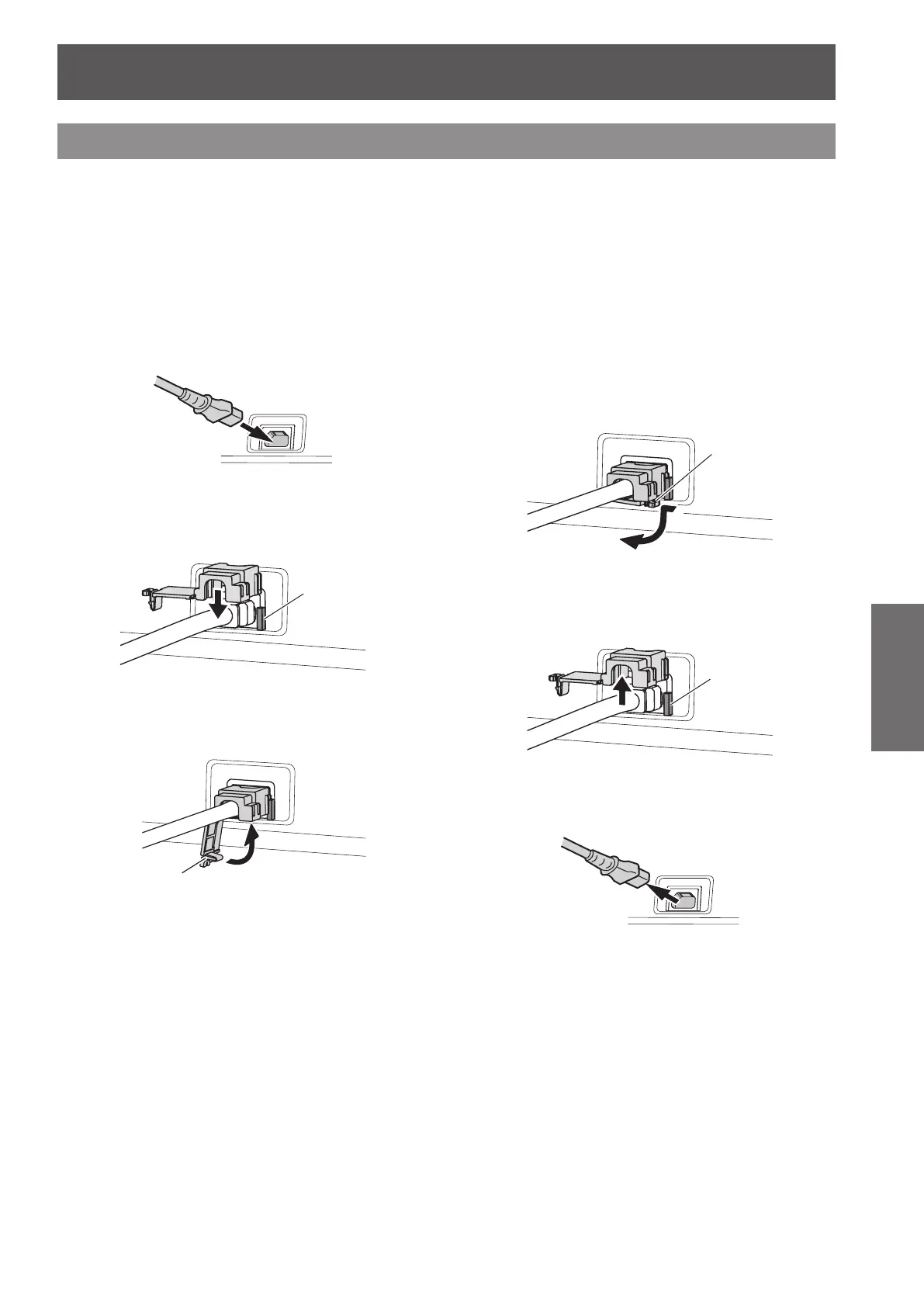
1) Check the shapes of the <AC IN>
terminal and the power cord connector
and insert the plug securely in the
correct direction.
2) Attach the power cord secure lock
along with the guide on the <AC IN>
terminal.
*XLGH
3) Push in the tab of the power cord
secure lock until it clicks.
Tab
4) Insert the power plug into the outlet.
■
Removing
1) Conrm that the <MAIN POWER>
switch of the projector is at the <OFF>
side, and unplug the power plug from
the outlet.
2) Press down the tab of the power cord
secure lock to remove.
Tab
3) Remove the power cord secure lock
from the projector in the direction of
the <AC IN> terminal guide.
*XLGH
4) Remove the power cord connector
from the projector <AC IN> terminal.





 To Next Page