CDs
This unit can play MP3 files recorded on CD-R/RW with a computer.
Files are treated as tracks and folders as albums.
This unit can access up to 999 tracks, 195 albums and 20 sessions.
Disc format
Discs must conform to ISO9660 level 1 or 2 (except for extended
formats).
File format
MP3 files must have the extension “.MP3” or “.mp3”.
To play in a certain order
Prefix the folder and file names with 3-digit
numbers in the order you want to play them.
For example:
001abcd.mp3, 002efgh.mp3, 003ijkl.mp3.
However, some software used for writing discs may
cause recording to occur in a different order.
MPEG Layer-3 audio decoding technology
licensed from Fraunhofer IIS and Thomson
multimedia.
When making MP3 files to play on this unit
• This unit is not compatible with packet-write format.
• When both MP3 and CD-DA data is recorded on the disc over a
number of sessions:
• If the first session contains MP3 recordings, the unit will play from
the MP3 made in that session till the session before the first CD-
DA recordings.
• If the first session contains CD-DA recordings, the unit will play
only the recordings made in that session. The subsequent
sessions will be ignored.
• Maximum number of displayable characters:
Album/track title: 21
ID3 title/artist name: 24
Text data that the unit doesn’t support cannot be displayed.
(ID3 is a tag embedded in MP3 track to provide information about
the track.)
• You cannot use RANDOM and RANDOM REPEAT modes, search
function, and TIME ACCESS function.
• Some MP3 may not be played due to the condition of the disc or
recording.
• Recordings will not necessarily be played in the order you recorded
them.
File format indicator
“.MP3”: Indicates the disc contains MP3 files
Limitations on MP3 play
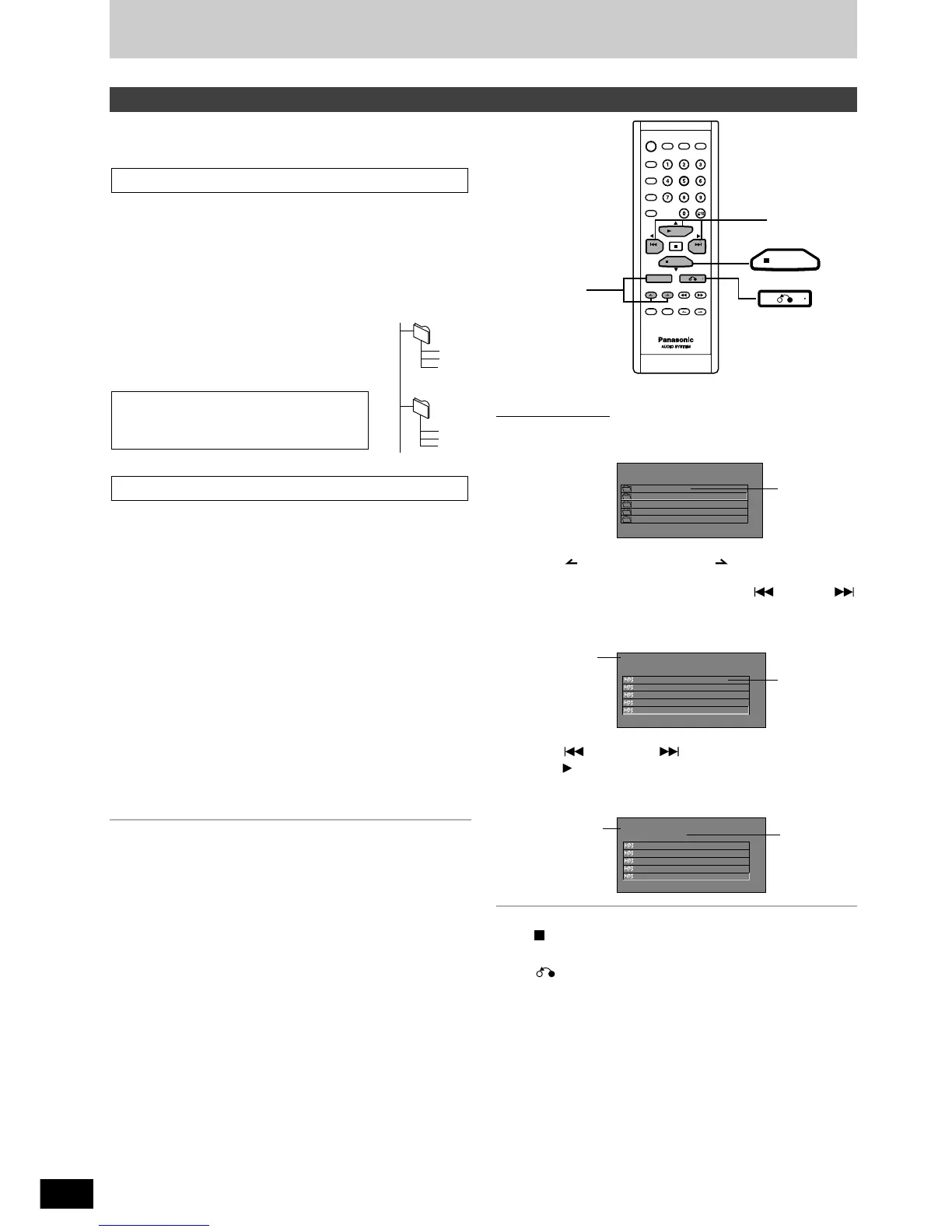
To stop play
Press [ PBC/CLEAR].
To return to album list while in track list
Press [ ].
Remote control only
1
When a MP3 format CD is inserted, its album list will be
displayed.
Press [ ALBUM] or [ALBUM ] to select an album
and press [ENTER].
You can also use the cursor buttons or [ PREV], [
NEXT] to select an album.
2
A track list is displayed.
Press [ PREV] or [ NEXT] to select a track and
press [ SELECT].
You can also use the cursor buttons to select a track.
Play starts.
Using menus to play MP3 discs



 To Next Page