5
RQT7801
ENGLISH
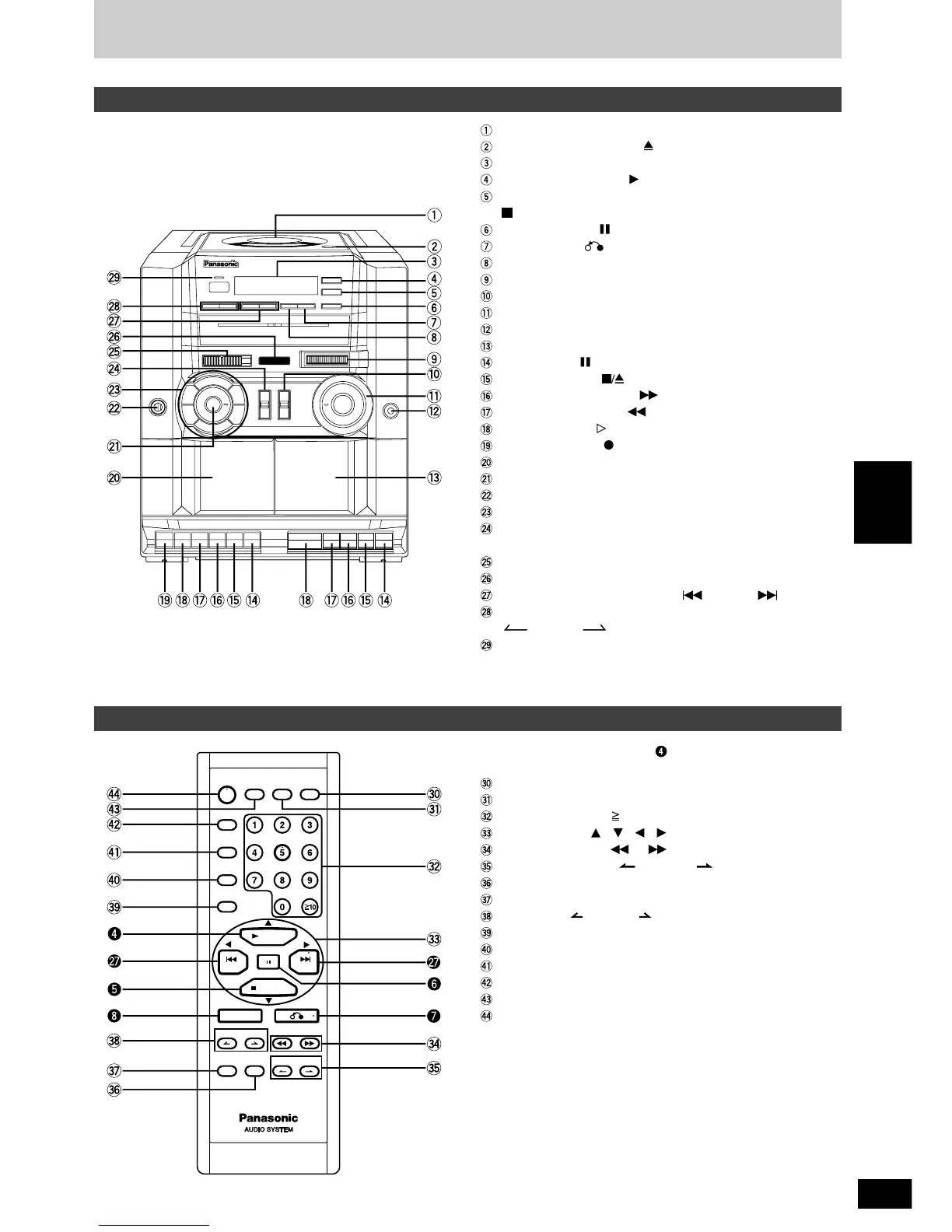
Control guide
The shaded buttons, such as
,
function in exactly the same
way as the buttons on the main unit.
Time access button (TIME ACCESS)
CD display button (DISPLAY)
Numbered buttons ( 10, 1–9, 0)
Cursor buttons (
, , ,
)
CD search buttons ( ), ( )
Video index buttons ( V-INDEX )
Resume play button (RESUME)
Shift button (SHIFT)
Album skip ( ALBUM )
Program button (PROGRAM)
A-B repeat button (A-B REP)
Play mode select button (PLAY MODE)
Zoom button (ZOOM)
Multi screen button (MULTI SCREEN)
On-screen display button (OSD)
Main unit
Remote control
CD lid
CD lid open/close button ( CD OPEN/CLOSE)
Display
CD play, select button ( SELECT, PLAY)
Stop/program clear, PBC on/off button
( PBC/CLEAR, STOP)
CD pause button ( PAUSE)
Return button ( )
Enter button (ENTER)
Tuning control (TUNING)
Function selector (SELECTOR)
Volume control (VOLUME)
Headphones jack (PHONES)
DECK 2 cassette holder (DECK 2)
Pause button ( PAUSE)
Stop/eject button ( STOP/EJECT)
Fast forward/cue button ( FF/CUE)
Rewind/review button ( REW/REV)
Playback button ( PLAY)
Recording button ( REC)
DECK 1 cassette holder (DECK 1)
XBS adjustor (XBS)
Built-in microphone (MIC)
Preset equalizer buttons
Editing speed/FM mode/beat proof selector
(EDIT/FM MODE/BP)
Band selector (BAND)
Fine tuning control (FINE TUNING)
CD skip, previous, next buttons ( PREV), ( NEXT)
Album skip, menu selection buttons
( ALBUM , – MENU + )
Operation /battery indicator (OPERATION/BATT)



 To Next Page