11
RQT7801
ENGLISH
The radio Tapes
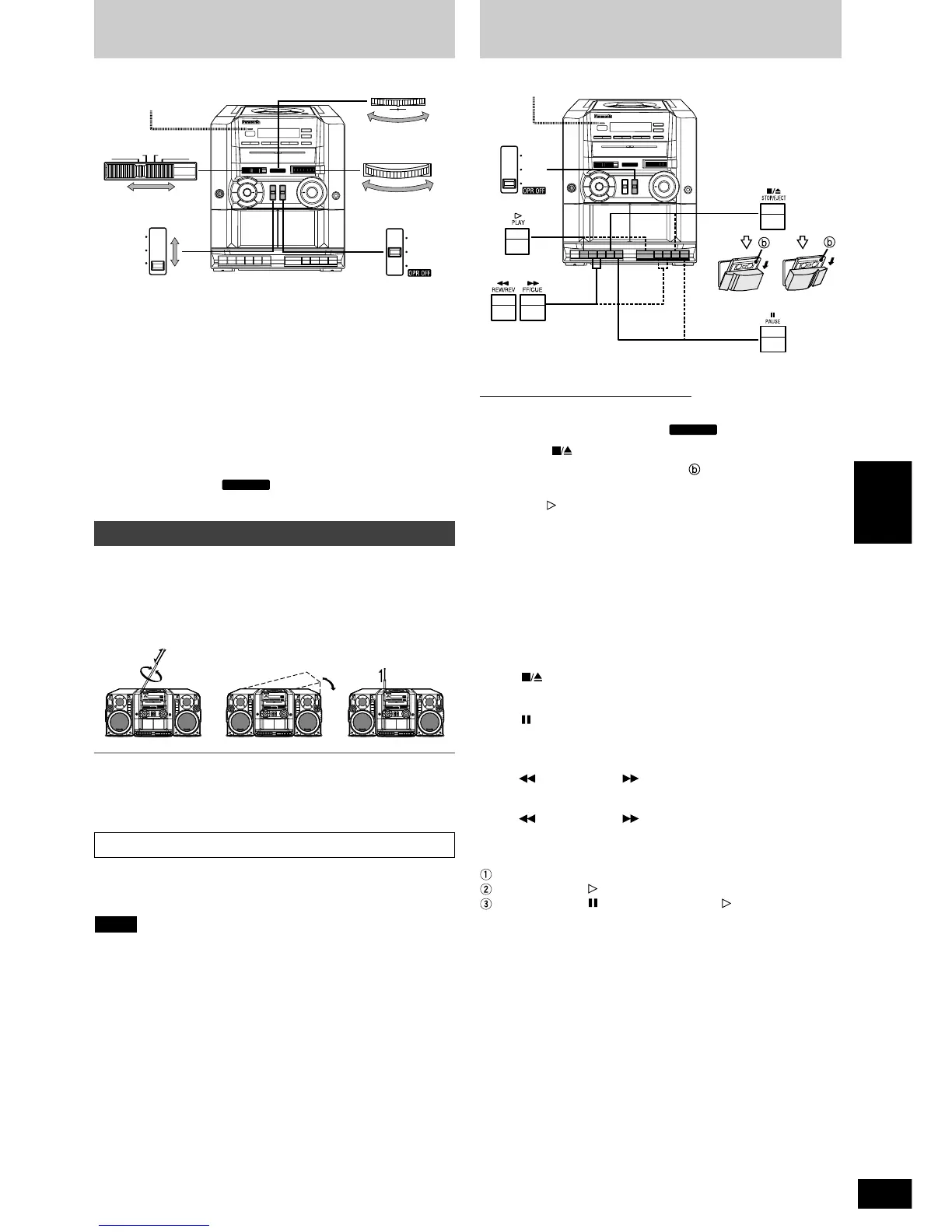
To improve reception
FM: Raise and extend the whip antenna.
If stereo reception is poor, set [EDIT/FM MODE/BP] to MONO.
MW:Turn the unit to face the direction with the best reception.
SW:Raise and extend the whip antenna and keep it vertical
(SW1: also turn the unit to face the direction with the best
reception).
Reference:
Radio broadcasts may be hard to receive in a moving vehicle or
building because their signals are weak. Whenever possible, use the
unit by a window.
For short-wave broadcasts (SW1, SW2), tune to the approximate
frequency with [TUNING], and then use [FINE TUNING] control for
more precise tuning.
When using [TUNING], be sure to set [FINE TUNING] control pointer
to the center position.
Note
Fine tuning control
1
Set [SELECTOR] to RADIO.
OPERATION/BATT lights while the radio is on.
2
Switch [BAND] to select FM, MW, SW1 or SW2.
3
Tune in the station by using [TUNING].
4
If FM has been selected in step 2,
Select between STEREO and MONO using the
[EDIT/FM MODE/BP] switch.
To turn off the radio
Set [SELECTOR] to TAPE/ .
Use normal position/TYPE
I
tape only.
Tape can be played on either DECK 1 or DECK 2.
1
Set [SELECTOR] to TAPE/
2
Press [ STOP/EJECT] and insert the tape with the
side to be played facing out ( ). Close the tape deck
by hand.
3
Press [ PLAY]
• Tapes exceeding 100 minutes are thin and can break or get caught
in the mechanism.
• Tape slack can get caught up in the mechanism and should be
tightened before playing the tape.
• Endless tapes can get caught up in the mechanism if used
incorrectly.
“OPERATION/BATT” indicator(s)
Lights while the tape is being played.
To stop play
Press [ STOP/EJECT].
To pause play
Press [ PAUSE].
Press again to resume play.
To fast-forward or rewind (while stopped)
Press [ REW/REV] or [ FF/CUE].
To cue or review (during play)
Press [ REW/REV] or [ FF/CUE].
To play relay (DECK 2 to DECK 1)
When DECK 2 play has finished, DECK 1 play starts automatically.
Insert the tapes into DECK 1 and DECK 2.
Press DECK 2 [ PLAY].
Press DECK 1 [ PAUSE], then press [ PLAY].
Caution
Sound quality may be effected and the cassette tape may become
stuck if you do not adhere to the following.
• Do not use stickers not included with the cassette tape.
• Place stickers on the cassette tape only as indicated.



 To Next Page