CDs
Remote control only
1
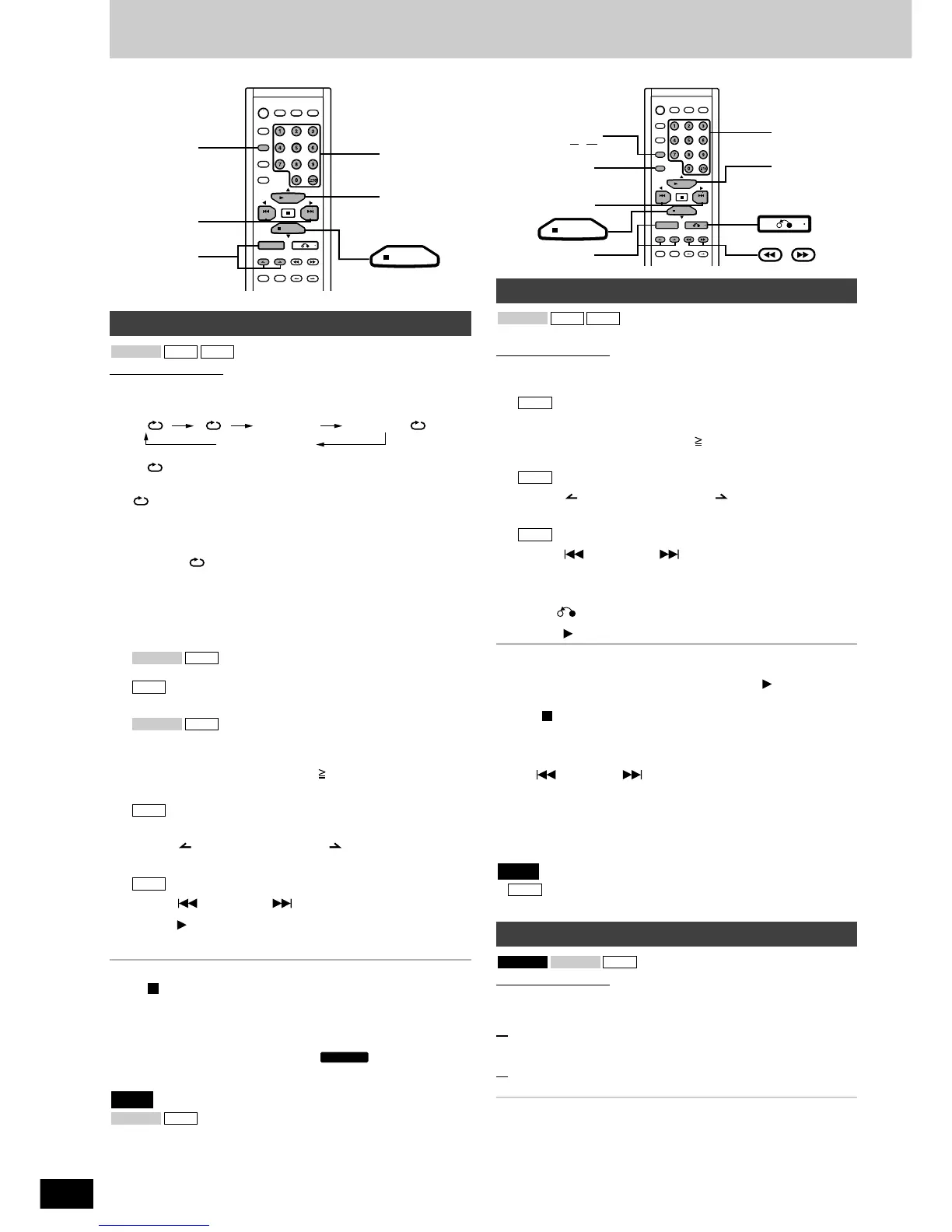
Press [PLAY MODE] to select the desired mode.
Every time you press the button:
: Plays and repeats one song only.
(1-REPEAT)
: Repeatedly plays all tracks on the disc.
(ALL-REPEAT)
RANDOM : Plays all the tracks on the disc in random
order.
RANDOM : Repeatedly plays all the tracks on the disc in
random order. (RANDOM REPEAT)
off (no indication) : Plays all tracks on the disc.
For MP3: RANDOM and RANDOM REPEAT modes are not
possible.
(The original display or screen returns after about 2 seconds.)
Proceed to step 2 if you selected 1-REPEAT in step 1.
Proceed to steps 3 and 4 if you selected 1-REPEAT in step1.
2
When you selected 1-REPEAT in step 1
Select the track with the numbered buttons.
To select a track 10 or over, press [ 10] then the two numbers.
Play starts from the selected track.
3
When you selected 1-REPEAT in step 1
Press [ ALBUM] or [ALBUM ] to select an album
and press [ENTER].
4
Press [ PREV] or [ NEXT] to select a track.
5
Press [ SELECT].
The CD starts.
To stop play
Press [ PBC/CLEAR].
To cancel
• Press [PLAY MODE] to clear the PLAY MODE indicator on the
display.
• Set [SELECTOR] to RADIO or TAPE/ .
• Open the CD lid.
You cannot select RANDOM or RANDOM REPEAT
play during PROGRAM mode.
CDVCD 1.1
Note
MP3CDVCD 1.1
CD Play Modes
You can program up to 24 tracks.
Remote control only
1
Press [PROGRAM].
“PGM” appears.
Proceed to steps 3, 4 and 5.
2
Select the tracks with the numbered buttons.
To select track 10 or over, press [ 10] then the two numbers.
Repeat step 2 to program other tracks.
3
An album list appears.
Press [ ALBUM] or [ALBUM ] to select an album
and press [ENTER].
4
A track list appears.
Press [ PREV] or [ NEXT] to select a track and
press [ENTER].
Repeat this step to program other tracks.
To program from another album
Press [ ], and then repeat the steps 3 and 4.
5
Press [ SELECT] to start play.
To exit program mode
Press [PROGRAM] in the stop mode. (You can replay your
programmed tracks by pressing [PROGRAM] and [ SELECT].)
To cancel
• Press [ PBC/CLEAR] in the stop mode while “PGM” is displayed.
“CLEAR” will now be displayed.
• Open the CD lid to cancel this mode.
To check program contents
Press [ PREV] or [ NEXT] in the stop mode while “PGM” is
displayed.
Every time you press the button, the track number and program order
are displayed.
To add to the program
Repeat steps 2 - 4 while checking program contents.
•
You cannot program CD-DA tracks together with MP3 tracks.
• “Cd FULL” appears when over 24 tracks are programmed.
MP3
Note
MP3
MP3
MP3
MP3CDVCD 1.1
Program play
Remote control only
While a disc is playing, if you specify a start point (point A) and an
end point (point B), that segment will be repeated.
1
(During playback)
Press [A-B REP] at the start point (point A).
2
Press [A-B REP] at the end point (point B).
The segment between A and B is played repeatedly.
To cancel A-B repeat
Press [A-B REP] during the A-B repeat playback.
For your reference
• A-B repeat can only be done with the same track.
• A-B repeat is not possible with video CD when the time difference
between A and B is less than 2 seconds.
• A-B repeat is not possible during PROGRAM mode.
• During A-B repeat, TIME ACCESS cannot be used.
CDVCD 1.1VCD 2.0
A-B repeat



 To Next Page