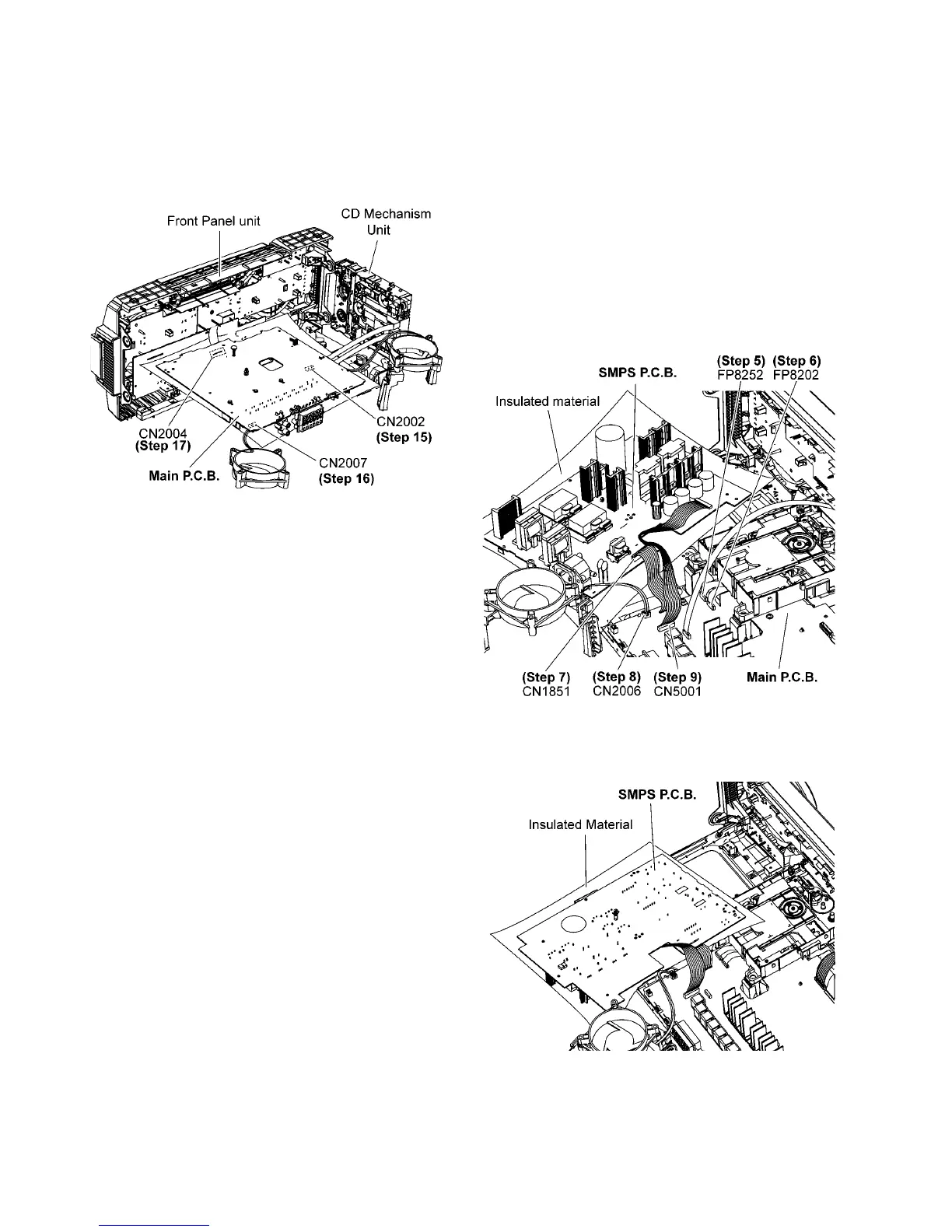
Step 14 Attach 30P FFC at the connector (CN2004) on Main
P.C.B..
Step 15 Attach 10P FFC at the connector (CN2002) on Main
P.C.B..
Step 16 Attach 2P Wire at the connector (CN2007) on Main
P.C.B..
Step 17 Side A Main P.C.B. can be checked as diagram shown.
10.4. Checking of SMPS P.C.B.
Step 1 Remove Top Cabinet.
Step 2 Remove Rear Panel.
Step 3 Remove CD Mechanism.
Step 4 Remove SMPS P.C.B..
Step 5 Attach 10P FFC at the connector (FP8252) on Main
P.C.B..
Step 6 Attach 24P FFC at the connector (FP8202) on Main
P.C.B..
Step 7 Attach 11P Cable at the connector (CN1851) on SMPS
P.C.B..
Step 8 Attach 2P Wire at the connector (CN2006) on Main
P.C.B..
Step 9 Attach 12P Wire at the connector (CN5001) on Main
P.C.B..
Step 10 Upset the SMPS P.C.B..
Step 11 The SMPS P.C.B. can be checked as diagram shown.













 To Next Page