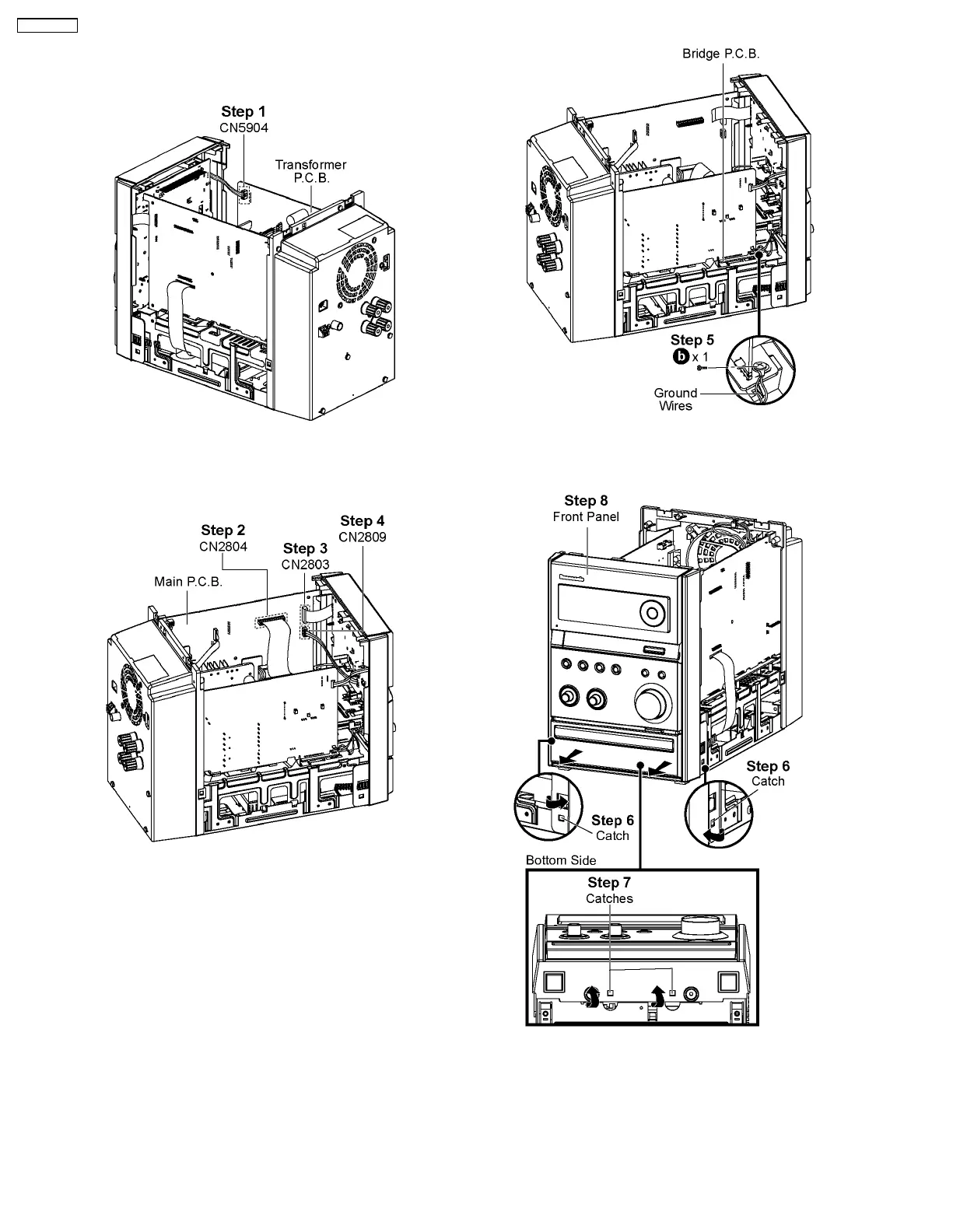
8.4. Disassembly of Front Panel
• Follow the (Step 1) - (Step 5) of Item 8.3
Step 1 : Detach 4P cable at the connector (CN5904) on
Transformer P.C.B..
Step 2 : Detach 20P FFC cable at the connector (CN2804) on
Main P.C.B..
Step 3 : Detach 17P FFC cable at the connector (CN2803) on
Main P.C.B..
Step 4 : Detach 4P cable at the connector (CN2809) on Main
P.C.B..
Step 5 : Remove 1 screw on Bridge P.C.B..
Caution : Do not exert strong force when releasing the
catches.
Step 6 : Release the catch at each side of the Front Panel in
the direction of arrow.
Step 7 : Release the catches at the bottom of the Front Panel.
Step 8 : Remove Front Panel.
22
SA-PMX3GN





 To Next Page