Item
FL Display
Key Operation
Mode Name Description
Front Key
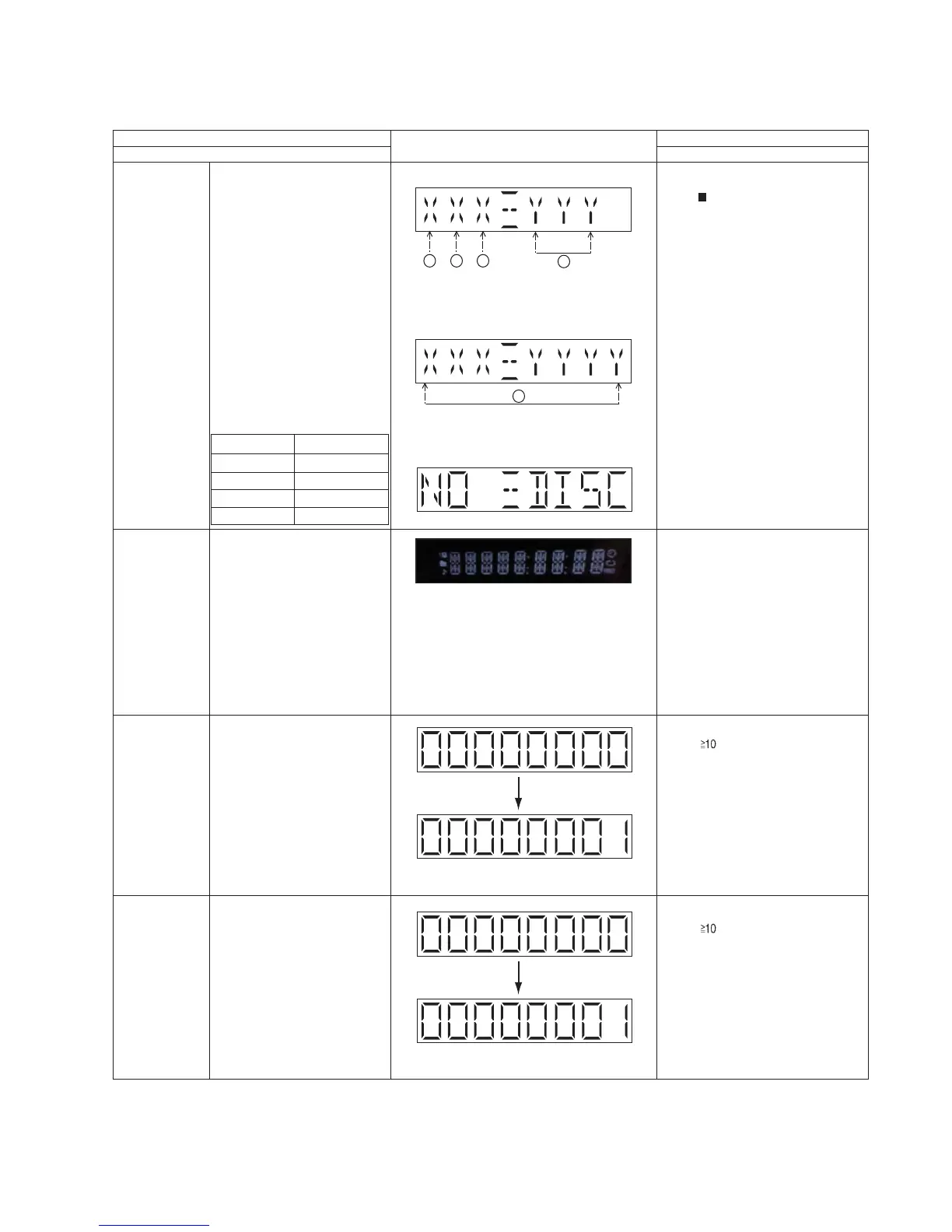
Doctor Mode
(Display 1)
(Display 2)
The SDK version will be display for 2 sec.
In any mode:
Press
[ ]
button on main unit follow by
[4] & then [7] on the remote control.
•
To exit Doctor Mode, press
[DEL]
button on the remote control without
power off.
• Unplug the AC cord.
In Doctor mode:
Press
[1]
button on the remote control.
To cancel, press [0] button on remote
control. [CANCEL] will be display and
returns to Doctor Mode.
•
To exit Doctor Mode, press
[DEL]
button on the remote control without
power off.
• Unplug the AC cord.
(Display 3)
The Checksum of EEPROM and firmware
version will be display for 2 sec.
To enter into Doctor Mode for
checking of various items and
displaying EEPROM check sum
and Opecon firmware version
Note: The Opecon firmware
version as shown is an example.
It will be revised when there is
updates.
Displaying of
1. Year of sales.
2. Model type.
3. ROM type.
4. Opecon version number.
5. SDK version.
FL Display sequence Display
1¡2¡3
Model Name
PMX70
PMX100
PMX70B
PMX100B
Version display
_5IA
_5IB
_5IC
_5ID
FL Display Test
To check the FL segments
display (All segments will light
up)
In Doctor Mode:
Press [ ] follow by [2] & then [1]
button on the remote control.
To check the Loading Reliability
of tray.
CD Tray
Reliability
•
To exit Doctor Mode, press
[DEL]
button on the remote control without
power off.
• Unplug the AC cord.
To cancel, press [0] button on remote
control. [CANCEL] will be display and
returns to Doctor Mode.
In Doctor Mode:
Press [ ] follow by [1] & then [2]
button on the remote control.
To check for the traverse unit
operation. In this mode, the
first & last track is access &
read. (TOC). It fails when
TOC is not completed by 10s
or the traverse is out of
focus. for more than 2s
CD Traverse
Test Mode
•
To exit Doctor Mode, press
[DEL]
button on the remote control without
power off.
• Unplug the AC cord.
To cancel, press [0] button on remote
control. [CANCEL] will be display and
returns to Doctor Mode.
1 2 3
4
5




 To Next Page