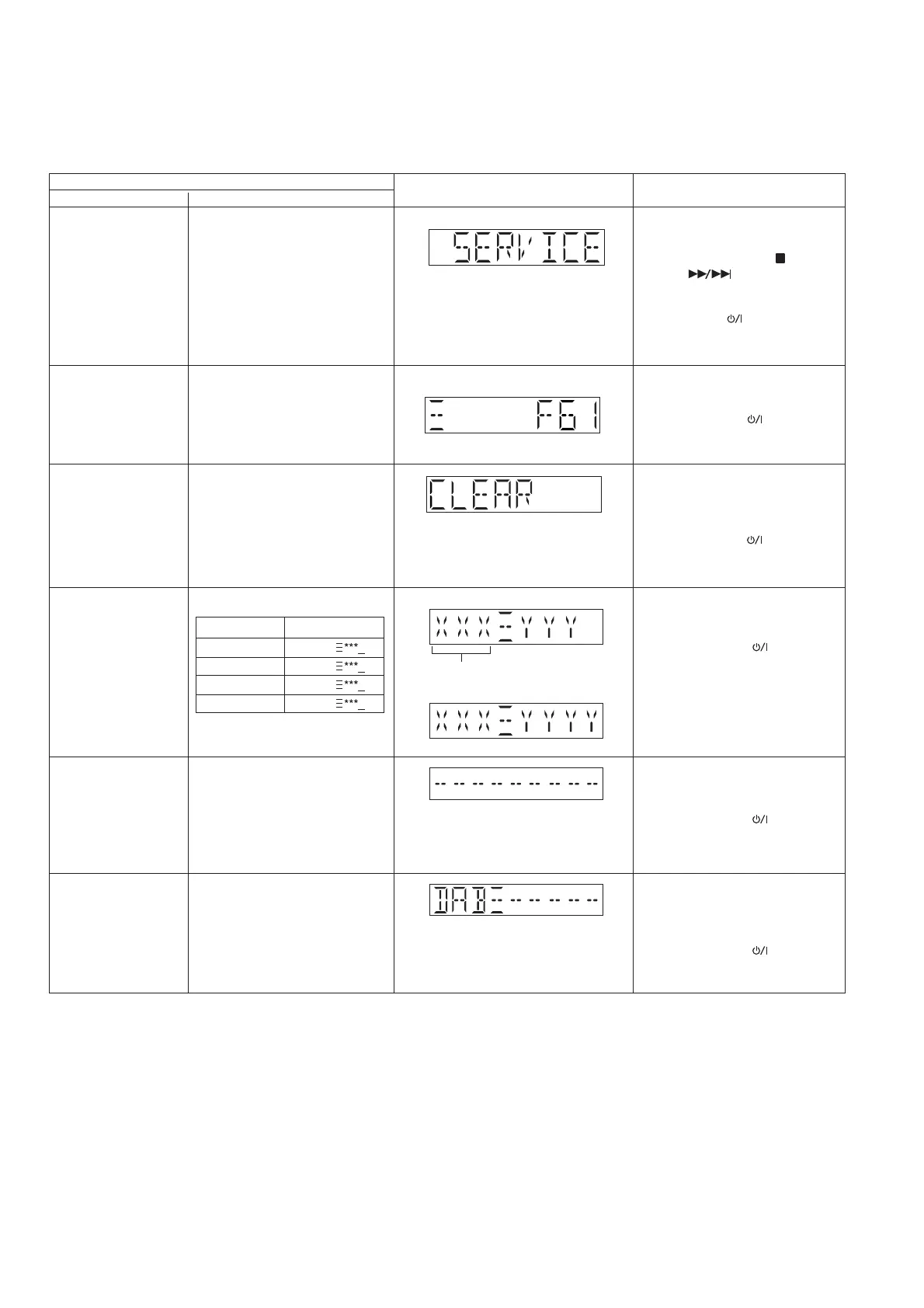
6.1. Service Mode Table
Service Mode To enter into Service Mode
checking
Item
FL display Key operation
Mode name Description
Error code information
Delete Error code
Example:
System will perform a check on
any unusual/error code from the
memory
To clear the stored in memory
(EEPROM IC)
Firmware version
Cold Start
To display model name & version
Model Name
PMX80
PMX82/84/82M
PMX150
PMX152
Version display
7IA
7IB
7IC
7ID
Step 1 : Select CD mode
(Ensure no disc is inserted).
Step 2 : Press and hold [ ] follow by
[ ] on main unit for 2
second .
• To exit, press [TA] on the main
unit or using remote control.
• Unplug AC cord.
Step 1 : Press [STOP] on main unit.
• To exit, press the [TA] on main
unit or using remote control.
• Unplug AC cord.
Step 1 : Press and hold [OK] on
remote control for more than
5 second.
• To exit, press the [TA] on main
unit or using remote control.
• Unplug AC cord.
Version display
(Display 1)
(Display 2)
Press [DISPLAY] button on remote
control.
• To exit, press the [TA] on main
unit or using remote control.
• Unplug AC cord.
Press [SETUP] button on remote
control.
• To exit, press the [TA] on main
unit or using remote control.
• Unplug AC cord.
To activate cold start upon next
power up.
(Backup data are initialized)
Tuner DAB firmware
version
Step 1 : Change to DAB selector.
Step 2 : Press [SOUND] button on
remote control.
• To exit, press the [TA] on main
unit or using remote control.
• Unplug AC cord.
To display DAB firmware version.
(For model with DAB Tuner)
(Scrolling display for version no.)






 To Next Page