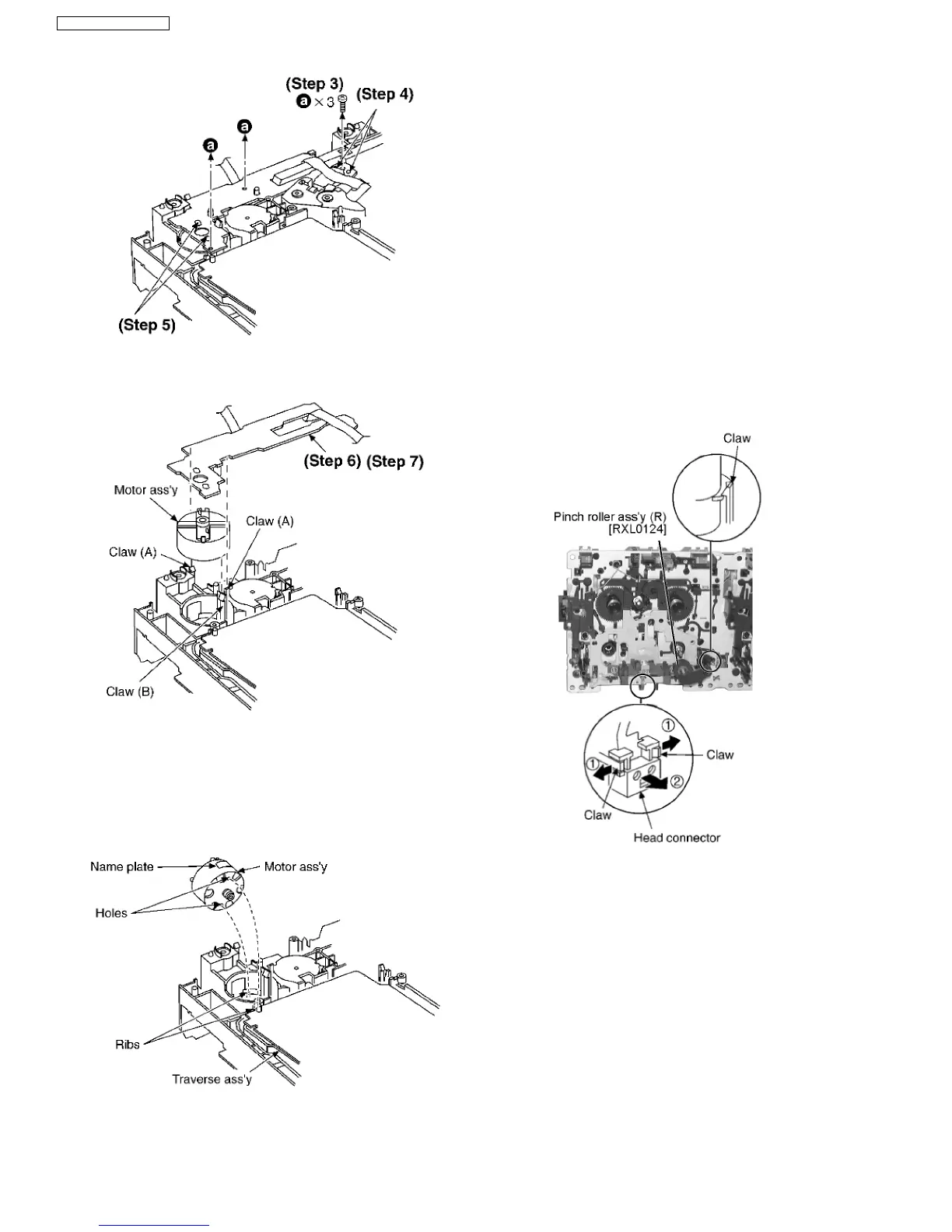
Step 4 Unsolder the plunger terminals (2 points).
Step 5 Unsolder the motor terminals (2 points).
Step 6 Release the 2 claws (A), and then remove the Motor
P.C.B.
Step 7 Release the claw (B), and then remove the motor ass’y.
[Notice for motor ass’y installation]
1. Locate the name plate of motor to the traverse ass’y.
2. Align the hole of motor with the ribs.
11.7. Disassembly Deck Mechanism
11.7.1. Replacement for the pinch roller
ass’y and head block
·
Follow the (Step 1) - (Step 2) of Item 11.1 - Disassembly of
Top Cabinet and Rear Panel
·
Follow the (Step 1) - (Step 6) of Item 11.1.1 - Disassembly
for CD Lid
·
Follow the (Step 1) - (Step 2) of Item 11.2 - Disassembly for
the CD Mechanism Unit
·
Follow the (Step 1) of Item 11.3 - Disassembly for the Main
P.C.B. & Transformer P.C.B.
·
Follow the (Step 1) - (Step 2) of Item 11.4 - Disassembly for
the Panel P.C.B. & Tact Switch P.C.B.
·
Follow the (Step 1) - (Step 5) of Item 11.5 - Disassembly for
the Deck Mechanism Unit & Deck P.C.B.
* The mechanism as shown below is for DECK1. For the
one of DECK 2, perform the same procedures.
Step 1 Release the 2 claws, and then remove the pinch roller
(R), (F).
Step 2 Release ther 2 claws, and then remove the head
connector.
30
SA-VK31GC / SA-VK31GS



 To Next Page