15
VQT2Z56
≥It is possible to playback 3D videos by connecting this unit with a 3D compatible TV.
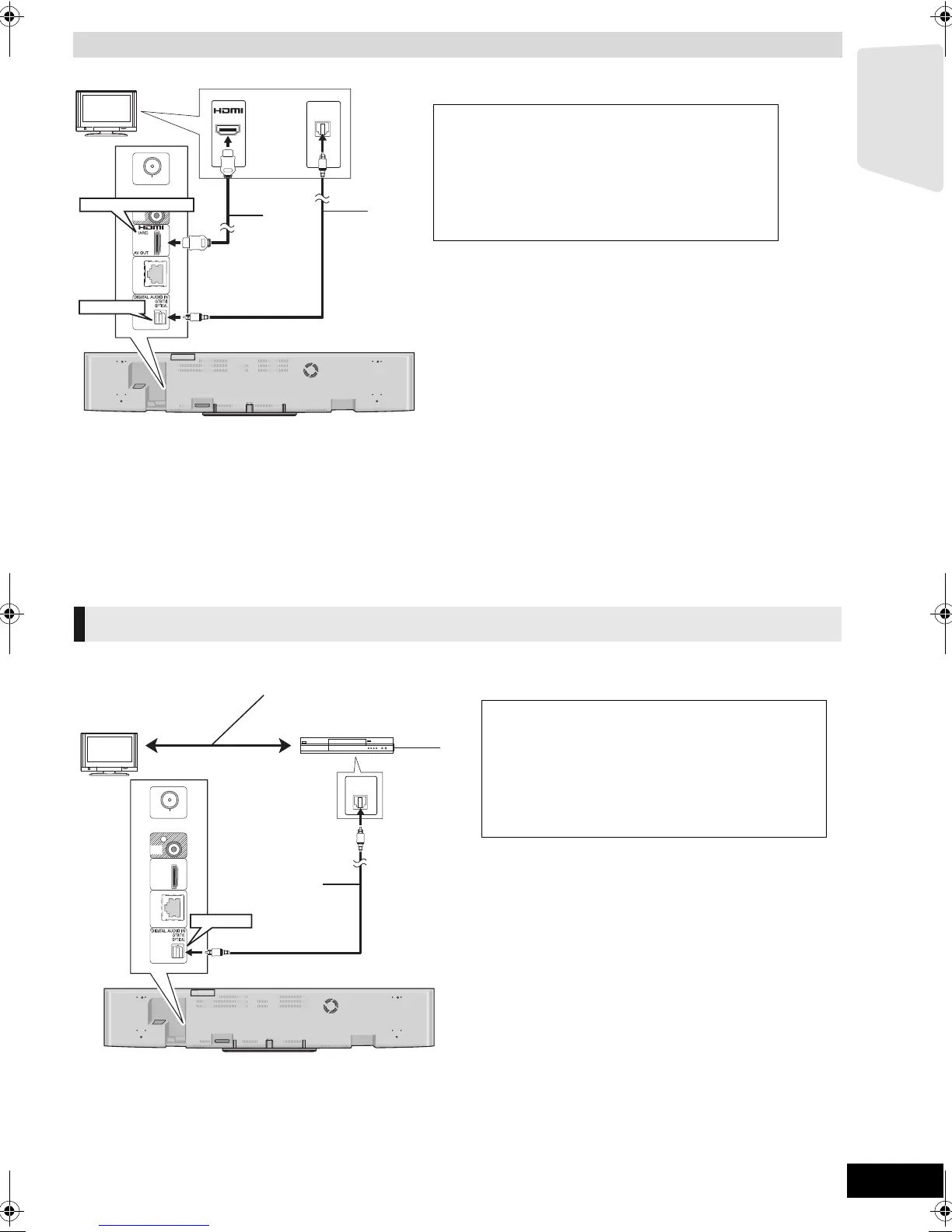
ARC (Audio Return Channel)
(Available when using an ARC compatible TV)
With this function it is possible to receive the digital audio signal from the TV without connecting the optical digital audio cable (
B
).
Be sure to connect to the TV’s ARC compatible terminal.
≥Select “ARC” as the audio input source (> 23).
≥Refer to the operating instructions of the TV for the settings to output digital audio.
Connection for the best picture and audio
OPTICAL
OUT
AV IN
HDMI AV OUT (ARC)
OPTICAL
TV
A HDMI cable (not supplied)
B Optical digital audio cable (not supplied)
To enjoy TV audio from this home theatre
system’s speakers
1 Connect the TV and the main unit with the
Optical digital audio cable (not supplied).
2 Select “DIGITAL IN” or “D-IN” as a source
(> 23).
Connection with Set Top Box, etc.
OPTICAL
OUT
OPTICAL
TV
Refer to the operating instructions of the respective
devices for the optimal connections.
A Optical digital audio cable (not supplied)
B Set Top Box (Cable/Satellite), etc.
To enjoy TV audio from this home theatre
system’s speakers
1 Connect the STB and the main unit with the
Optical digital audio cable (not supplied).
2 Select “DIGITAL IN” or “D-IN” as a source
(> 23).
e.g.,
SCBFT800_VQT2Z56_eng.book 15 ページ 2010年8月4日 水曜日 午後5時10分






 To Next Page