9
VQT2Z56
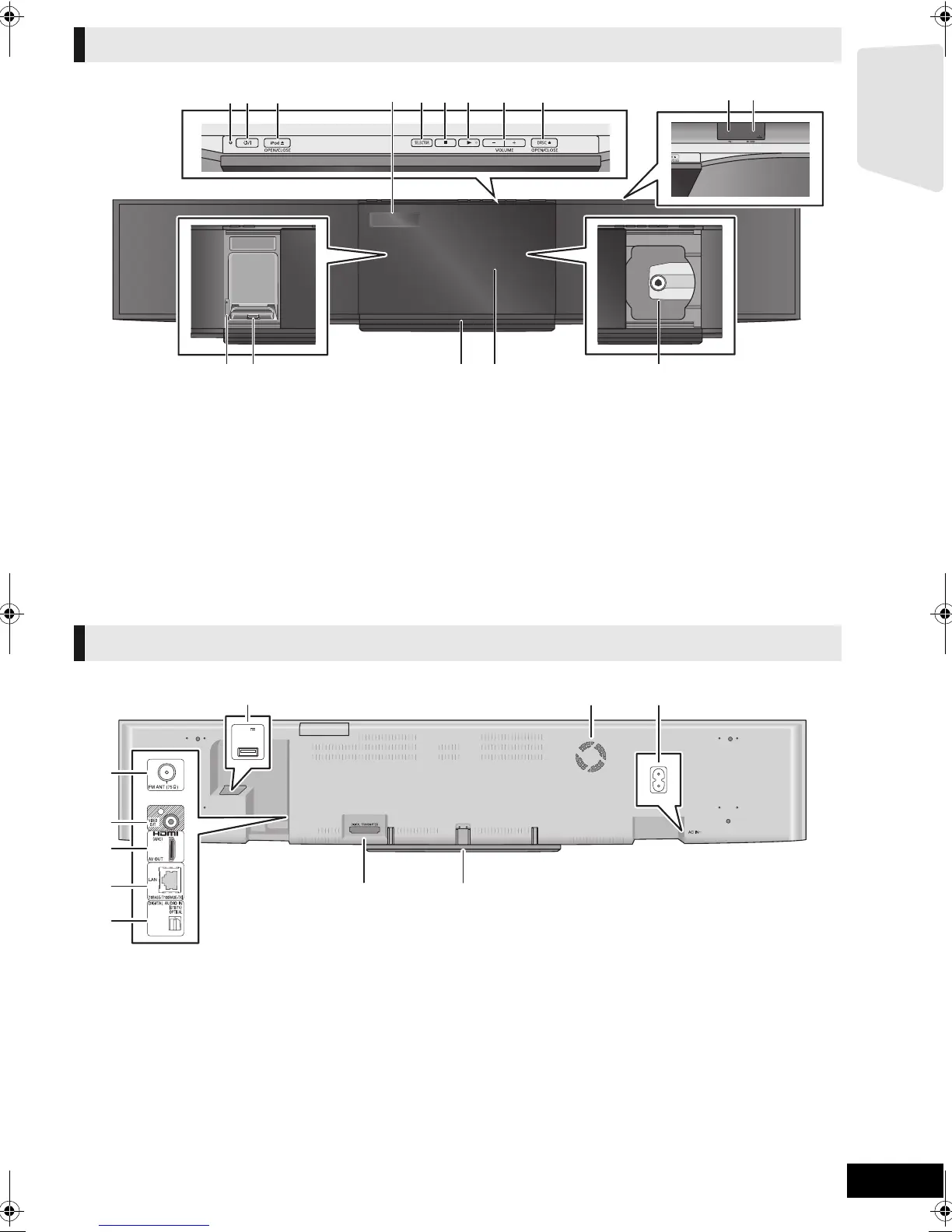
1 Power indicator
The indicator lights when this unit is turned on.
2 Standby/on switch (Í/I) (> 19)
Press to switch the unit from on to standby mode or vice
versa. In standby mode, the unit is still consuming a small
amount of power.
3 Open or close the iPod/iPhone side sliding door (> 22)
4 Display (FL display)
5 Select the source (> 23)
6Stop (> 25)
7 Start play (> 25)
8 Adjust the volume of the main unit
9 Open or close the disc side sliding door (> 22)
10 USB port (> 22)
11 SD card slot (> 22)
12 iPod/iPhone Docking switch lever (> 33)
13 Connect iPod/iPhone (> 33)
14 Remote control signal sensor
Distance: within approx. 7 m.
Angle: Approx. 20e up and down, 30e left and right
15 Sliding door
16 Disc tray
1 FM radio antenna terminal (> 16)
2 VIDEO OUT terminal (> 14)
3 HDMI AV OUT terminal (> 15)
4LAN port (> 17)
5 DIGITAL AUDIO IN terminal (> 14 , 15)
6 USB port for optional wireless LAN adaptor (> 17)
7 Cooling fan
8 AC IN terminal (> 18)
9 Digital transmitter dock (> 16)
Connect a digital transmitter when using an active
subwoofer.
10 Stand (> 13)
Main unit (Front)
2 314
5 6 7 8 9 10 11
13
12 15 1614
Main unit (Rear)
DC OUT
5V
LAN
WIRELESS
500mA MAX
1
2
4
5
6
7 8
9 10
3
SCBFT800_VQT2Z56_eng.book 9 ページ 2010年8月4日 水曜日 午後5時10分







 To Next Page