18
VQT2Z56
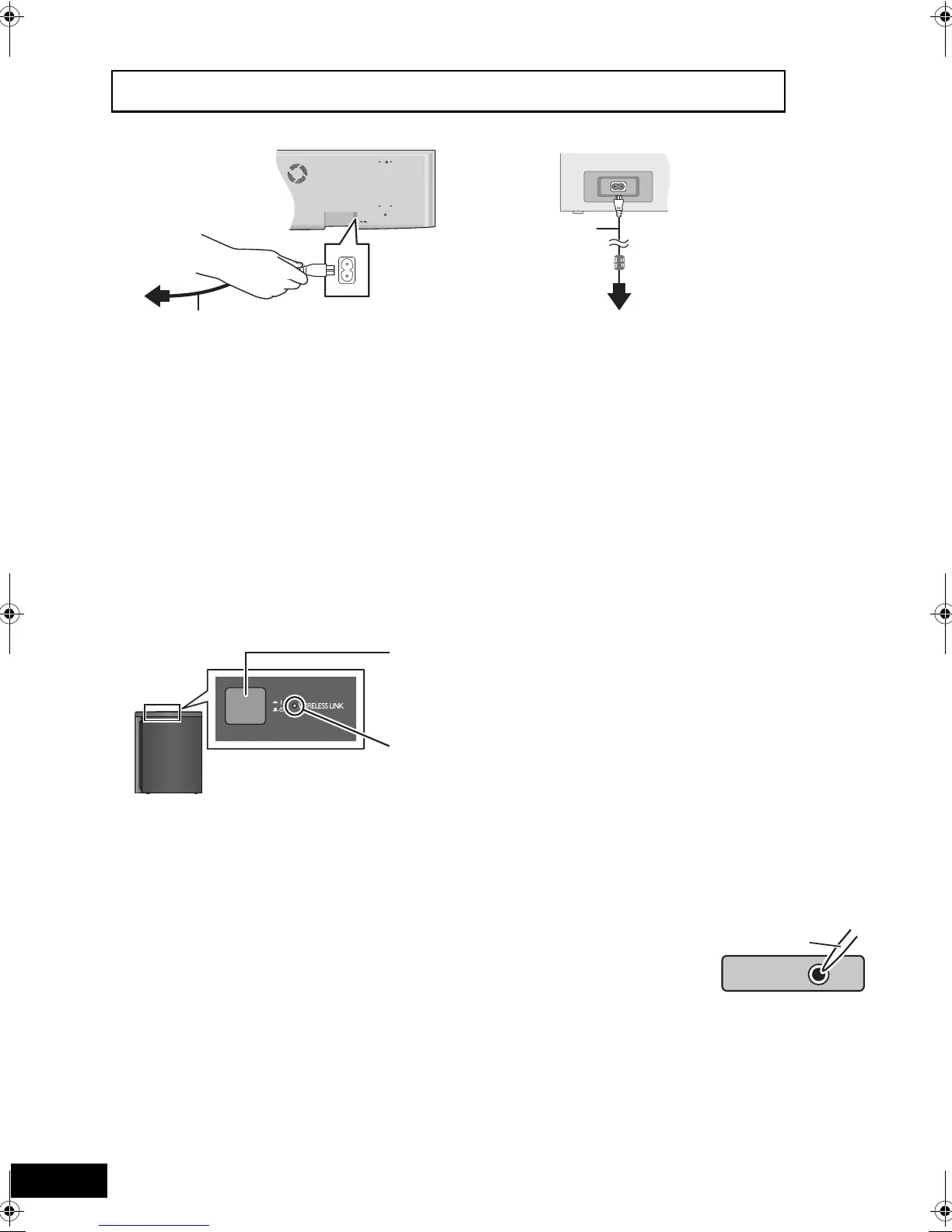
STEP 3: AC mains lead connection
A AC mains lead (supplied)
B To a household mains socket
A AC mains lead (supplied)
B To a household mains socket
≥ Connect only after all other connections are complete.
≥The main unit consumes a small amount of AC power, even when it is turned off (When the “Quick Start” setting is “Off”: approx.
0.1 W, the active subwoofer: approx. 0.4 W). In the interest of power conservation, if you will not be using this unit for a long
time, unplug it from the household mains socket.
≥Do not use any other AC mains lead except the supplied one.
STEP 4:
Active subwoofer wireless connection
Turn on the active subwoofer after all connections are complete.
∫ When “ [W] ” is not displayed on the main unit’s display (Making the active subwoofer link)
If you should change the digital transmitter, repeat the pairing
steps using the new digital transmitter.
Preparation
≥ Make sure to connect the AC mains lead of the active
subwoofer.
≥ Insert the digital transmitter into the main unit.
≥ Turn on the main unit and reduce the volume.
1 Turn on the active subwoofer.
2 While pressing [∫] on the main unit, press the number
button [2] on the remote control until “P” lights in the main
unit’s display.
3 While “P” is displayed, press [I/D SET] on the bottom of the
active subwoofer.
≥ The indicator on the active subwoofer turns green.
≥ If “P” goes off before you press [I/D SET], repeat step 2
and then continue the procedure.
4 While pressing [∫] on the main unit, press the number
button [2] on the remote control.
5 Turn off and on the active subwoofer.
≥ Make sure the indicator on the active subwoofer lights up
green. (“ [W] ” is also displayed on the main unit’s
display.)
\For\the\United\Kingdom\and\Republic\of\Ireland\only\
BE SURE TO READ THE CAUTION FOR THE AC MAINS LEAD ON PAGE 3 BEFORE CONNECTION.
Main unit
Rear of the active subwoofer
≥ AC mains lead with a ferrite
core is for the active
subwoofer. Do not use any
other AC mains lead except
the supplied one.
WIRELESS LINK indicator
Red: The active subwoofer is on and the wireless link is deactivated.
Green: The active subwoofer is on and the wireless link is activated.
(“ [W] ” is also displayed on the main unit’s display.)
Press [C I, BÍ] on the active subwoofer.
Unit on/off button [C I, BÍ]
C I: The active subwoofer is on.
BÍ: The active subwoofer is off.
Active subwoofer
A Use a pointed object.
SCBFT800_VQT2Z56_eng.book 18 ページ 2010年8月4日 水曜日 午後5時10分







 To Next Page