33
VQT2Z56
Other devices
Using the iPod/iPhone
Preparation
≥ Before connecting/disconnecting the iPod/iPhone, turn the
main unit off or reduce the volume of the main unit to its
minimum.
≥ Make sure that the video cable connection is made to view
photos/videos from the iPod/iPhone. (> 14)
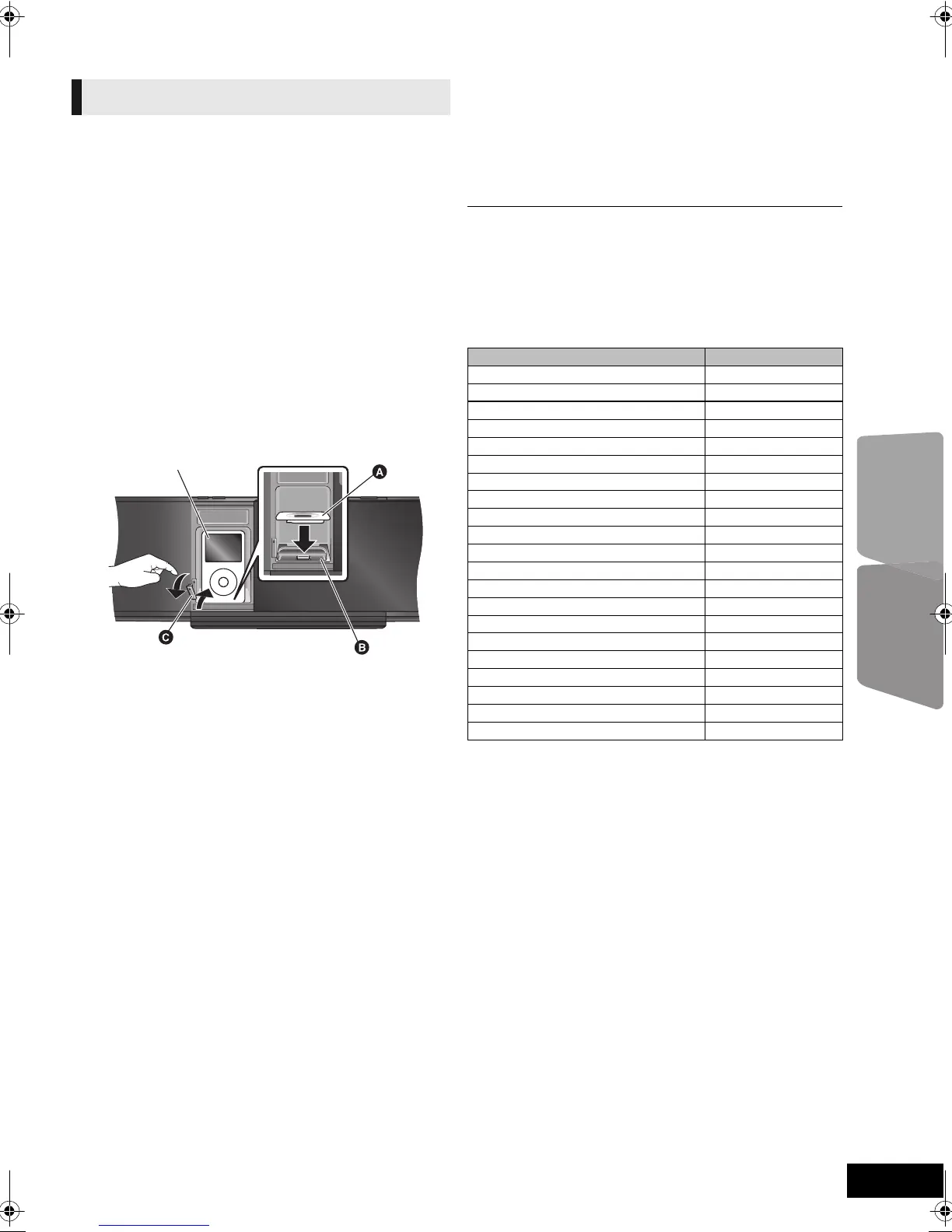
1 Press [iPod < OPEN/CLOSE] to open the
sliding door and be sure to insert the iPod/
iPhone dock adapter supplied with the
iPod/iPhone into the Dock for iPod/iPhone.
Insert the side of the iPod/iPhone dock adapter with the
clips facing towards you first and then push the opposite
side until it clicks into place.
2 Press [<] to unlock the Dock for iPod/
iPhone and pull the docking switch lever to
tilt the Dock for iPod/iPhone.
3 Connect the iPod/iPhone firmly.
4 Gently push the docking switch lever back
until it clicks into place.
5 Press [iPod < OPEN/CLOSE] to close the
sliding door.
Removing an iPod/iPhone
1 Press [iPod < OPEN/CLOSE] to open the sliding door.
2 Press [<] to unlock the Dock for iPod/iPhone and then pull
the docking switch lever to tilt the Dock for iPod/iPhone
and pull the iPod/iPhone straight out.
3 Push the docking switch lever back until it clicks into place.
If the Dock for iPod/iPhone is not tilt when connecting/
disconnecting the iPod/iPhone, it may cause damage to
the connector.
About recharging the battery
≥ iPod/iPhone will start recharging regardless of whether this unit is on or off.
≥ “IPOD ¢” will be shown on the main unit’s display during iPod/iPhone
charging in main unit standby mode.
≥ Once fully recharged, additional recharging will not occur.
Compatible iPod/iPhone (as of August 2010)
≥ Compatibility depends on the software version of your iPod/iPhone.
iPod/iPhone Connection
A Dock adapter (not supplied)
≥ Attach the dock adapter until firmly fitting into the
dock. The adapter should be supplied with your
iPod/iPhone for the stable use.
If you need an adapter, consult your iPod/iPhone
dealer.
B Dock for iPod/iPhone
C [<] Docking switch lever
Name Memory size
iPod touch 3rd generation 32 GB, 64 GB
iPod nano 5th generation (video camera) 8 GB, 16 GB
iPod touch 2nd generation 8 GB, 16 GB, 32 GB
iPod classic 120 GB, 160 GB (2009)
iPod nano 4th generation (video) 8 GB, 16 GB
iPod classic 160 GB (2007)
iPod touch 1st generation 8 GB, 16 GB, 32 GB
iPod nano 3rd generation (video) 4 GB, 8 GB
iPod classic 80 GB
iPod nano 2nd generation (aluminum) 2 GB, 4 GB, 8 GB
iPod 5th generation (video) 60 GB, 80 GB
iPod 5th generation (video) 30 GB
iPod nano 1st generation 1 GB, 2 GB, 4 GB
iPod 4th generation (colour display) 40 GB, 60 GB
iPod 4th generation (colour display) 20 GB, 30 GB
iPod 4th generation 40 GB
iPod 4th generation 20 GB
iPod mini 4 GB, 6 GB
iPhone 3GS 16 GB, 32 GB
iPhone 3G 8 GB, 16 GB
iPhone 4 GB, 8 GB, 16 GB
VQT2Z56~Body_mst.fm 33 ページ 2010年8月6日 金曜日 午前10時8分






 To Next Page