22
VQT2Z56
Inserting or removing media
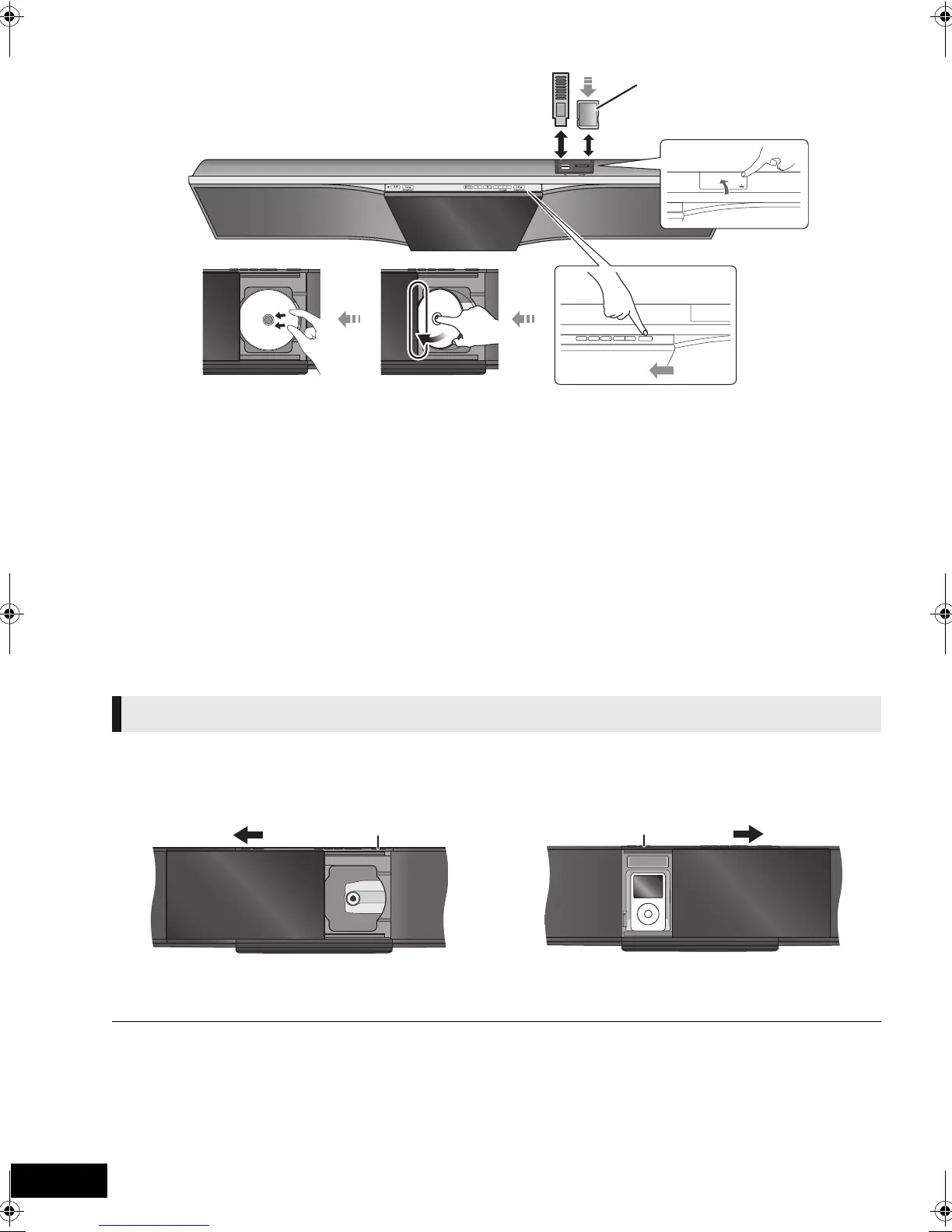
Inserting a disc
1 Press [DISC < OPEN/CLOSE] to open the sliding door.
2 With the label of the disc facing towards you, tilt the
disc into the disc tray under the sliding door.
3 Place the disc onto the spindle in the centre and then
push the disc down until it clicks into place.
Removing a disc
1 Press [DISC < OPEN/CLOSE] to open the sliding door.
2 Hold the centre and the top right of the disc and pull the top
right of the disc to unlock it from the spindle.
3 Tilt the disc so as not to touch the sliding door and remove
the disc.
≥ When inserting a disc, ensure that the label of the disc is
facing towards you.
≥ While the reading indicator is displayed, do not turn off the
unit or remove the media. Such action may result in loss of
the media’s contents.
≥ When removing the SD card, press on the centre of the card
and pull it straight out.
≥
If the USB device is not recognized by the main unit,
disconnect the USB device from the main unit and reconnect it.
≥ It may take some time to be recognized by the main unit.
∫ To switch sources
Press [BD/SD] or [EXT-IN] to select “BD/DVD”, “SD” or
“USB”.
≥ If media is inserted while the unit is stopped, the source
switches automatically depending on the inserted media.
≥ Do not open or close the sliding door by hand.
≥ Keep your hands away for the sliding door while it is opening or closing. Your hand or clothing’s, etc. might get caught inside the door.
≥ Keep your fingers away from the sliding door when it is closing to avoid possible minor injuries.
≥ Do not leave the disc side of the sliding door open. Dirt may mount on the lens.
≥ Do not touch the lens or other parts of the laser pickup.
≥ During disc playback the sliding door will not open when [iPod < OPEN/CLOSE] is pressed.
– If [iPod < OPEN/CLOSE] is pressed twice, disc playback will stop and the sliding door will open.
≥ The sliding door will not close and “DOCK UNLOCKED” is displayed if the iPod/iPhone is not correctly connected.
≥ If the sliding door is opened to the left with [DISC < OPEN/CLOSE], you cannot close the sliding door with [iPod < OPEN/CLOSE]. If the sliding door is
opened to the right with [iPod < OPEN/CLOSE], you cannot close the sliding door with [DISC < OPEN/CLOSE].
≥ The sliding door for the iPod/iPhone will not close automatically when the unit is turned off.
Insert the card with the cut-off corner
on the left.
Operating the sliding door
Press [DISC < OPEN/CLOSE] to open the
sliding door to insert a disc.
Press [iPod < OPEN/CLOSE] to open the
sliding door to connect an iPod/iPhone.
Press [DISC < OPEN/CLOSE] again to close
the sliding door.
Press [iPod < OPEN/CLOSE] again to close
the sliding door.
[DISC OPEN/CLOSE]
SCBFT800_VQT2Z56_eng.book 22 ページ 2010年8月4日 水曜日 午後5時10分






 To Next Page