8
VQT2Z56
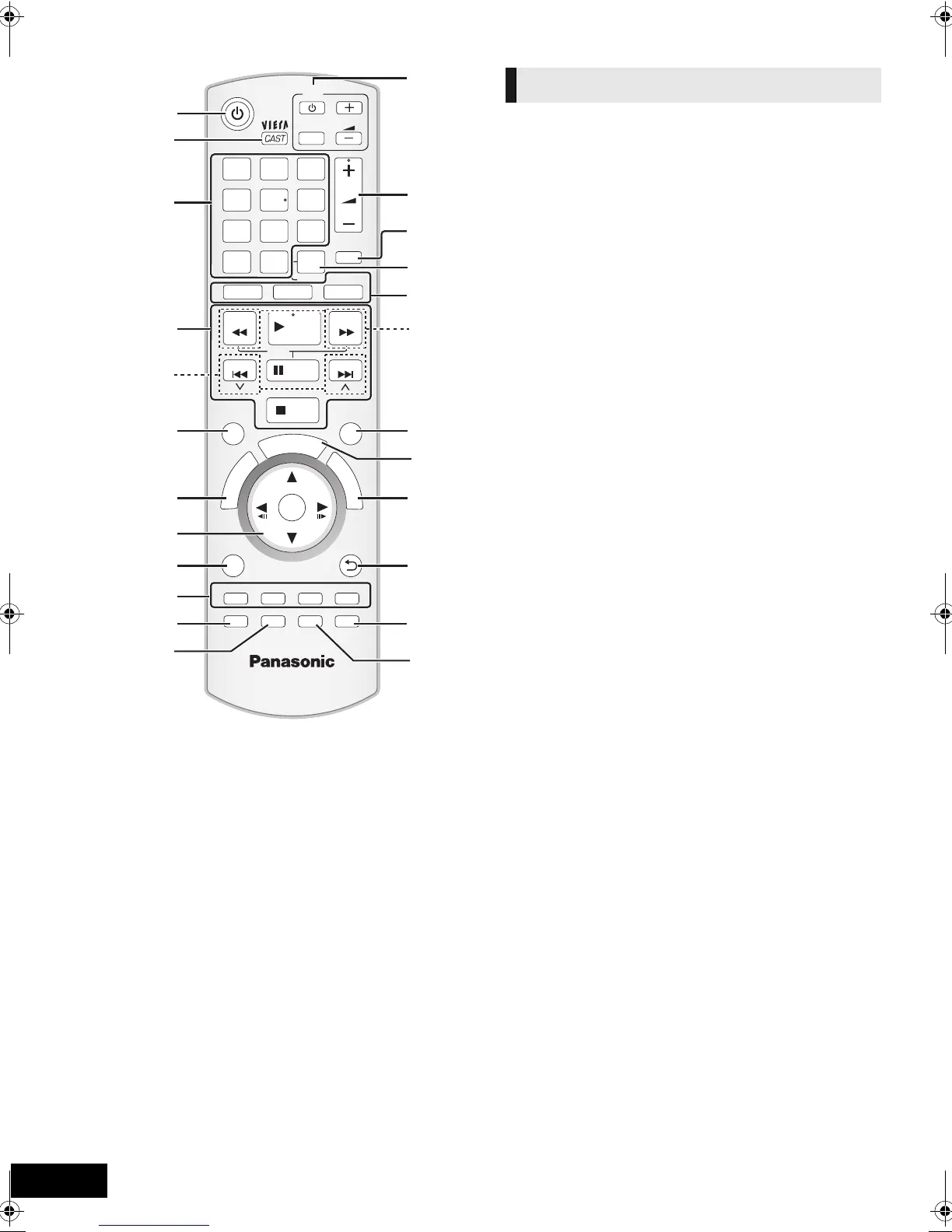
Control reference guide
1 Turn the unit on and off (> 19)
2 Display the Home screen of VIERA CAST (> 35)
3 Select title numbers, etc./Enter numbers or characters
(> 35)
[CANCEL]: Cancel
4 Basic playback control buttons (> 25)
5 Select preset radio stations (> 30)
6 Show status messages (> 25)
7 Show Top Menu/DIRECT NAVIGATOR (> 25)
8[3, 4, 2, 1]: Menu selection
[OK]: Selection
[2, 1]: Select preset radio station (> 30)
[2] (2;), [1] (;1): Frame-by-frame (> 25)
9 Show OPTION menu (> 26)
10 Coloured buttons (red, green yellow, blue)
These buttons are used when;
≥ Operating a BD-Video disc that includes Java
TM
applications (BD-J).
≥ Displaying “Title View” and “Album View” screens.
(> 28)
≥ Operating contents of VIERA CAST (> 35)
11 Set the sound mode (> 24)/Select speaker channel
(> 24)
12 Select surround sound effects (> 24)
13 TV operation buttons
You can operate the TV through the unit’s remote control.
[Í]: Turn the television on and off
[AV]: Switch the input select
[ijVOL] : Adjust the volume
14 Adjust the volume of the main unit
15 Mute the sound
≥ “MUTE” flashes on the unit’s display, while the function is
on.
≥ To cancel, press the button again or adjust the volume.
≥ Muting is cancelled if the unit is turned off.
16 Show Playback menu (> 35)/Set the sleep timer
1 Press and hold [jSLEEP].
2 While “SLEEP ££” is displayed, press [jSLEEP]
several times to select the time (in minutes).
≥ Timer selection is up to 120 minutes.
≥ Select “OFF” when cancelling the setting.
≥ To confirm the remaining time
Press and hold the button again.
17 Select the source
[BD/SD]: Select disc drive or SD card drive (> 23)
[iPod]: Select iPod/iPhone as the source (> 23, 34)
[RADIO/EXT-IN]: Select FM tuner, USB or external audio
as the source (> 23, 29, 31)
18 Select radio stations manually (> 29)
19 Exit the menu screen
20 Show START menu (> 23)
21 Show Pop-up menu (> 25)
22 Return to previous screen
23 Open or close the disc side sliding door
24 Open or close the iPod/iPhone side sliding door
CANCEL
RETURN
VOL
STOP
1 2 3
4 5 6
7 8
0
9
VOL
TV
AV
SEARCH
SKIP
SLOW
SKIP
PLAY
PAUSE
SEARCH
OK
BD/SD
iPod
EXT-IN
MUTE
RADIO
P
O
P
-
U
P
M
E
N
U
T
O
P
M
E
N
U
EXIT
STATUS
OPTION
-
CH SELECT
SOUND
SURROUND
DISC
iPod
abc
def
jkl
mno
tuv
ghi
qrs
p
xyz
w
D
I
R
E
C
T
N
A
V
I
G
A
T
O
R
-
SLEEP
DISPLAY
S
T
A
R
T
19
8
21
22
24
13
15
20
1
4
18
2
23
14
16
17
3
5
6
7
9
10
11
12
Remote control
SCBFT800_VQT2Z56_eng.book 8 ページ 2010年8月4日 水曜日 午後5時10分







 To Next Page