EasyManua.ls Logo

Panasonic SC-CH64M - Sequential CD Playback; Playback Operation and Controls

Panasonic SC-CH64M
44 pages
Print Icon
To Next Page IconTo Next Page
To Previous Page IconTo Previous Page
Loading...
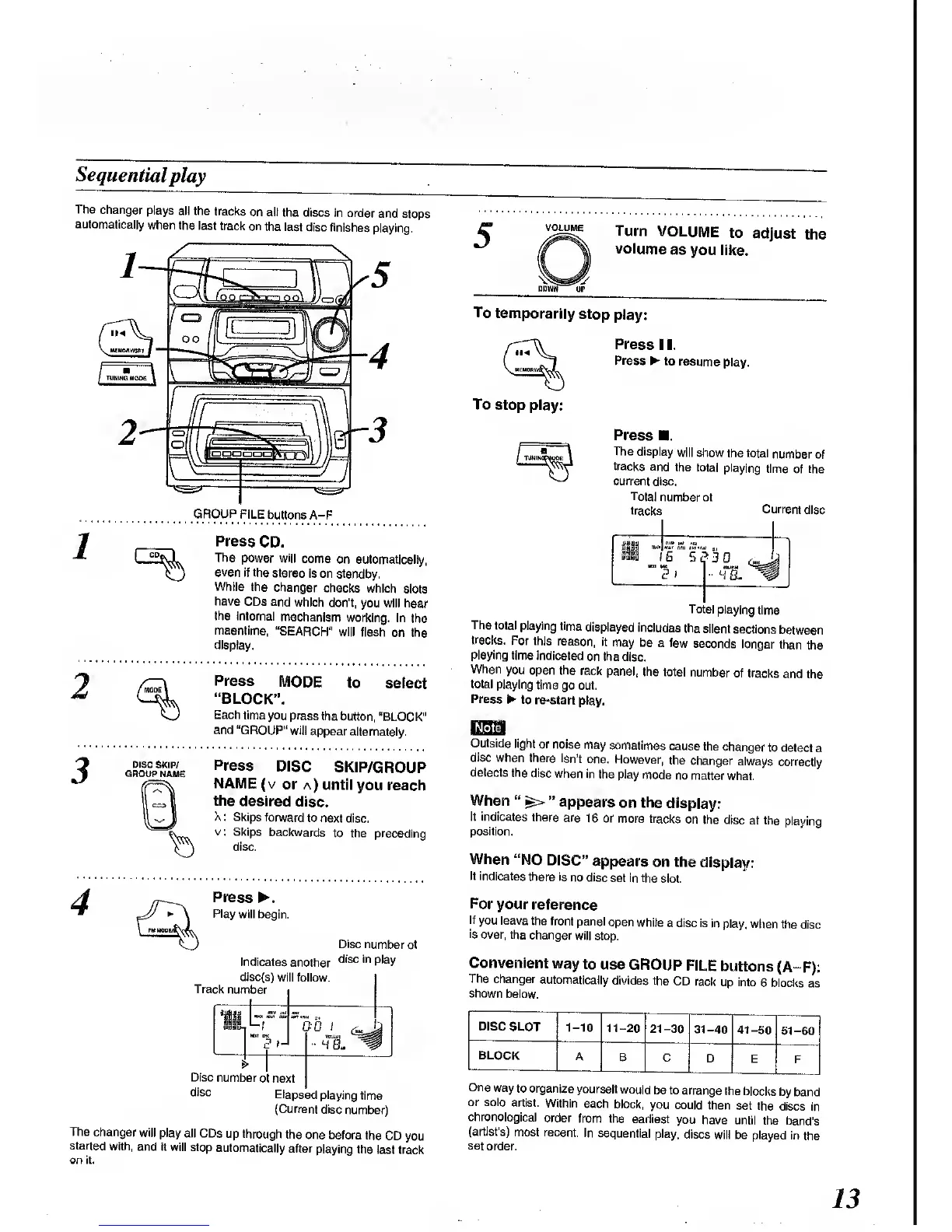
Sequential
play
The
changer
plays
all the
tracks
on all
the discs
in order
and
stops
automatically
when the
last
track on
the last
disc finishes
playing.
GROUP
FILE
buttons A-F
Press
CD.
The power
will
come
on automatically,
even if
the
stereo is on standby.
While the
changer
checks
which
slots
have
CDs and
which
don't,
you will hear
the internal
mechanism
working.
In
the
meantime,
"SEARCH"
will
flash
on the
display.
2
Press
MODE
to
select
"BLOCK".
Each
time you press
the
button,
"BLOCK"
and "GROUP"
will
appear
alternately.
Press
DISC
SKIP/GROUP
NAME
(v
or
a) until
you reach
the
desired
disc.
X
:
Skips
forward
to
next disc,
v:
Skips
backwards
to the preceding
disc.
Press
.
Play
will begin.
Disc number
of
Indicates
another
disc in
P
|a
y
disc(s)
will
follow.
Track
number
Disc
number
of next
disc
Elapsed
playing
time
(Current
disc
number)
The
changer
will play
all CDs
up through
the
one before
the
CD
you
started
with,
and it will
stop
automatically
after
playing the
last track
on it.
VOLUME
Turn
VOLUME
to
adjust
the
volume
as
you like.
To
temporarily
stop
play:
To
stop play:
Press
1 1.
Press
to resume
play.
Press
The
display
will show
the
total
number
of
tracks
and
the total
playing
time
of the
current
disc.
Total
number
of
tracks
Current
disc
11
"7s
-3i
Total
playing
time
The
total
playing
time
displayed
includes
Ihe
silent
sections
between
tracks.
For this
reason,
it
may be
a few
seconds
longer than
the
playing time
indicated
on the disc.
When
you
open the
rack
panel,
the
total
number
of
tracks
and the
total
playing
time
go out.
Press
to
re-start
play.
Outside
light
or noise
may
sometimes
cause
the
changer
to detect
a
disc when
there isn't
one. However,
the
changer
always
correctly
detects
the disc
when
in
the play
mode
no matter
what.
When
"
^>
"
appears
on the
display:
It indicates
there
are
16 or
more tracks
on
the disc
at the
playing
position.
When
"NO
DISC"
appears
on the
display:
It
indicates
there is
no disc
set in the
slot.
For
your
reference
If
you leave
the front
panel
open
while
a disc is
in play, when
the
disc
is
over, the
changer
will stop.
Convenient
way
to
use
GROUP
FILE
buttons
(A-F):
The
changer
automatically
divides the
CD
rack
up
into
6 blocks
as
shown
below.
DISC SLOT
1-10
11-20
21-30
31-40
41-50
51-60
BLOCK
A
B
C D
E
F
One
way
to organize
yourself
would
be to
arrange
the blocks
by
band
or solo
artist.
Within
each
block,
you could
then
set the
discs
in
chronological
order
from the
earliest
you
have until
the band's
(artist's)
most recent.
In
sequential
play,
discs
will be played
in
the
set
order.
13

Related product manuals