EasyManua.ls Logo

Panasonic SC-CH64M - Listening to Compact Discs; Disc Handling and Loading Procedures; CDs Playback Modes Overview

Panasonic SC-CH64M
44 pages
Print Icon
To Next Page IconTo Next Page
To Previous Page IconTo Previous Page
Loading...
to
c
omp
act
discs
Setting/Removing
discs
Special
notes
You
can set
discs
in the
rack
and
remove
them
too, while
playinq
discs.
•Never
set a
disc in the
slot
of the
disc
being
played.
•Sometimes
the rack
panel
cannot
be
opened
while
a disc
is
playing.
It is
a question
of time.
In
such case,
wait
until
you
can
open it.
•Do not
open
the
rack
panel
while the
changer
is changing
discs.
How
to
set
discs
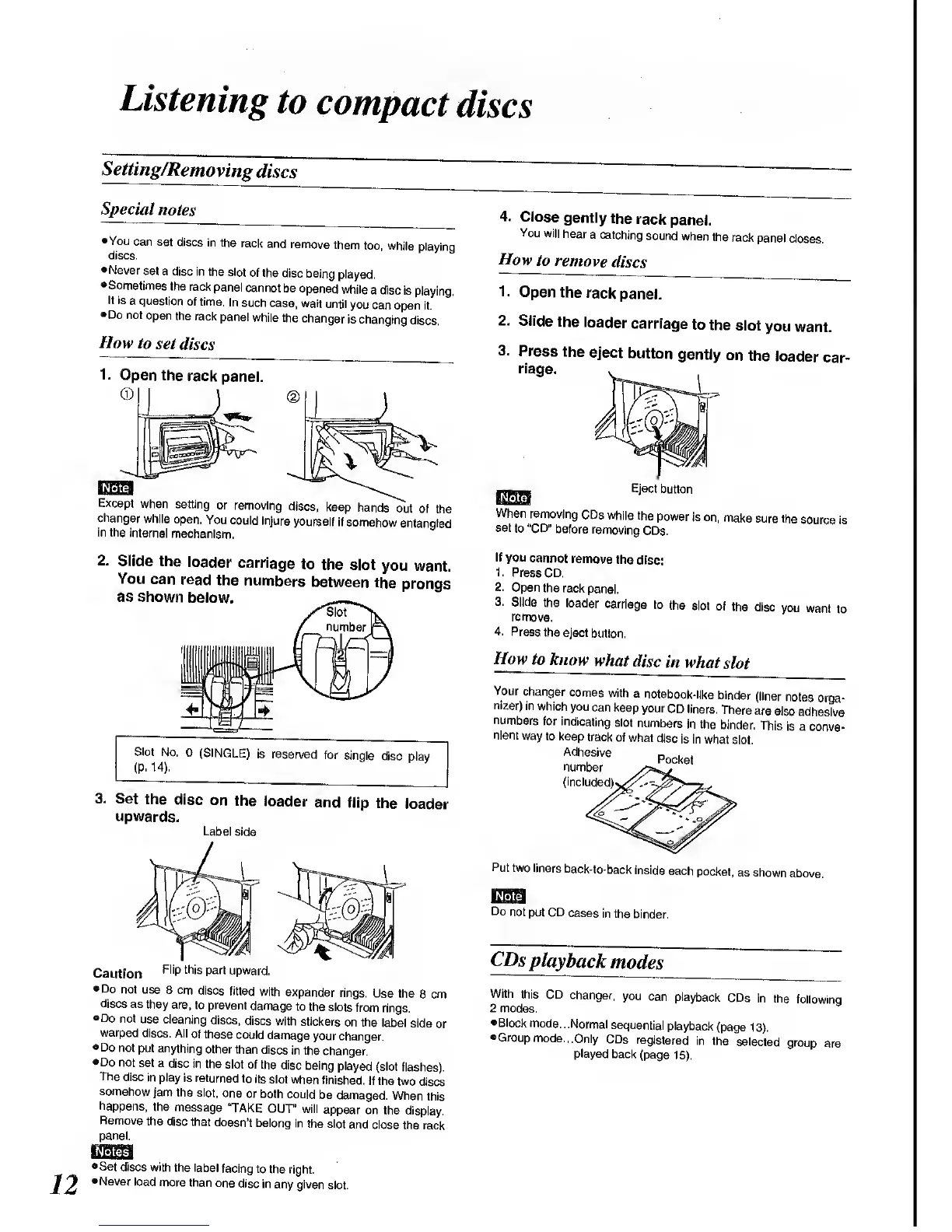
1. Open
the
rack
panel.
J.
Except
when
setting
or
removing
discs,
keep
hands
out
of
the
changer
while
open.
You
could
injure
yourself
if
somehow
entangled
in the
internal
mechanism.
2.
Slide
the
loader
carriage
to
the slot
you
want.
You
can
read
the
numbers
between
the
prongs
as shown
below.
'Slot
number
Slot
No.
0
(SINGLE)
is reserved
for
single
disc
play
(P-
14).
3.
Set
the
disc
on
the
loader
and
flip
the
loader
upwards.
Label
side
Caution
Fli
P
this
P
art
upward.
•Do
not use
8
cm
discs
fitted
with
expander
rings.
Use
the
8 cm
discs
as
they are,
to
prevent
damage
to
the slots
from
rings,
Do
not
use cleaning
discs,
discs
with
stickers
on the
label
side
or
warped
discs.
All
of these
could
damage
your
changer.
Do
not
put anything
other
than
discs
in the
changer.
•Do
not
set a
disc
in the
slot of the
disc
being
played
(slot
flashes).
The
disc
in play
is returned
to
its
slot when
finished.
If the two
discs
somehow
jam
the slot,
one
or both
could
be
damaged.
When
this
happens,
the
message
"TAKE
OUT'
will
appear
on
the display.
Remove
the disc
that
doesn't
belong
in
the slot
and
close
the rack
panel.
4. Close
gently
the
rack
panel.
You
will
hear
a catching
sound
when
the
rack
panel
closes.
How
to
remove
discs
1.
Open
the
rack
panel.
2.
Slide
the
loader
carriage
to
the
slot
you
want.
3.
Press
the
eject
button
gently
on
the
loader
car-
riage.
Eject
button
When
removing
CDs while
the
power
is on,
make
sure
the
source
is
set
to "CD"
before
removing
CDs.
If
you
cannot
remove
the
disc:
1.
Press CD.
2. Open
the
rack
panel.
3.
Slide
the
loader
carriage
to
the
slot
of
the disc
you
want
to
remove,
4. Press
the
eject
button.
How
to
know
what
disc
in
what
slot
Your
changer
comes
with
a
notebook-like
binder
(liner
notes
orga-
nizer)
in
which
you
can keep
your
CD liners.
There
are
also
adhesive
numbers
for
indicating
slot
numbers
in the
binder.
This
is a
conve-
nient
way
to keep
track
of
what
disc
is in
what
slot
Adhe
K
sive
Pocket
number
(included).
Put
two
liners
back-to-back
inside
each
pocket,
as shown
above.
ran
Do
not
put CD
cases
in the
binder.
CDs
playback
modes
With
this CD
changer,
you
can
playback
CDs
in the
followinq
2 modes.
Block
mode...
Normal
sequential
playback
(page
13).
•Group
mode..,
Only
CDs
registered
in
the
selected
group
are
played
back
(page
15).
Set
discs with
the label
facing to
the
right.
•Never
load
more than
one
disc
in
any given
slot.

Related product manuals