EasyManua.ls Logo

Panasonic SC-CH64M - Listening to Radio Broadcasts; Preset and Manual Tuning Methods

Panasonic SC-CH64M
44 pages
Print Icon
To Next Page IconTo Next Page
To Previous Page IconTo Previous Page
Loading...
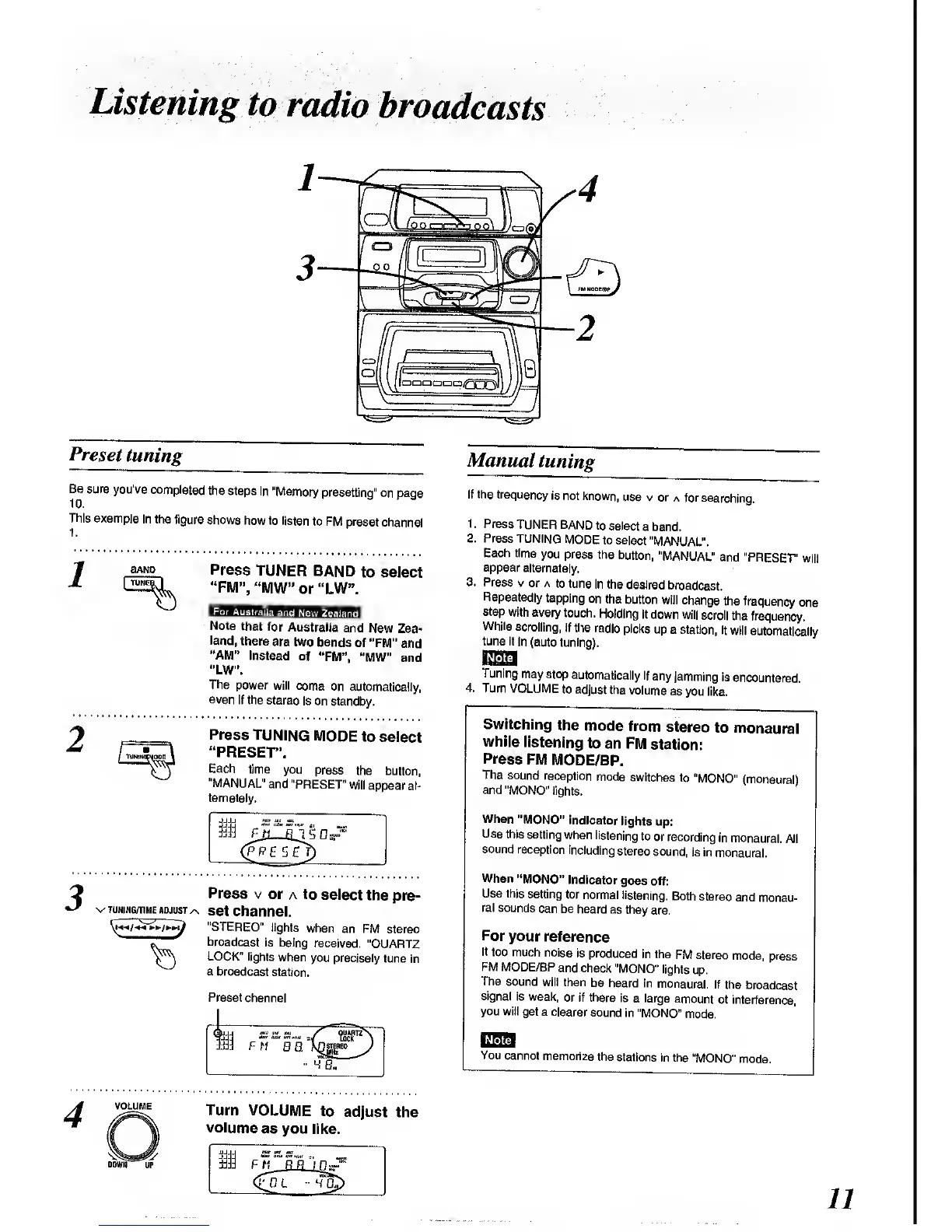
Listening
to
radio
broadcasts
Preset
tuning
Be
sure
you've
completed
the
steps In
"Memory
presetting"
on page
This
example
in the
figure
shows
how to
listen to
FM preset
channel
BAND
Press
TUNER
BAND
to select
"FM", "WW"
or
"LW".
For
Australia
and
New
Zealand
Note
that for
Australia
and
New Zea-
land,
there
are two
bands
of "FM"
and
"AM"
instead
of
"FM",
"MW" and
"LW".
The
power
will come
on
automatically,
even
if the
stereo
is on standby.
Press
TUNING
MODE
to
select
"PRESET".
Each
time
you
press
the button,
"MANUAL"
and
"PRESET"
will
appear al-
ternately.
Press
v
or
a
to
select
the
pre-
tuning/time
ADjus
T
/s
set
channel.
^^/j
"STEREO"
lights
when
an FM
stereo
~
broadcast
is being
received.
"QUARTZ
Y^J
LOCK" lights
when
you precisely
tune
in
^
a broadcast
station.
Preset
channel
FM
0
0.
Xnsireo
Manual
tuning
If the
frequency
is
not
known,
use v
or a
for searching.
3.
Press
TUNER
BAND
to
select
a band.
Press
TUNING
MODE
to
select
"MANUAL".
Each time
you press
the
button,
"MANUAL"
and
"PRESET'
will
appear
alternately.
Press
v
or a
to tune
in the
desired
broadcast.
Repeatedly
tapping
on
the
button
will
change
the
frequency
one
step
with every
touch.
Holding
it down
will
scroll
the
frequency.
While scrolling,
if
the radio
picks
up
a station,
it
will
automatically
tune it
in (auto
tuning).
Tuning
may stop
automatically
if
any
jamming
Is
encountered.
4. Turn VOLUME
to adjust
the
volume
as
you like.
Switching
the
mode
from
stereo
to
monaural
while
listening
to
an FM
station:
Press
FM
MODE/BP.
The sound
reception
mode
switches
to
"MONO"
(monaural)
and
"MONO"
lights.
When
"MONO"
indicator
lights
up:
Use
this
setting
when
listening
to
or recording
in
monaural.
All
sound
reception
including
stereo
sound,
is in
monaural.
When
"MONO"
Indicator
goes off:
Use this
setting
for
normal
listening.
Both
stereo
and
monau-
ral sounds
can be
heard as
they
are.
For
your
reference
If
too much
noise
is
produced
in the
FM stereo
mode, press
FM MODE/BP
and
check
"MONO"
lights
up.
The
sound
will then
be heard in
monaural.
If the
broadcast
signal
is weak,
or if there
is
a large
amount
of interference,
you will
get a clearer
sound
in
"MONO"
mode.
You
cannot
memorize the
stations
in the
"MONO"
mode.
Turn
VOLUME
to
adjust
the
volume
as you
like.

Related product manuals