EasyManua.ls Logo

Panasonic SC-CH64M - Page 10

Panasonic SC-CH64M
44 pages
Print Icon
To Next Page IconTo Next Page
To Previous Page IconTo Previous Page
Loading...
Memory
presettin
g
•If broadcast
frequencies
are preset
in the
memory,
you can
easily
tune in
any
of these
frequencies
from the
system
or remote
control
unit.
•Up to
12 stations
can each
be set
in
the
FM,
MW
and
LW
(For
Australia
and
New
Zealand:
FM
and
AM)
bands with
the
automatic
or
manual
memory
presetting.
Automatic
memory
presetting
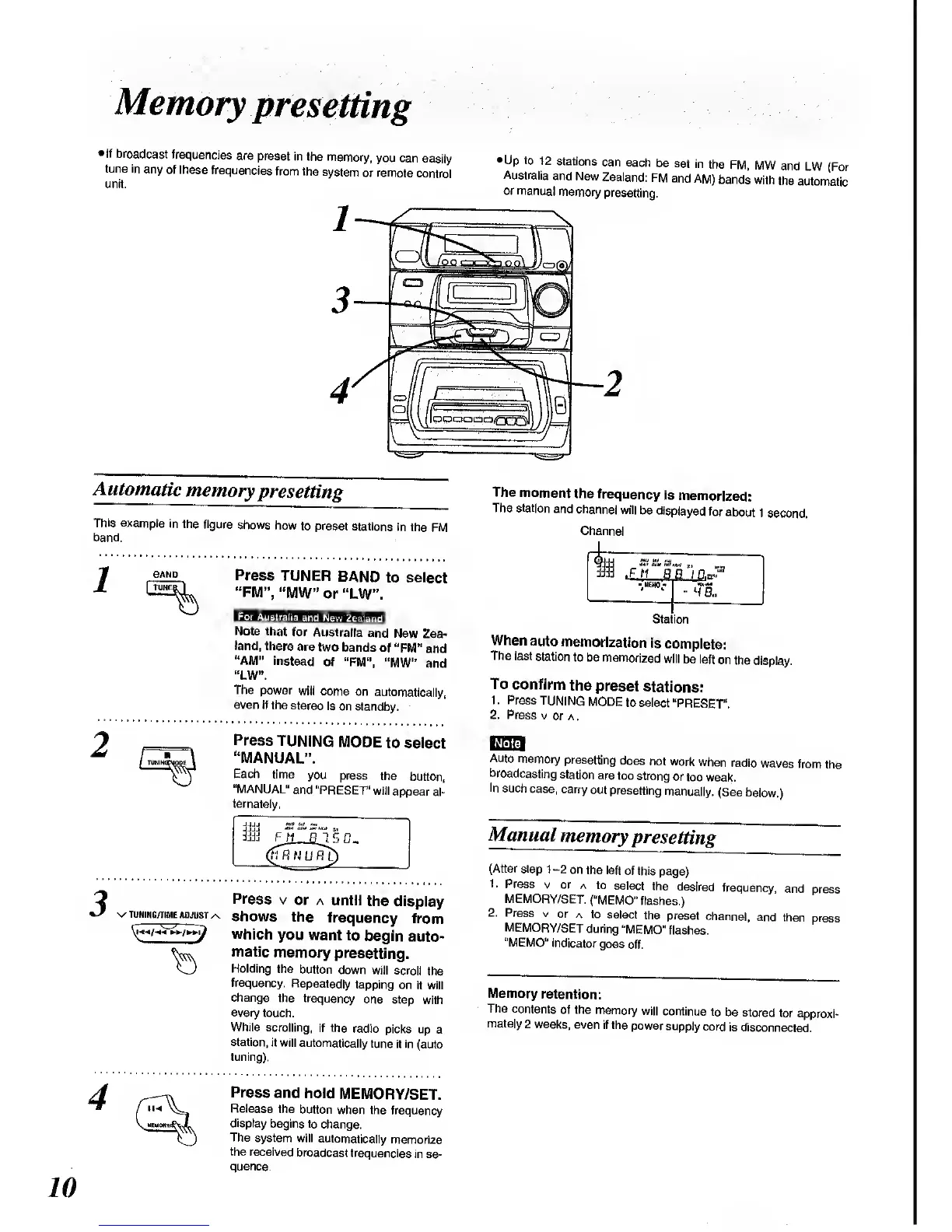
This example
in the
figure
shows
how
to preset
stations
in the
FM
band.
BAND
Press
TUNER
BAND
to select
"FM",
"MW"
or
"LW".
For
Australia
and
New'Zealand'
Note that
for
Australia
and
New
Zea-
land,
there
are
two
bands
of
"FM"
and
"AM" instead
of "FM",
"MW" and
"LW".
The
power
will come
on
automatically,
even if
the stereo
is
on standby.
Press
TUNING
MODE
to select
"MANUAL".
Each
time
you
press
the
button,
"MANUAL"
and
"PRESET"
will
appear
al-
ternately,
Press
v
or
a until
the
display
wunihg/iimf.
adjust^
shows
the
frequency
from
which
you
want to
begin
auto-
matic
memory
presetting.
Holding
the
button
down
will scroll
the
frequency.
Repeatedly
tapping
on it will
change
the
frequency
one
step
with
every
touch.
While
scrolling,
if
the
radio
picks up
a
station,
it will
automatically
tune
it in
(auto
tuning).
The
moment
the
frequency
is
memorized:
The station
and
channel
will
be
displayed
for
about
1
second.
Channel
UEHO-
••
^
a.
Station
When
auto
memorization
is
complete:
The
last
station
to be
memorized
will
be left
on
the
display.
To
confirm
the
preset
stations:
1
.
Press
TUNING
MODE
to select
"PRESET".
2. Press
v
or a
.
Auto
memory
presetting
does
not work
when
radio
waves
from
the
broadcasting
station
are
too
strong
or
too weak.
In
such
case,
carry
out
presetting
manually.
(See
below.)
Manual
memory
presetting
(After step 1-2
on
the left
of this
page)
1.
Press
v
or
a to
select
the
desired
frequency,
and
press
MEMORY/SET.
("MEMO"
flashes.)
2.
Press
v
or
a to
select
the
preset
channel,
and
then
press
MEMORY/SET
during
"MEMO"
flashes.
"MEMO"
indicator
goes
off.
Memory
retention:
The
contents
of
the
memory
will
continue
to
be stored for
approxi-
mately
2
weeks,
even
if the
power
supply
cord
is disconnected.
Press
and
hold
MEMORY/SET.
Release
the
button
when the
frequency
display
begins to
change.
The
system will
automatically
memorize
the
received
broadcast
frequencies
in se-
quence.

Related product manuals