EasyManua.ls Logo

Panasonic SC-CH64M - Setting the Clock

Panasonic SC-CH64M
44 pages
Print Icon
To Next Page IconTo Next Page
To Previous Page IconTo Previous Page
Loading...
Setting
the
time
•The
built-in
demo
function
will run
automatically
shortly
after
you
plug in the
system
(see
page
26).
The
demo
function
in
the
power
standby
mode
will
be
can-
celled
automatically
by
setting
the time.
This
is
a 24-hour
display
clock.
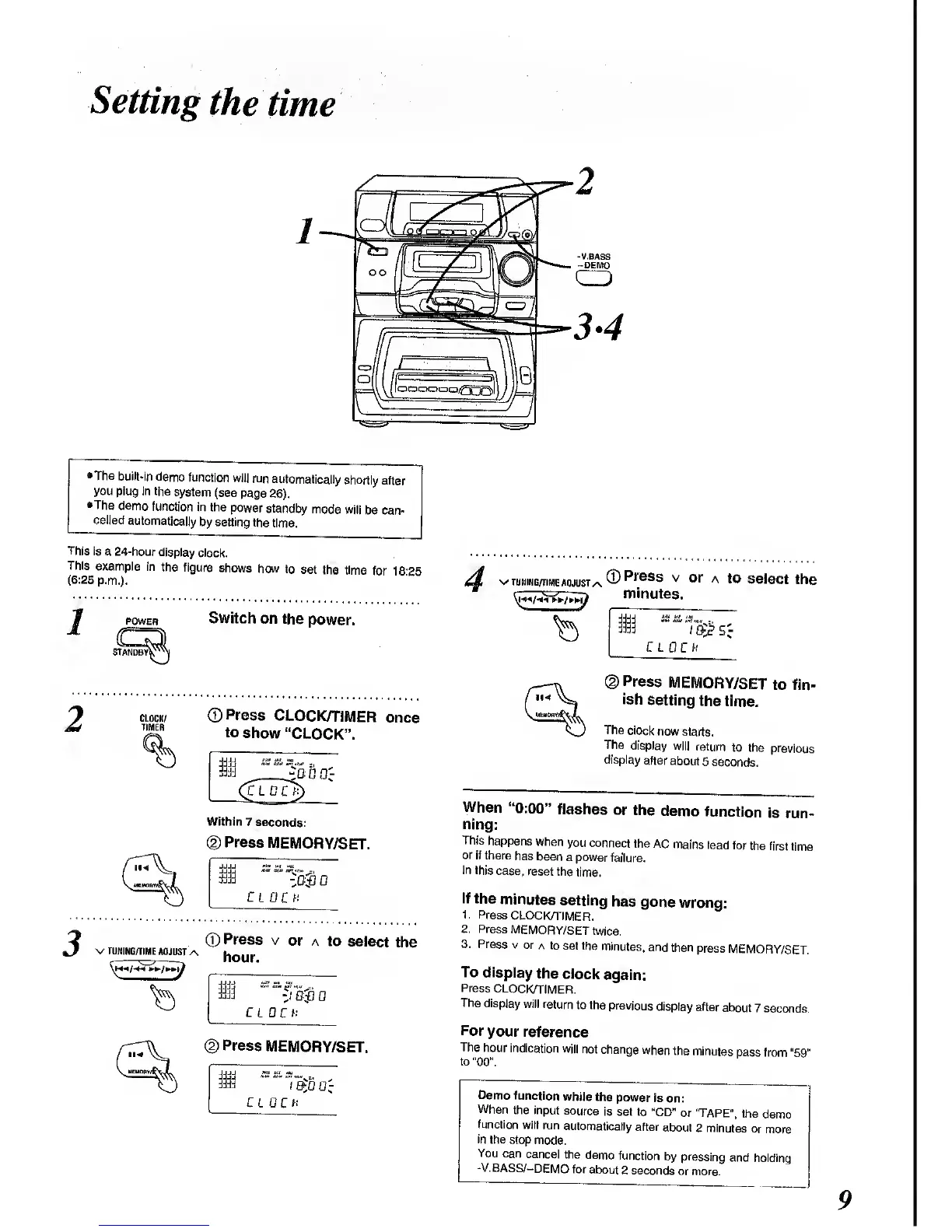
This
example
in
the figure
shows
how
to set
the time
for 18?5
(6:25
p.m.).
I
POWER
Switch
on
the
power.
CLOCK/
TIMER
©Press
CLOCK/TIMER
once
to
show
"CLOCK".
Within
7
seconds:
©
Press
MEMORY/SET.
m
CLOCK
2
©
Press
v or
a to
select
the
^/
V TUNING/TIME
ADJUST
/\
hour
i
"5
o
CLOCK
(2)
Press
MEMORY/SET.
±t0
CL CO;
v
TUNING/TIME
ADJUST
/\
0
Press
v
or
a to
select
the
minutes.
C L
0 C
ff
(2)
Press
MEMORY/SET
to fin-
ish
setting
the
time.
The
clock
now
starts.
The
display
will
return
to the
previous
display
after about
5
seconds.
When
"0:00"
flashes
or
the
demo
function
is
run-
ning:
This
happens
when
you connect
the AC
mains
lead
for
the first
time
or
if there
has
been
a power
failure.
In this
case,
reset
the
time.
If the
minutes
setting
has
gone
wrong:
1.
Press
CLOCK/TIMER.
2.
Press
MEMORY/SET
twice.
3.
Press v or
a to
set the
minutes,
and
then
press
MEMORY/SET.
To
display
the
clock
again:
Press
CLOCK/TIMER.
The
display will
return
to the
previous
display
after
about
7 seconds.
For
your
reference
The
hour
indication
will not
change
when
the
minutes
pass
from
"59"
to
"00".
Demo function
while
the
power
is
on:
When
the input
source
is set to
"CD"
or TAPE",
the
demo
function
will
run
automatically
after
about
2 minutes
or
more
in
the
stop mode.
You
can
cancel the
demo
function
by
pressing
and
holding
-V.BASS/-DEMO
for about
2 seconds
or
more.

Related product manuals