EasyManua.ls Logo

Panasonic SC-CH64M - Page 8

Panasonic SC-CH64M
44 pages
Print Icon
To Next Page IconTo Next Page
To Previous Page IconTo Previous Page
Loading...
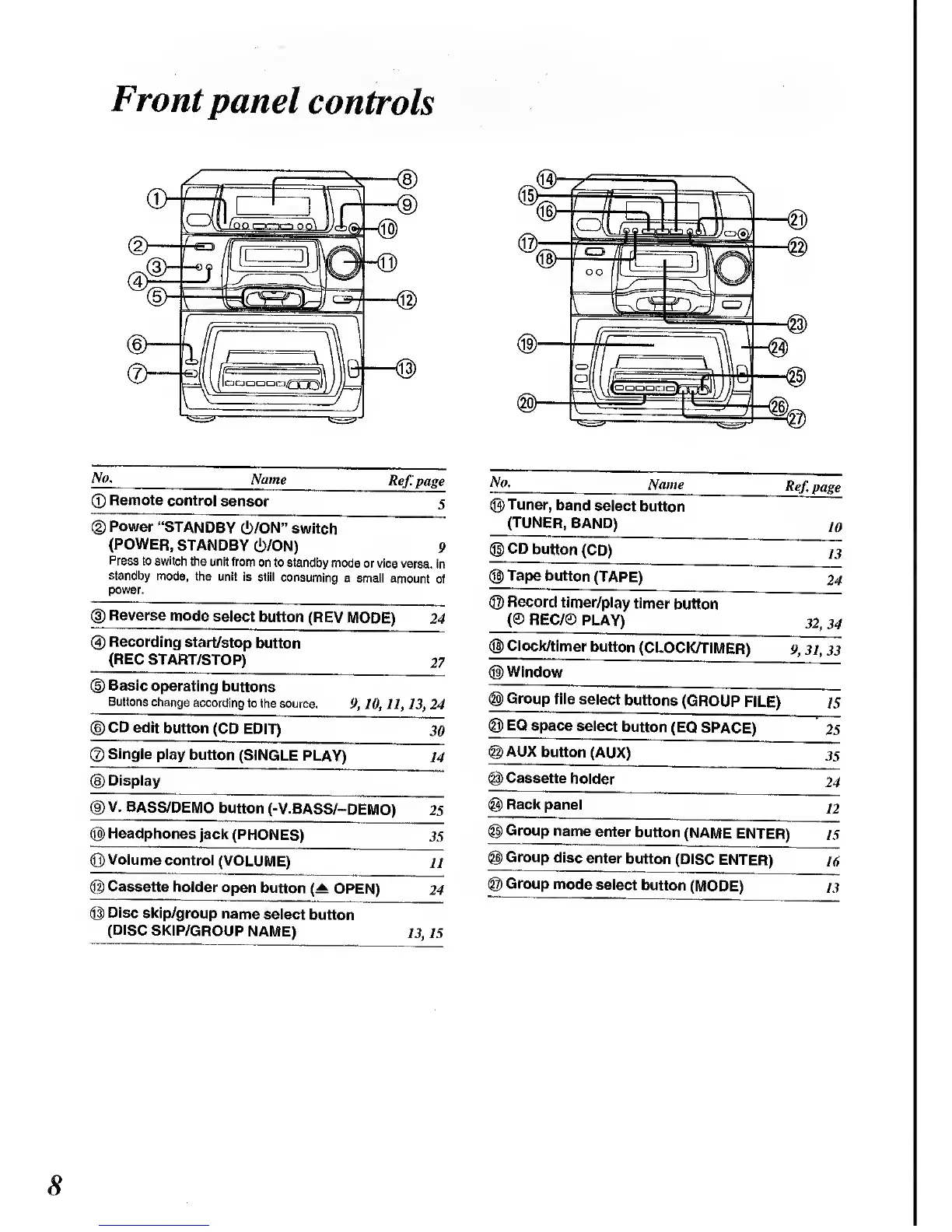
Front
panel
controls
No.
Name
Ref: page
©
Remote
control
sensor
5
(2)
Power
"STANDBY
6/ON"
switch
(POWER,
STANDBY
(!)/0N)
9
Press to switch
the unit
from
on to standby
mode
or vice versa.
In
standby mode,
the
unit
is
still consuming
a
small
amount of
power.
®
Reverse
mode
select button
(REV MODE)
24
(4)
Recording
start/stop
button
(REC
START/STOP)
27
(D
Basic
operating
buttons
Buttons
change
according
to
the source.
9,
10,
11, 13,24
(D
CD
edit
button
(CD EDIT)
30
©Single
play
button
(SINGLE
PLAY)
14
(D
Display
(D
V.
BASS/DEMO
button
(-V.BASS/-DEMO)
25
©
Headphones
jack
(PHONES)
35
(Q)
Volume
control
(VOLUME)
11
@
Cassette
holder
open
button
(A
OPEN)
24
@
Disc
skip/group
name
select
button
(DISC
SKIP/GROUP
NAME)
13,15
No.
Name
Ref.
page
(Q)
Tuner,
band
select
button
(TUNER,
BAND)
10
©CD
button
(CD)
13
©
Tape
button
(TAPE)
24
©
Record
timer/play
timer
button
REC/®
PLAY)
32,34
(©Clock/timer
button
(CLOCK/TIMER)
9,
31, 33
©Window
<§)
Group
file
select
buttons
(GROUP
FILE)
15
@)
EQ
space
select
button
(EQ
SPACE)
25
@AUX
button
(AUX)
35
(g)
Cassette
holder
24
@
Rack
panel
12
©
Group
name
enter
button
(NAME
ENTER)
15
<§)
Group
disc
enter
button
(DISC
ENTER)
16
©
Group
mode
select
button
(MODE)
13

Related product manuals