EasyManua.ls Logo

Panasonic SC-CH64M - Recording from Compact Discs; Normal and One-Touch Editing Recording

Panasonic SC-CH64M
44 pages
Print Icon
To Next Page IconTo Next Page
To Previous Page IconTo Previous Page
Loading...
Recording
from compact
discs
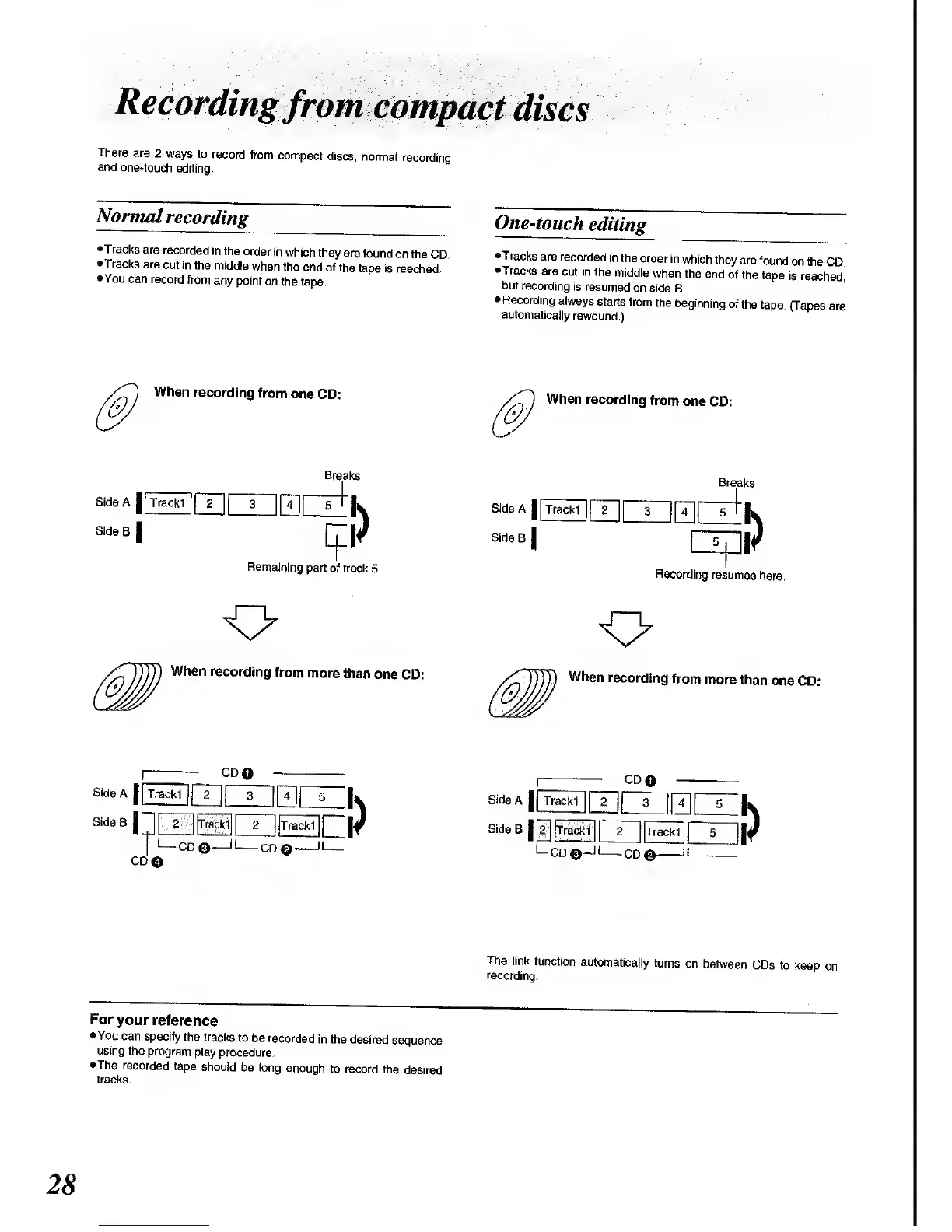
There
are
2
ways
to
record
from
compact
discs,
normal
recording
and
one-touch
editing.
Normal
recording
•Tracks
are
recorded
in
the order
in which
they
are
found
on the
CD.
•Tracks
are
cut in
the middle
when the
end
of the
tape
is reached.
•You
can record
from
any point
on
the tape.
One-touch
editing
•Tracks
are recorded
in the
order
in
which
they
are found
on the
CD.
•Tracks
are
cut in
the
middle
when
the
end
of the
tape
is
reached^
but
recording
is
resumed
on side
B.
Recording
always
starts
from
the
beginning
of
the
tape.
(Tapes
are
automatically
rewound.)
When
recording
from
one
CD:
When
recording
from
one
CD:
Side A
|
[Trackl
|
fT"| j
3
Side
B
|
Breaks
iri
Remaining
part
of track
5
Breaks
Side
A
I
[T]
[7]
[nfr
k
Side
B
|
|
5
|
||f
Recording
resumes
here.
When
recording
from
more
than
one
CD:
When
recording
from
more
than
one
CD:
CDQ
j
Trackl
1
LLJ|3 II
^
II
s
||
2
|Trackl||
2
||Trackl||
CD
O
•CD
CD©
CD.
|
Trackl
[
? M
3 4
5
£Jll!^lJLi_Jlll^!!l
5
|
LCD
©-J
CD
The link
function
automatically
turns
on
between
CDs to
keep
on
recording.
For
your
reference
•You
can specify
the
tracks to
be recorded
in
the desired
sequence
using
the program
play
procedure.
•The
recorded
tape
should
be long
enough
to record
the
desired
tracks.

Related product manuals