EasyManua.ls Logo

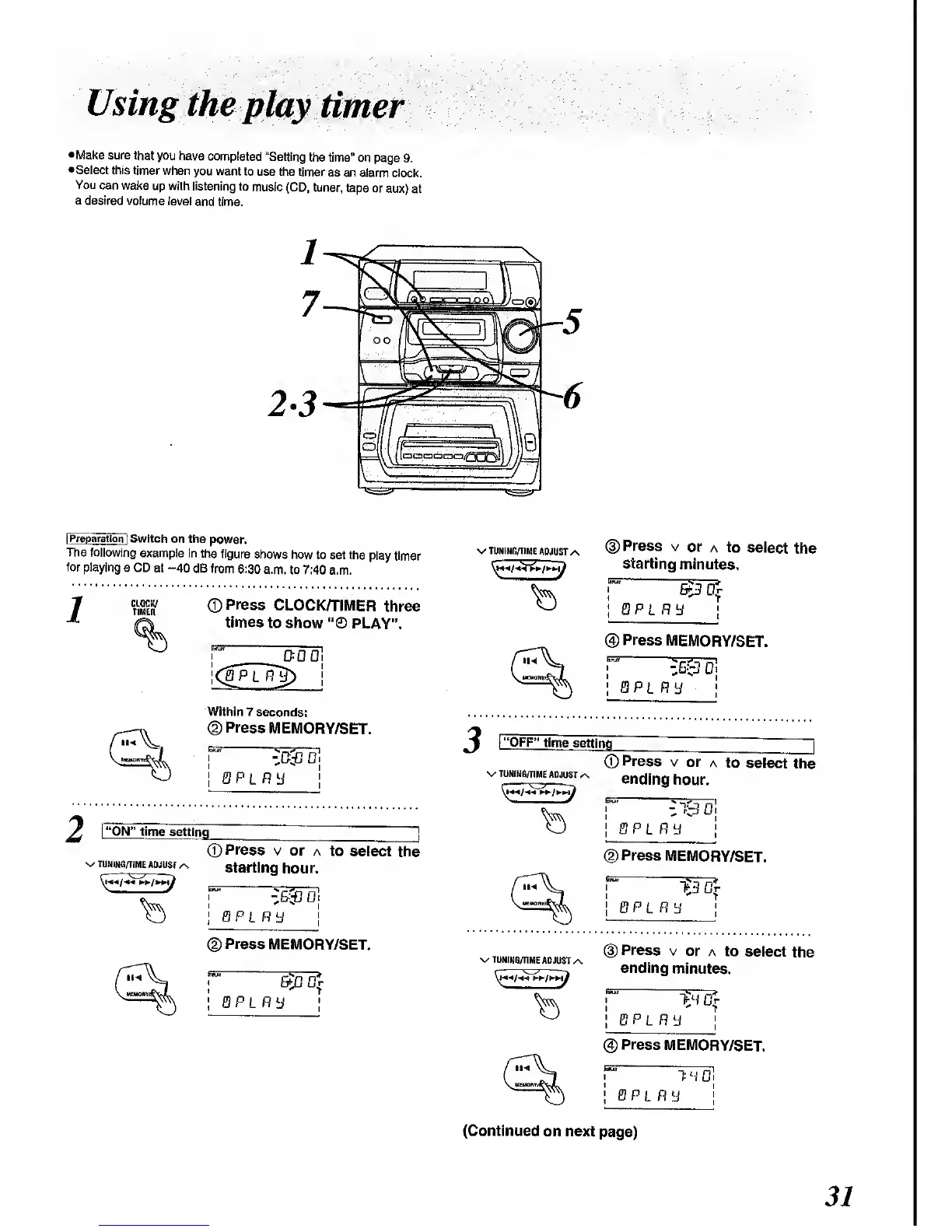
Panasonic SC-CH64M - Using the Play Timer; Setting Play Timer Parameters

Panasonic SC-CH64M
44 pages
Print Icon
To Next Page IconTo Next Page
To Previous Page IconTo Previous Page
Loading...
Using
the
play
timer
•Make
sure that
you have
completed
"Setting
the time"
on page 9.
•Select this timer
when
you want to
use the timer
as an
alarm clock.
You
can wake
up with listening
to
music (CD,
tuner,
tape
or aux)
at
a desired
volume
level
and time.
|
Preparation]
Switch
on the
power.
The following
example
in the
figure
shows
how
to set the
play timer
for playing
a CD
at
-40
dB from 6:30
a.m.
to 7:40 a.m.
CLOCK/
TIMER
CO
Press
CLOCK/TIMER
three
times
to show
PLAY".
Within 7
seconds:
©Press
MEMORY/SET.
z0&
D
bpl
ny
rON"
time
setting
^ TUNING/TIME
ADJUST
/s
©
Press
v
or
a to
select the
starting
hour.
Wo
QPLR
L
J
(2)
Press
MEMORY/SET.
v TUNING/TIME
ADJUST
Press
v
or
a to
select
the
starting
minutes.
r
§3^
!
Q
P
L
Ft
y
;
®
Press
MEMORY/SET.
BP
LP,
y
"OFF"
time
setting
V TUNING/TIME
ADJUST
/\
©
Press
v
or
a to
select
the
ending
hour.
PL fly
<D
Press
MEMORY/SET.
BPLR
"J
v/
TUNING/TIME
ADJUST^
i
Press
v
or a to
select
the
ending
minutes.
@
Press MEMORY/SET.
1H0
PL fl
(Continued
on
next
page)
3/

Related product manuals